
Auto populating virtual implementations
-
I have been re implementing some custom delegate classes some times as you typing the whole declaration shows and by <crl><enter> it is appended to the declaration, which is fantastic. But in the next line re implementing another function that declaration does not shows, with the first few letters of the function you get a small reminder of the whole declaration but cannot <ctr><enter> to bringing in. Is there a way to solve that?
-
Hi
Im not 100% sure what you see/what happens
with the ctrl+enter when it works and when it do not.So just wanna to say you can insert virtual funcs another way
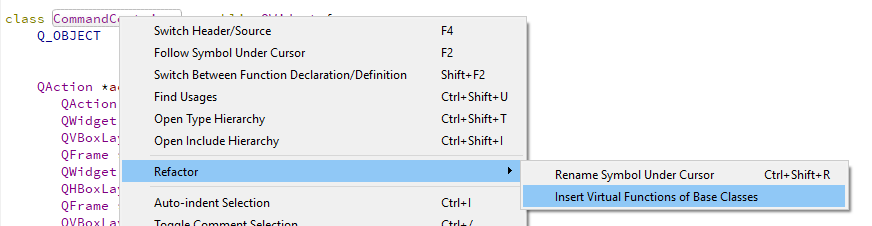
Just right click class name.
-
I'm reading my question and indeed is confusing. I try to explain further. I'm creating a class that have an inherited QStyleItemDelegate. On the header file under public as you type (for example: virtual QWidget *creat....) it shows the entire function, then if you press <ctr><enter>, you can paste the whole function on your definition. But in the very next line when typing the next function tom be re-implemented only a small remainder of what the function looks like shows up and <ctr><enter> does nothing.
I didn't know about using the refactor at the class level, i think that solution works.
Thanks very much. -
I assume you mean this?
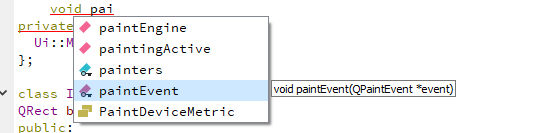
it would let me insert most functions by typing enough so it suggest it.
-
It seems to me, that if you are in the header and start typing all the functions that you are re implementing it gives you the option to autocomplete all the functions. But if you type the first function, then go to the implementation, type some code there and then came back to re-implement the second function the option to autocomplete does not work. I have not tested thoroughly could by just a coincidence. Your suggestion about using the refactor at the class level works wonderfully. Thanks

