Skip to content
  • Categories
  • Recent
  • Tags
  • Popular
  • Users
  • Groups
  • Search
  • Get Qt Extensions
  • Unsolved
Collapse
Brand Logo
  1. Home
  2. Qt Development
  3. General and Desktop
  4. Custom plugin with CMake

Custom plugin with CMake

Scheduled Pinned Locked Moved Solved General and Desktop
12 Posts 2 Posters 4.6k Views 2 Watching
  • Oldest to Newest
  • Newest to Oldest
  • Most Votes
Reply
  • Reply as topic
Log in to reply
This topic has been deleted. Only users with topic management privileges can see it.
  • apalomerA Offline
    apalomerA Offline
    apalomer
    wrote on last edited by apalomer
    #1

    Hello,

    I have created several widgets for a library that I developed that are the different GUIs for the different parts of my library. My library is compiled using cmake and using it I can compile all the widgets as well as a main window that uses them. My next step is to try and make these widgets available in the QtCreator or designer. However, I have found very few information on how to do this using cmake instead of qmake. I have created this small project based on the analog clock examples that is widely available. There I create both a widget and a plugin interface (that inherits from QDesignerCustomWidgetInterface). Everything compiles fine and I can install the files as well (sudo make install). However, when I restart qtcreator the plugin does not appear. I have several questions that sum up to: Can somebody tell me what am I doing wrong?

    • Is it possible to create a plugin with qt4 that will be loaded to a qtcreator that was compiled using qt5?
    • Where should I actually install the plugin(I am using Ubuntu)?
    • Should I install something else a part from the plugin part? My guess is that the widget itself should be installed as well. Where? How can i provide a CMake to find it?

    Thank you very much!

    1 Reply Last reply
    0
    • apalomerA Offline
      apalomerA Offline
      apalomer
      wrote on last edited by apalomer
      #6

      Ok, I think I have it. Please go here if you want to see how I did it. Feel free to criticize it as much as possible, this way I will be able to improve it. It only works in Qt4. The Qt5 branch in the git repository only compiles the stand alone libraries and the cmake part is not well resolved as for Qt4.

      1 Reply Last reply
      1
      • mrjjM Offline
        mrjjM Offline
        mrjj
        Lifetime Qt Champion
        wrote on last edited by SGaist
        #2

        @apalomer said in Custom plugin with CMake:
        Hi

        • Is it possible to create a plugin with qt4 that will be loaded to a qtcreator that was compiled using qt5?
          No, its a DLL/so file and must use the same version of Qt that Creator is build with AND compiler.
          (visual studio 2015, in release mode , mingw is not supported out of the box)

        • Where should I actually install the plugin?
          C:/Qt/Qt5xxx/Tools/QtCreator/lib/qtcreator/plugins/
          C:/Qt/Qt5xxx/Tools/QtCreator/bin/plugins/designer

        • Should I install something else a part from the plugin part? My guess is that the widget itself should be installed as well.
          The plugin normally include the widget code also. Only if widget uses external other dlls/so files , those should be included

        • How can i provide a CMake to find it?
          Sorry, i dont know cmake very well.

        [edit: Fixed path SGaist]

        1 Reply Last reply
        1
        • apalomerA Offline
          apalomerA Offline
          apalomer
          wrote on last edited by
          #3

          Thank you very much for the response. For the second and third questions if we can focus them on Linux that would be great for me.

          mrjjM 1 Reply Last reply
          0
          • apalomerA apalomer

            Thank you very much for the response. For the second and third questions if we can focus them on Linux that would be great for me.

            mrjjM Offline
            mrjjM Offline
            mrjj
            Lifetime Qt Champion
            wrote on last edited by mrjj
            #4

            @apalomer
            Well its same in linux regarding placement.
            so where u installed Qt + /Tools/QtCreator/bin/plugins/designer
            You can do
            locate Welcome.so to see

            mine is in
            /home/master/Qt5.7.1/Tools/QtCreator/bin/plugins/designer
            but it depends on where you did in fact install it.

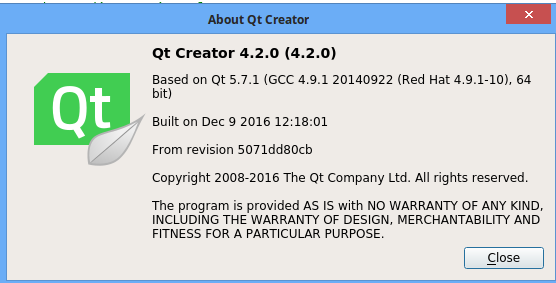
            In linux , you should use the same version of gcc as Creator was compiled with. ( there can be a bit more of version diff than in windows) But a Qt4 plugin in a Qt5 Creator is most likely asking too much.

            Check in help->about Creator menu what version of gcc you need
            alt text

            1 Reply Last reply
            1
            • mrjjM Offline
              mrjjM Offline
              mrjj
              Lifetime Qt Champion
              wrote on last edited by mrjj
              #5

              UPDATE
              Not enough coffee syndrom.
              The path i shown is for Creator plugins.
              You were actually asking for
              xx/Tools/QtCreator/bin/plugins/designer

              1 Reply Last reply
              0
              • apalomerA Offline
                apalomerA Offline
                apalomer
                wrote on last edited by apalomer
                #6

                Ok, I think I have it. Please go here if you want to see how I did it. Feel free to criticize it as much as possible, this way I will be able to improve it. It only works in Qt4. The Qt5 branch in the git repository only compiles the stand alone libraries and the cmake part is not well resolved as for Qt4.

                1 Reply Last reply
                1
                • mrjjM Offline
                  mrjjM Offline
                  mrjj
                  Lifetime Qt Champion
                  wrote on last edited by
                  #7

                  Super and thx for sharing.
                  Very useful for people ever want to use cmake for plugins.
                  All docs uses qmake.

                  1 Reply Last reply
                  0
                  • apalomerA Offline
                    apalomerA Offline
                    apalomer
                    wrote on last edited by
                    #8

                    That's why I posted it, I struggled for two days to get this working! XD

                    mrjjM 1 Reply Last reply
                    0
                    • apalomerA apalomer

                      That's why I posted it, I struggled for two days to get this working! XD

                      mrjjM Offline
                      mrjjM Offline
                      mrjj
                      Lifetime Qt Champion
                      wrote on last edited by
                      #9

                      @apalomer
                      Yeah and while qmake.exe is pretty nice as a tool,
                      i found the language pretty awkward and non intuitive but luckly
                      there are tons of online help.

                      Btw did you get Creator to syntax highlight the cmakle.txt file as it does with .pro file?

                      1 Reply Last reply
                      0
                      • apalomerA Offline
                        apalomerA Offline
                        apalomer
                        wrote on last edited by
                        #10

                        I have never used .pro files, so I don't really know what do you mean exactly.

                        mrjjM 1 Reply Last reply
                        0
                        • apalomerA apalomer

                          I have never used .pro files, so I don't really know what do you mean exactly.

                          mrjjM Offline
                          mrjjM Offline
                          mrjj
                          Lifetime Qt Champion
                          wrote on last edited by
                          #11

                          @apalomer
                          when using .pro file, if you open it, in Creator,
                          it colors the keywords like it would in a .cpp/h file.
                          It can also autocomplete and guess like for class etc.

                          With my brief encounters with cmake, it could not get it to do
                          any of these things even it does understand its a project file but its
                          shown as a text file with no coloring and no code completion possible.

                          I just wondered if i had missed something to enable to make Creator provide such features
                          to cmake projects also.

                          1 Reply Last reply
                          0
                          • apalomerA Offline
                            apalomerA Offline
                            apalomer
                            wrote on last edited by
                            #12

                            I do not know how I did it, but the CMake part works. CMake functions such as find_package, add_dependencies would be highlighted and you can also get the tooltip information as well as autocomplete. I do not know if it actually allows for autocomplete of anything that is not CMake built in (such as some macro that you might develop)

                            1 Reply Last reply
                            1

                            • Login

                            • Login or register to search.
                            • First post
                              Last post
                            0
                            • Categories
                            • Recent
                            • Tags
                            • Popular
                            • Users
                            • Groups
                            • Search
                            • Get Qt Extensions
                            • Unsolved