
Menu items greyed out
-
Hi all: I am a newbie in Qt, even though have worked in C++.
Developing a basic GUI. In that, have plugged in a simple media player using QMediaPlayer. But some of the menu items in Edit - like Cut / Copy / Paste - is greyed out while playing the video. But at other times it is active. I have checked designer UI file, and it is enabled as well. Other menu items in Edit menu are active.
Any solutions for this trivial & strange issue?
Thanks a ton, folks. -
Hi all: I am a newbie in Qt, even though have worked in C++.
Developing a basic GUI. In that, have plugged in a simple media player using QMediaPlayer. But some of the menu items in Edit - like Cut / Copy / Paste - is greyed out while playing the video. But at other times it is active. I have checked designer UI file, and it is enabled as well. Other menu items in Edit menu are active.
Any solutions for this trivial & strange issue?
Thanks a ton, folks.@krec-dev said in Menu items greyed out:
But some of the menu items in Edit - like Cut / Copy / Paste - is greyed out while playing the video. But at other times it is active.
about what menu are you talking?
Where do the menu actions come from? -
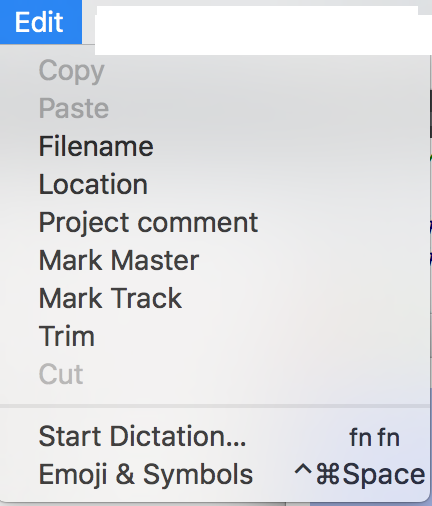
Thanks @raven-worx for the note. My developed demo GUI for a video player has a EDIT menu, which has simple menu items called copy, paste etc.
While the video is playing in the media player, the menu items of copy & paste in Edit menu in the top menu bar is greyed out. At other items, these menu items - copy & paste - in Edit menu are active.
I have also attached a screenshot for your kind reference.
Added to this, there is this un-needed "Emoji Symbols " menu in the Edit menu drop down on Mac. Any work arounds for that?
-
Thanks @raven-worx for the note. My developed demo GUI for a video player has a EDIT menu, which has simple menu items called copy, paste etc.
While the video is playing in the media player, the menu items of copy & paste in Edit menu in the top menu bar is greyed out. At other items, these menu items - copy & paste - in Edit menu are active.
I have also attached a screenshot for your kind reference.
Added to this, there is this un-needed "Emoji Symbols " menu in the Edit menu drop down on Mac. Any work arounds for that?
@krec-dev
you haven't answered my question, but nevermind i figured it out by myself.
try the following:#ifdef Q_OS_MAC #include <Foundation/NSUserDefaults.h> #endif int main(int argc, char **argv) { #ifdef Q_OS_MAC [[NSUserDefaults standardUserDefaults] setBool:YES forKey:@"NSDisabledCharacterPaletteMenuItem"]; [[NSUserDefaults standardUserDefaults] setBool:YES forKey:@"NSDisabledDictationMenuItem"]; #endif QApplication app(argc, argv); .... return app.exec(); } -
Seems that you're disabling these action.
I don't know your implementation, but would you think that may be a good idea to set up the actions in the ctor or any function that changes the actions?
Thank you
-
To add further to this and clarify , please note the menu items will be disabled ONLY after calling QFileDialog to open and load a video file to play. Does this have any issue as mentioned here (https://forum.qt.io/topic/51950/qt-mac-osx-few-menu-items-are-disabled-after-qfiledialog). Need to check.
Thanks for the replies, @raven-worx. But seems, the solutions is for the "emoji symbols and start dictation " menu items. But it appears it does not work out. I will explore that again.
@Charlie_Hdz. I have not setup any actions, in fact tried adding simple statements after setting up actions too, but still it does not work. The moment , Copy/ Paste /Cut changes to say demo or Copies, Pastes, Cuts - the menu items are active!
I observe on stack overflow, that giving space while defining the titles in creator will solve that, but it has not worked out for me so far.
