Unsolved QSyncable - Synchronize data between models
-
Hi,
I would like to share my new library project - QSyncable. It is a library for synchronize data between models. It is designed to solve a fundamental problem of QML application : How to share data between C++ and QML?
The function of QQmlListProperty is limited, and QAbstractItemListModel is hard to use.
QSyncable also works on pure QML application. In case you prefer to hold your data in Javascript object but you also need a ListModel for ListView. QSyncable is a solution for this problem too:
benlau/qsyncable: QSyncable - Synchronize data between models
QSyncable - Synchronize data between models
QSyncable provides an QML friendly list model (based on QAbstractItemModel) as a wrapper of any data structure from C++ / Javascript. Instead to access data from original source per query, it duplicates a copy of data locally, and keep updated by an average O(n) synchronization algorithm. Every update is carried by passing a full copy of data snapshot. It will find out the diff and transform into a list of change operations like insertion, removal and move. It will guarantee the behaviour is identical to the original QML ListModel. Therefore, UI components could react to the changes correctly.
An immediate benefit of using QSycnable is the simplification of data pipeline. If you need your UI to respond for changes like insertion / removal correctly, you must update the ListModel by the corresponding method explicitly. QSyncable combines all kinds of update methods into a single way. Such that user doesn’t need to care about their differences and setup data binding by just a single connection.
Moreover, QSyncable could also be used as a solution for the nested list model.
How it works?
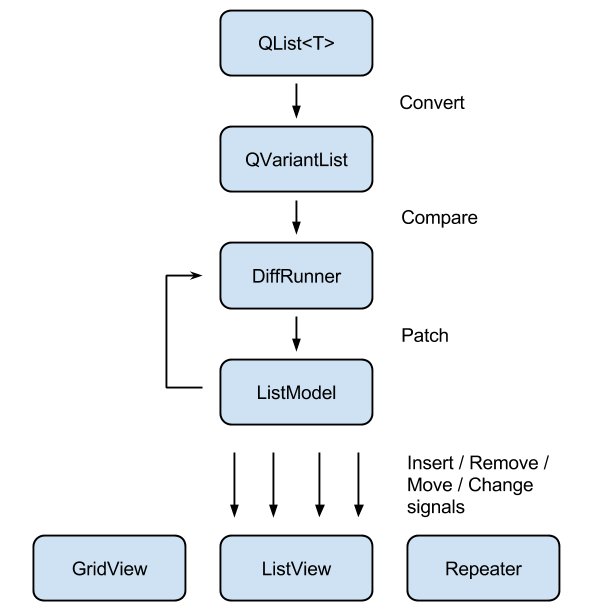
DiffRunner (QSDiffRunner) compares two QVariantList to produce a patch for transforming one of the list to another list with minimum no. of steps. The result can be applied on a QSListModel. DiffRunner use an average O(n) algorithm and therefore it should be fast enough for regular UI application.
ListModel (QSListModel) is an implementation of QAbstactItemModel. It stores data in a list of QVariantMap. It will emit insert, remove, move and data changed signals according to the patch applied.
QSyncable provides the two classes above for user to convert their own data structure to a QML friendly list model. Usually there are several ways to update a list model. QSyncable combines all of update methods into a single process - patching.
Whatever the data source has been changed, regardless of update method, user converts it into a QVariantList and pass it to DiffRunner to compare with current snapshot. Then apply the generated patch on QSListModel. UI component will be refreshed according to the emitted signals from QSListModel.
The diagram below shows an example application architecture using QSyncable:
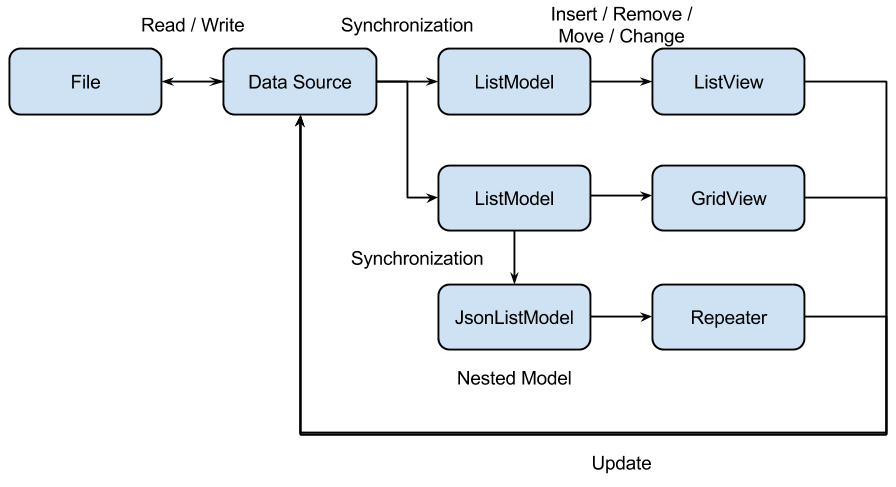
In QSyncable application, ListModel only keep a copy of the data. it is meaningless for UI components to modify it. Instead, UI components should ask to update the data source and trigger synchronization afterward. The component for “updates” and “queries” is in fact separated. (More information in this article )
Design Principle - Separation of "updates" and "queries"
QSyncable is designed to solve a fundamental problem of C++ & QML application: How to share data between C++ and QML?
QObject list model is definitely a bad idea. It is terrible to manage their life cycle and ownership (QML / C++ scope). You should beaware of garbage collection in your QObject list model even it is written by C++.
Using a variant list model is better, but it is not C++ friendly. And it is difficult to handle nested list model.
In fact, the problem will be simple if you separate “updates” and “queries” into different components.
First of all, you don’t even need to consider QObject list model approach.
It has no any advantage of using QObject list model if you use other component for update.Moreover, it is not necessary to use a variant list model as a central data source. You may use any data structure you like. Leave variant list model for presentation only.
QSyncable takes a step further. It simplifies the process to update the variant list model from a data source by combining insertion, removal, move and change operations into a single process - patching, while maintaining the correctness of UI response. It solves not only the problem of C++ and QML data sharing, but also a solution of nested list model within QML.
Reference:
Why use QSyncable for C++?
(1) The function of QQmlListProperty is limited.
(2) Implement your own QAbstactItemModel is troublesome.
You need to understand how QAbstactItemModel works and emit insert, remove, move and update signals correctly. Otherwise, UI components like ListView will not react correctly.
(3) Use implicit sharing class over QObject
QObject is not copyable and you need to manage its life cycle. It is not really a good solution as a data storage class.
Implicit sharing class is recommended for this purpose. Because it can safely be copied across threads, like any other QVariant classes.
Once you find that your data is too big for processing, you may pass it to a thread and work in the background.Implicit Sharing | Qt Core 5.5
(4) Works for any data structure
You just need to write a conversion function, QSyncable will do the rest for you.
(5) Simple update method
No matter what kind of update happen, just convert your data structure to QVariantList, pass it to DiffRunner, then patch a model.
Why use QSyncable for QML?
(1) Use JsonListModel to wrap your Javascript object.
(2) Able to work as a nested list model.
(3) Simple data pipeline.
Algorithm
The average time complexity of the diff algorithm in QSDiffRunner is O(n), where n is the sum of the number of items in comparison.
But it is not the worst case time complexity. It is O(n + m log m), where m is the no. of block move operations.However, unless you are doing a reverse or random shuffle.
Moving a single block of items, regardless of the number, from one to another place will remain in O(n) time complexity.If you really need to do a reverse of a list or random shuffle with large amount of data, you may consider to move it to a thread or set the key field to null.
QSDiffRunner will ignore the insertion , removal, and moving checking if key field is not set.Condition Time Complexity Insert to an empty list O(1) Clear the list O(1) Insert items to any position O(n) Remove a block of items O(n) Move a block of items O(n) Insert, remove, updates O(n) Reverse the list O(n + m log m) Random shuffle O(n + m log m) Installation
Download a release and bundle the folder within your source tree.
Or:
qpm install com.github.benlau.qsyncableClass Reference
Example
faketrello - Simulate a Trello card board.
-
Hi, @benlau
Thanks for your contribution.
I haven't tried QSyncable. I don't know whether my question is valid. You say "In QSyncable application, ListModel only keep a copy of the data." Does it mean the memory consumption of QSyncable is high? especially when the data size is big, for example, images or video clips are used as the data.
-
@Vincent007 It should have no problem for regular data type like string , text , integer even you make a copy of data. Because you won't show too many information to user at a time.
Image and video are another case. Usually you will only hold a reference to their position (e.g URL) and load via a cache manager / video manager. Holding in a list model is not suggested.
However, QImage is in fact an implicitly sharing class. The memory consumption will be the same even you have multiple reference.
-
Hi @benlau ,
Thanks for your reply.
As I said earlier, why not share what you have done to Qt contributors? As especially, you have documented your work. Therefore they can understand what you have done quickly.
-
@Vincent007 No idea what to write in the email yet. So I pick another things to do first.
-
-
@Vincent007 Should be a good idea.
-
Thanks for the component.
Not a criticism as your library is built for a different type of programming but for readers landing on this page, if you can overcome "Implement your own QAbstactItemModel is troublesome." (maybe use QStandardItemModel using only QAbstactItemModel interface) a QIdentityProxyModel or QSortFilterProxyModel is probably what you are looking for"La mort n'est rien, mais vivre vaincu et sans gloire, c'est mourir tous les jours"
~Napoleon BonaparteOn a crusade to banish setIndexWidget() from the holy land of Qt
-
@VRonin QStandardItemModel is easier to implement, but if user need to provide custom data, user still need to understand the concept of "Role" and reimplement QStandardItem. User need to aware that they can't update QStandardItem by just adding setXXXX function. They have to setup the "role" correctly.
In this case, a variant list model approach (not a official component from Qt, but there has implementation available in few OSS projects) is much easier.
So I don't think the statement is wrong.
-
Just by luck I found this: QtWS15- Lightning Talk, A new way for creating QML models from C++, Thomas Boutroue
https://www.youtube.com/watch?v=96XAaH97XYoTested it and found the QQmlObjectListModel to be the easiest way to use c++ models with QML. It is basically a QObject List wrapped in a QAbstractListModel. And every property you define in you QObject derived class becomes a role.
If you use the QQMLHELPERS macros, you don't even need the bloated glue code in c++ to define properties.
http://gitlab.unique-conception.org/qt-libraries/lib-qt-qml-tricks/blob/master/src/qqmlhelpers.h
-
@levelxxl In fact I would recommend his Variant List Model rather then a QObject list model.
src/qqmlvariantlistmodel.h · master · Qt Libraries / Qt QML Tricks · GitLab
Just consider the following scenario:
-
User would like to add a new item to list.
-
The app create a QObject then append to QObject list model (which is a global context property).
-
Then he go to another page. Several minutes later. The app crash suddenly.
Why? Because the QObject is created under JavascriptOwnership. It may be destroyed by GC. But C++ may not be aware of that. Ofcoz you could use a QPointer to hold the reference. But the data is already destroyed. QObject list model will lost the record.
-
-
You mean if a user adds a QObject from QML, or from c++? Till now I didn't run into a crash when I added QObjects from c++ only.
-
@levelxxl I mean from Javascript / QML.
-
Hi benlau, can qsyncable handle tree structures as well ?
Does it produce a valid abstractitemmodel for trees ? Have you got an example ? What is your experience with this approach for larger datasets ? lets say about 1000 entries ?
thank you,
Michael -
@IPO_DEV QSyncable could be used for nested list model. But it do not fit with tree view yet. I have tried with few hundred of items which is still smooth.
-
Hello,
I am going to write a new
FastDiffRunnercomponent to replace the original diff runner for better performance. And here is the proposed API. If anyone is interested, please feel free to comment and making suggestion.

