
How does the tdesktop render tabs?
-
I'm new to this and trying to figure out how the Telegram team managed to render tabs and chat selection so effectively. Can anyone give me a conceptual overview (perhaps with some key code examples) of how they did it?
I tried reading the source code, but it's pretty hard for a beginner to understand—it's written in a very low-level style. By the way, I didn't find a single QTabWidget in it.
I'm particularly interested in how they implemented interaction between tabs and the chat,
and how they store both.
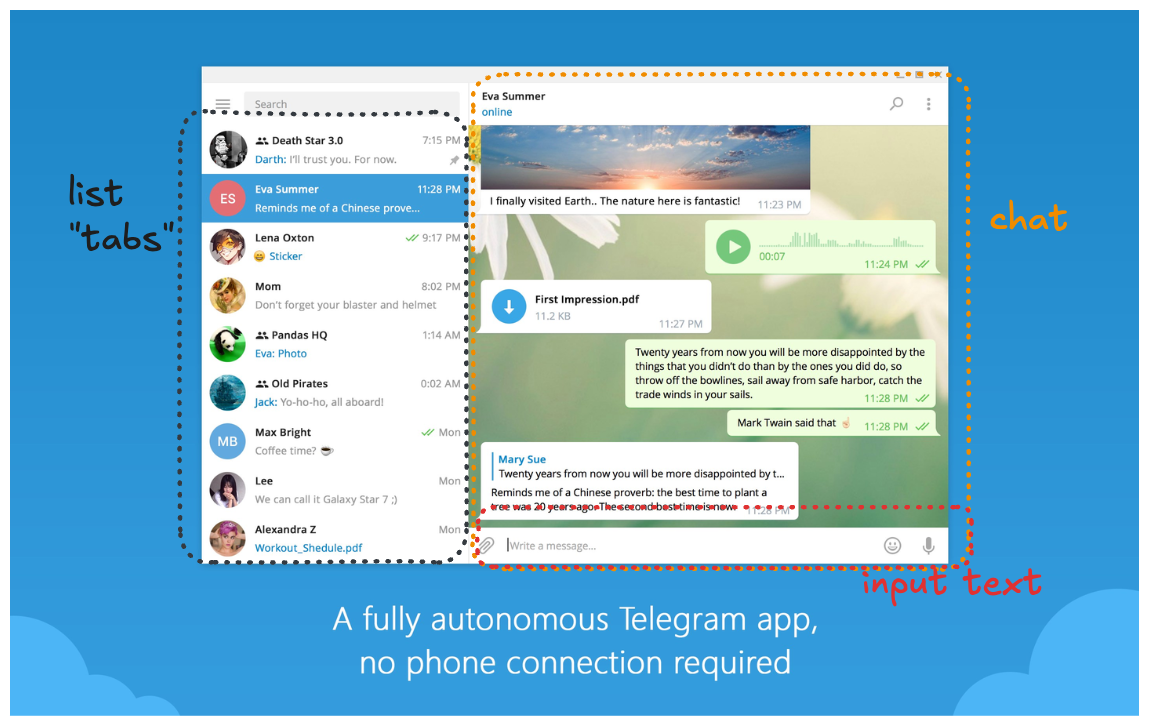
I'll try to recreate something similar
-
I'm new to this and trying to figure out how the Telegram team managed to render tabs and chat selection so effectively. Can anyone give me a conceptual overview (perhaps with some key code examples) of how they did it?
I tried reading the source code, but it's pretty hard for a beginner to understand—it's written in a very low-level style. By the way, I didn't find a single QTabWidget in it.
I'm particularly interested in how they implemented interaction between tabs and the chat,
and how they store both.
I'll try to recreate something similar
@MarkoProg said in How does the tdesktop render tabs?:
trying to figure out how the Telegram team managed to render tabs
From your screenshot, that looks like a ListView or similar -- no tabs involved.
This tutorial shows a simple version of that: https://doc.qt.io/qt-6/qtquickcontrols-chattutorial-example.html
-
@MarkoProg said in How does the tdesktop render tabs?:
trying to figure out how the Telegram team managed to render tabs
From your screenshot, that looks like a ListView or similar -- no tabs involved.
This tutorial shows a simple version of that: https://doc.qt.io/qt-6/qtquickcontrols-chattutorial-example.html
-
@JKSH They don't use QML; they render everything from scratch using QWidgets, and I'm also interested in this approach. How exactly did they achieve this using QWidgets? It seems to require a deeper understanding of how rendering works in Qt.
@MarkoProg said in How does the tdesktop render tabs?:
They don't use QML; they render everything from scratch using QWidgets, and I'm also interested in this approach. How exactly did they achieve this using QWidgets?
The idea the same, regardless of whether you're using Qt Quick or Qt Widgets:
- A Model stores an overview of the chat data.
- One row in the Model represents one chat.
- A row would contain data like chat title, chat icon, latest timestamp, latest message, delivery status.
- A Delegate lays out the GUI components in its rectangle (e.g. icon on the left, timestamp of the top-right).
- A ListView (Qt Quick) or QListView/QListWidget (Qt Widgets) is used to display the "tabs".
- If the Model contains N rows (N chats), then the View creates N Delegates.
- The View takes data from each row and gives that data to corresponding Delegate of that row. The Delegate then writes the data into the GUI
- A Model stores an overview of the chat data.
