
Creator cannot set layout on QMainWindow::centralWidget
-
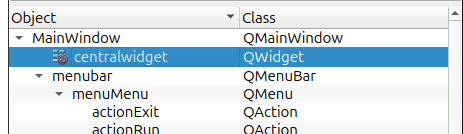
I use Creator 13.0.0 as supplied with Qt for Ubuntu 24.04. I don't know if this behaviour has always existed or is recent.
When designing a
QMainWindowit creates it with aQWidget centralWidget--- great. But, unlike any otherQWidgetyou might add anywhere, I cannot set a layout oncentralWidgetand it always stays with the red "no entry" sign. I have tried everything --- selecting it, right clicking (context menu forcentralWidgetnever acquires the Lay out > sub-menu which other widgets do, whether I add child widgets or not) in various places, dragging an explicit layout object onto it, etc. --- with no luck. Code is quite happy to callcentralWidget->setLayout(...)and that works as expected, but never possible in the UI.Can anyone find a way to add a layout at design-time which I cannot? Or does your version of Creator not exhibit this behaviour?
UPDATE
For now I have hand-edited the.uifile to change<widget class="QWidget" name="centralwidget"/>to:<widget class="QWidget" name="centralwidget"> <layout class="QVBoxLayout" name="verticalLayout"> ... </layout> </widget>This works fine: Designer can still read and show it correctly, the "no-entry" sign has gone and I can now add widgets onto it properly at design-time:
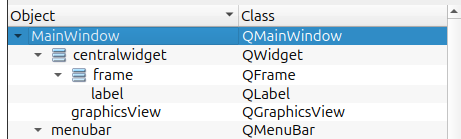
So it's just like it should be, but I shouldn't have to hand-edit to achieve it!
-
so do you actually mean you selected MainWindow not centralWidget?
No, I selected
centralwidget.This is in a fresh project. Note the grayed out layout options on the toolbar.
Also there's no layout options in the context menu oncentralwidget.
There are layout options in the context menu ofMainWindow, but they are grayed out (those are the same actions as on the toolbar I presume).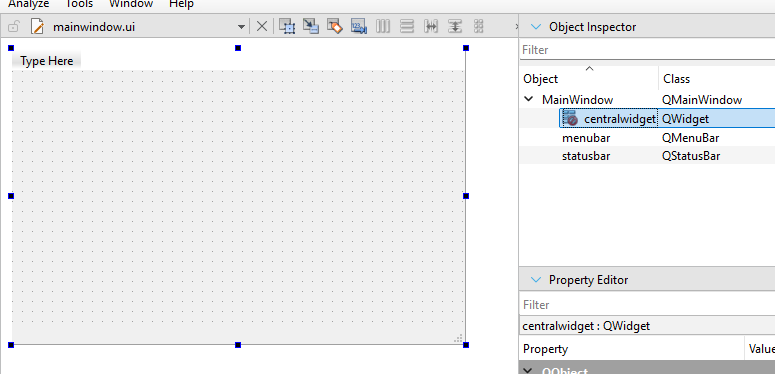
And this is with a button added. Layout options are now available on the toolbar and in context menu of
MainWindow.
There's still no layout context menu on thecentralwidget.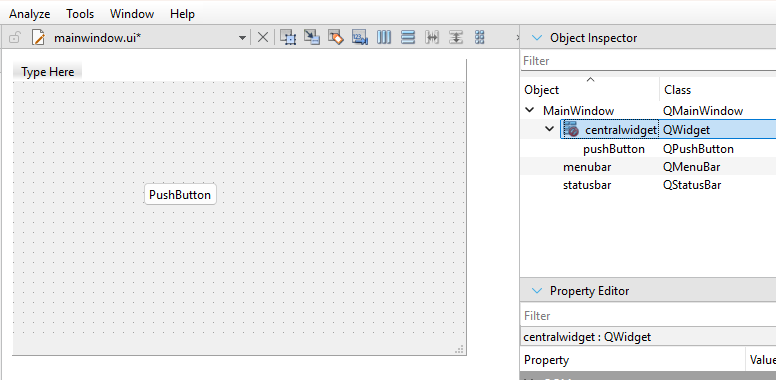
Right clicking on the form preview does select
MainWindowand has the same context menu behavior as clicking it in the tree view.So yeah, there are two things here:
- When it comes to context menu the layout options are placed on the
MainMenuand not oncentralwidget, but they are still available on the toolbar for both. - The options are enabled only after you add a child.
First one I would agree is not very intuitive and probably an easy fix - just add the same menu to the
centralwidget. Toolbar options already behave like that, so the actions are updating correctly anyway, they are just not exposed in the context menu.
The second one is probably a placeholder I mentioned. I don't know if it's that big of a deal, but could be addressed too I guess.@Chris-Kawa said in Creator cannot set layout on QMainWindow::centralWidget:
Layout options are now available on the toolbar
"Toolbar"? Wazzat? This tiny thing with pictures I have to guess what they mean?

Never noticed it, never used it! :) Words mean something to me ["a picture is worth a thousand words" -> "two words are worth an icon":) ]). If you can select an object and there are actions you can perform on it I am used to right-click context menu with what I can do. Anyway I agree that if you are on contextMenu this toolbar is the one and only way you can add a layout. (I have just found that main menu Tools > Form Editor also works like the toolbar on contextMenu, so that's another way.) If you want the corresponding right-click menu option you have to go select the Main Window node instead. My searches show I am not alone in not having a clue this is how it works.
The options are enabled only after you add a child.
Complained about that 10 years ago. Totally unintuitive, and again do a search to find how many others have no idea this is how it works. When designing a hierarchy of widgets I expect to: put the top-level widget down, set its desired layout, add child widgets, and repeat. Why you have to know to put a child first and only then go back and you can now set a layout is beyond me. 16 major release version numbers on from when I started with Creator it still has not addressed simple UI issues (e.g. just want to copy & paste a widget like in other Designers...?)....
- When it comes to context menu the layout options are placed on the
-
I have run into situations where qt-designer won't let me properly edit widget layouts, based on previous operations done in the editor, which I had subsequently undone. My work around always ended up being deleting the offending wodgets, exiting designer, then re-running and re-adding the widgets, at which point it worked again.
The dystopian literature that served as a warning in my youth has become an instruction manual in my elder years.
-
I have run into situations where qt-designer won't let me properly edit widget layouts, based on previous operations done in the editor, which I had subsequently undone. My work around always ended up being deleting the offending wodgets, exiting designer, then re-running and re-adding the widgets, at which point it worked again.
@Kent-Dorfman
Which might apply, were it not for the fact that I can create a brand new project with aQMainWindowand this happens no matter what I do or do not do, new session or not!All I am asking is if some kind soul with whatever version of Creator they have would create a
QMainWindowproject and confirm/deny that it is impossible to set a layout on thecentralWidgetno matter what they do...? If a later version of Creator allows it then there is no point my reporting it. Else it's bug, and I don't know how anyone can use aQMainWindowat design-time if you want to place things on the central widget during design as it'll never work properly without a layout. -
It's the same for me on Windows and latest Creator.
But it's not impossible. It works if you add any child to it. If you only want the layout then add a temporary child, set the layout and remove the child. The layout will stay.
My guess is that there's no actual central widget in the designer until you add children and the thing in the tree view is just a placeholder and not an actual widget that can have a layout. Is it a bug? Yeah, I guess you can call it that.
-
It's the same for me on Windows and latest Creator.
But it's not impossible. It works if you add any child to it. If you only want the layout then add a temporary child, set the layout and remove the child. The layout will stay.
My guess is that there's no actual central widget in the designer until you add children and the thing in the tree view is just a placeholder and not an actual widget that can have a layout. Is it a bug? Yeah, I guess you can call it that.
@Chris-Kawa said in Creator cannot set layout on QMainWindow::centralWidget:
But it's not impossible. It works if you add any child to it. If you only want the layout then add a temporary child, set the layout and remove the child. The layout will stay.
Hi. I am aware of this for every other widget. I am saying this does NOT work for me on centralWidget, and only centralWidget, in 13.0.0 no matter what I do (and I know all the tricks!). Did you actually try this on your version, just starting by creating a new
QMainWindowproject? And what version are you?The
centralWidgetas a widget is present in the generated.uifile. It has no layout (fair enough) but one cannot be added from Designer. Adding a child does not let me assign it any layout. Oh, and FWIW: once I have added a layout into the.uifile, Designer sees it fine but still never gives me a Layout menu on centralWidget. -
Did you actually try this on your version
You know me, of course :)
Created a fresh project, opened the designer, selected
centralwidgetand layout options are grayed out.
Dragged a button from the side panel, selectedcentralwidgetagain and layout options are available. Removed the button and layout is still there.I'm on Creator 20.0.0 and Qt 6.11.1.
Creator 13.0.0 is something like 2 years old I think. Can you try the latest?If you can't easily update Creator could you try it with the standalone designer from a recent Qt version? It behaves the same for me.
-
@Chris-Kawa said in Creator cannot set layout on QMainWindow::centralWidget:
You know me, of course :)
Thank you!
Two screenshots from my situation (starting from a brand new MainWindow project, just added a PushButton, the situation is the same with or without a child widget) which might show how there is a problem. I wonder how these compare to what you experience.
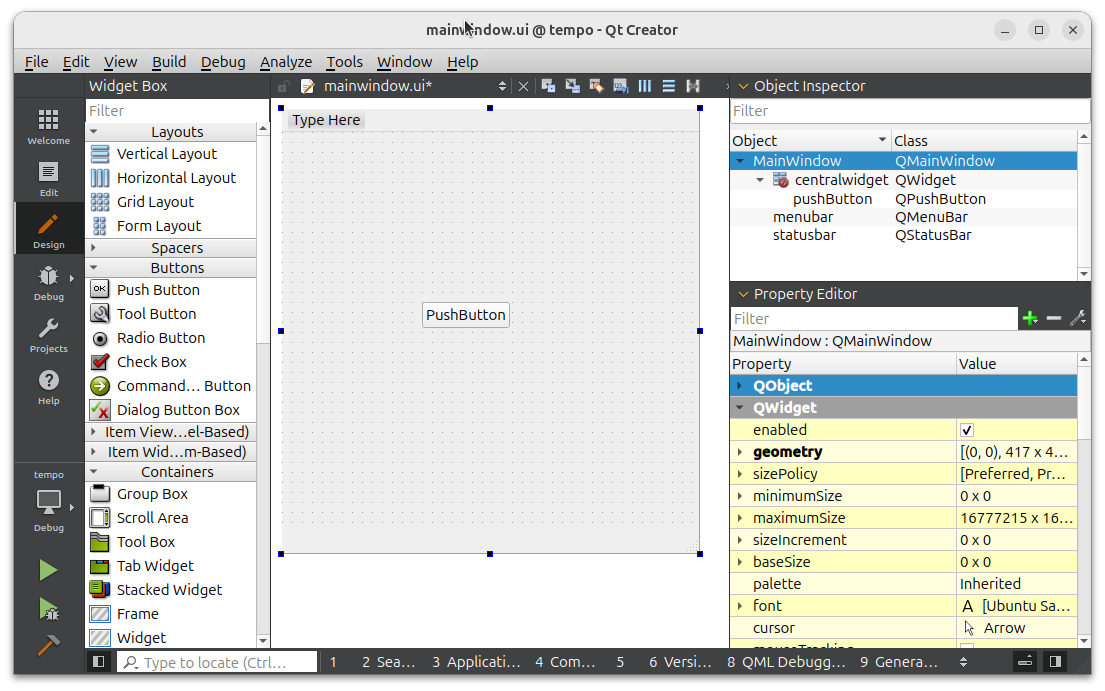
In this picture I am trying to do it by selecting and working in the left-hand, main pane. It does not matter how or where I (try to) click on the centralWidget it always selects the parent MainWindow. Since I can never select centralWidget here I can never get a right-click context menu on it in left-hand pane.
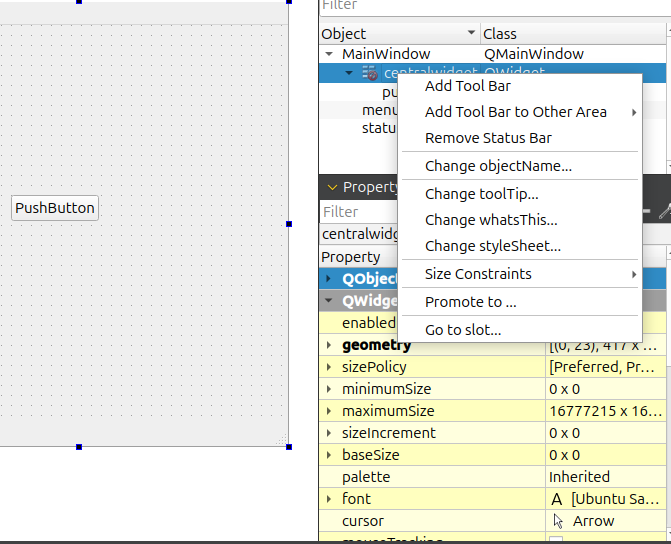
In this picture I am trying to do it by selecting and working in the right-hand, Object Explorer pane. That is the only place I can select centralWidget, and get right-click context menu. But as shown, on centralWidget the menu never has any Lay out > item, which it does have on any other widget. So I cannot set any layout from here either.
STOP-PRESS:
OMG, while doing this and playing I seem to have found it! What I find I have to do, and nobody has told me about, is that I must set the lay out not on the centralWidget but instead on the MainWindow itself! Whether in left- or right-hand pane, the secret is to get the right-context menu on MainWindow: that does give me the Lay Out > submenu in either pane.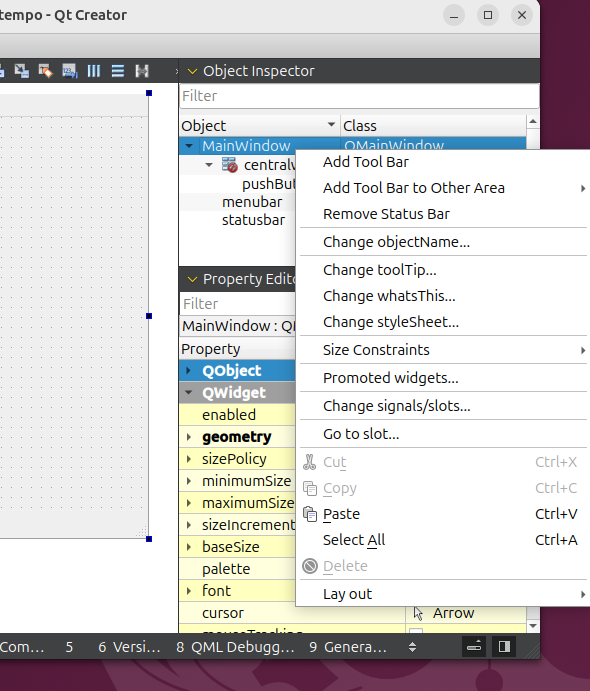
Setting a layout on MainWindow actually sets it on centralWidget. Which works, and the "red no-entry" sign on centralWidget goes away.
This is completely unexpected and unintuitive. The MainWindow already has its own layout which I do not want to touch. It is centralWidget's layout I need to set, and if done in code it's
centralWidget->setLayout(....). When I look at the.uifile after setting layout on the MainWindow widget visually in Designer it puts the<layout>...</layout>on the centralWidget widget instead. And the layout applied to MainWindow shows in the Property Editor as applied to centralWidget (though if accessed from context menu it has to be on MainWidget not centralWidget) :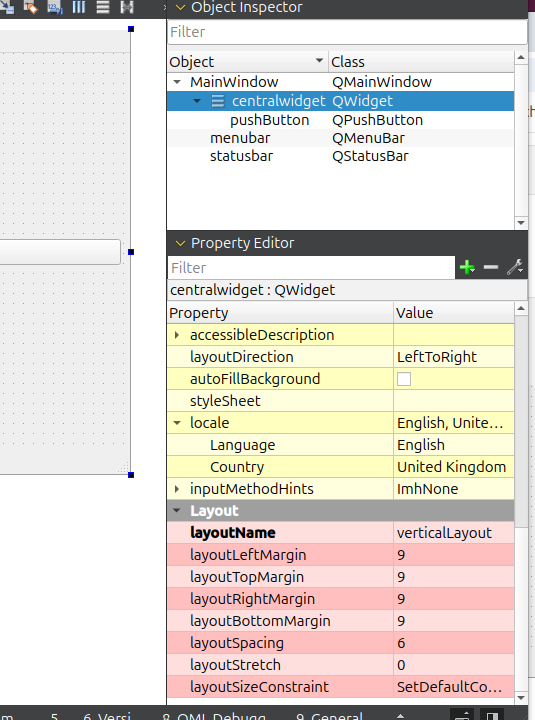
How is anyone supposed to know that in Designer you need to set MainWindow's layout if you want it set centralWidget's layout?!
Is this how it works in your Creator 20? You have to do it on MainWindow? Or in yours is centralWidget selectable and you do the layout on that?
So now I try Googling for
qt designer centralwidget. First hit is https://stackoverflow.com/questions/27536884/how-to-activate-centralwidget-in-qt-designer. Asked 11+ years ago. Same problem. Guy ends up editing.uifile like I had to. And then "over a year ago" just in the final Comment on the page someone saysNo need to edit .ui manually. Right click on main window, then set layout. It will apply to central widget.
Sigh. And I now see there are loads of people asking same in other questions, both on stackoverflow and here in this forum, e.g.
https://forum.qt.io/topic/153464/it-cannot-be-that-hard-add-layout-to-central-widget-retrospectively-without-being-forced-to-build-new-gui-from-scratch
I have now posted answer to the stackoverflow one at https://stackoverflow.com/a/79979857/489865So when you wrote:
Dragged a button from the side panel, selected centralwidget again and layout options are available.
so do you actually mean you selected MainWindow not centralWidget?!
-
so do you actually mean you selected MainWindow not centralWidget?
No, I selected
centralwidget.This is in a fresh project. Note the grayed out layout options on the toolbar.
Also there's no layout options in the context menu oncentralwidget.
There are layout options in the context menu ofMainWindow, but they are grayed out (those are the same actions as on the toolbar I presume).And this is with a button added. Layout options are now available on the toolbar and in context menu of
MainWindow.
There's still no layout context menu on thecentralwidget.Right clicking on the form preview does select
MainWindowand has the same context menu behavior as clicking it in the tree view.So yeah, there are two things here:
- When it comes to context menu the layout options are placed on the
MainMenuand not oncentralwidget, but they are still available on the toolbar for both. - The options are enabled only after you add a child.
First one I would agree is not very intuitive and probably an easy fix - just add the same menu to the
centralwidget. Toolbar options already behave like that, so the actions are updating correctly anyway, they are just not exposed in the context menu.
The second one is probably a placeholder I mentioned. I don't know if it's that big of a deal, but could be addressed too I guess. - When it comes to context menu the layout options are placed on the
-
so do you actually mean you selected MainWindow not centralWidget?
No, I selected
centralwidget.This is in a fresh project. Note the grayed out layout options on the toolbar.
Also there's no layout options in the context menu oncentralwidget.
There are layout options in the context menu ofMainWindow, but they are grayed out (those are the same actions as on the toolbar I presume).And this is with a button added. Layout options are now available on the toolbar and in context menu of
MainWindow.
There's still no layout context menu on thecentralwidget.Right clicking on the form preview does select
MainWindowand has the same context menu behavior as clicking it in the tree view.So yeah, there are two things here:
- When it comes to context menu the layout options are placed on the
MainMenuand not oncentralwidget, but they are still available on the toolbar for both. - The options are enabled only after you add a child.
First one I would agree is not very intuitive and probably an easy fix - just add the same menu to the
centralwidget. Toolbar options already behave like that, so the actions are updating correctly anyway, they are just not exposed in the context menu.
The second one is probably a placeholder I mentioned. I don't know if it's that big of a deal, but could be addressed too I guess.@Chris-Kawa said in Creator cannot set layout on QMainWindow::centralWidget:
Layout options are now available on the toolbar
"Toolbar"? Wazzat? This tiny thing with pictures I have to guess what they mean?
Never noticed it, never used it! :) Words mean something to me ["a picture is worth a thousand words" -> "two words are worth an icon":) ]). If you can select an object and there are actions you can perform on it I am used to right-click context menu with what I can do. Anyway I agree that if you are on contextMenu this toolbar is the one and only way you can add a layout. (I have just found that main menu Tools > Form Editor also works like the toolbar on contextMenu, so that's another way.) If you want the corresponding right-click menu option you have to go select the Main Window node instead. My searches show I am not alone in not having a clue this is how it works.
The options are enabled only after you add a child.
Complained about that 10 years ago. Totally unintuitive, and again do a search to find how many others have no idea this is how it works. When designing a hierarchy of widgets I expect to: put the top-level widget down, set its desired layout, add child widgets, and repeat. Why you have to know to put a child first and only then go back and you can now set a layout is beyond me. 16 major release version numbers on from when I started with Creator it still has not addressed simple UI issues (e.g. just want to copy & paste a widget like in other Designers...?)....
- When it comes to context menu the layout options are placed on the
-
 J JonB has marked this topic as solved

