
QFileDialog name filter on Linux
-
If I set a name filter for QFileDialog that looks like:
"RAW Files (*.cr2 *.cr3 *.crw *.nef *.mrw *.orf *.raf *.pef *.x3f *.dcr *.kdc *.srf *.arw *.raw *.dng *.ia *.rw2)"on Windows and macOS I am shown (e.g.) files with extensions of .cr2 and .CR2
On Linux Ubuntu 24.04.3 (Noble Numbat) and Linux Mint (which uses Thunar) I am only shown files with extensions .cr2.
On Lubuntu (which uses PCmanFM-Qt file manager) I am shown files with both .cr2 and .CR2 extensions.Should I expect this level on inconsistency between the different Linux systems?
Do I really need to specify (e.g. for .raf files) .raf, .RAF, .Raf, .rAf, .raF, etc. etc.)
Thanks, David
-
If I set a name filter for QFileDialog that looks like:
"RAW Files (*.cr2 *.cr3 *.crw *.nef *.mrw *.orf *.raf *.pef *.x3f *.dcr *.kdc *.srf *.arw *.raw *.dng *.ia *.rw2)"on Windows and macOS I am shown (e.g.) files with extensions of .cr2 and .CR2
On Linux Ubuntu 24.04.3 (Noble Numbat) and Linux Mint (which uses Thunar) I am only shown files with extensions .cr2.
On Lubuntu (which uses PCmanFM-Qt file manager) I am shown files with both .cr2 and .CR2 extensions.Should I expect this level on inconsistency between the different Linux systems?
Do I really need to specify (e.g. for .raf files) .raf, .RAF, .Raf, .rAf, .raF, etc. etc.)
Thanks, David
@Perdrix
Since Linux filing systems are case sensitive I would expect only to be shown files matching the case of the filter. I do not know about MacOS or Lubuntu. More to the point under Linux a, say,.tarfile should always be spelt as such, so how/why would you start with a.Taror a.TARfile in the first place? I would be surprised at that.You do not say whether you are using the native file dialog or the Qt one. I believe the filtering is handled internally in native dialogs so this is vital to behaviour. If it is and you are using native then it has nothing to do with Qt and you should be able to examine/replicate the behaviour in any program.
If you ensure you are using the Qt file dialog do you get consistent behaviour?
-
@Perdrix
Since Linux filing systems are case sensitive I would expect only to be shown files matching the case of the filter. I do not know about MacOS or Lubuntu. More to the point under Linux a, say,.tarfile should always be spelt as such, so how/why would you start with a.Taror a.TARfile in the first place? I would be surprised at that.You do not say whether you are using the native file dialog or the Qt one. I believe the filtering is handled internally in native dialogs so this is vital to behaviour. If it is and you are using native then it has nothing to do with Qt and you should be able to examine/replicate the behaviour in any program.
If you ensure you are using the Qt file dialog do you get consistent behaviour?
@JonB said in QFileDialog name filter on Linux:
I do not know about MacOS or Lubuntu
macOS is also case insensitive (well, technically you can format APFS partitions as case sensitive if you really want to, but then all kind of things break).
Lubuntu is a Linux distribution running LXQt as the desktop environment (a minor lightweight DE written in Qt). The difference from Ubuntu/Mint is that the latter two automatically use the gtk3 platform theme plugin shipped with Qt, and therefore you get the Gtk file picker dialogs. In Lubuntu, it is possible that you'll get the different native file picker (if there is an alternative theme plugin configured), or the non-native one built-in. Whether non case sensitive filter matching is to be expected or not depends on that.
-
Except! Running on Noble Numbat.
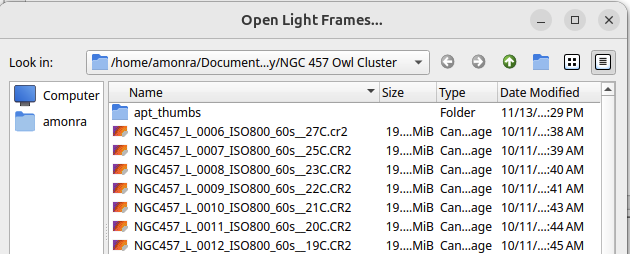
DeepSkyStacker 6.1.0 which uses Qt 6.9.2 displays both .cr2 and .CR2 files with that name filter:
whereas Qt 6.1.1 Beta 2 which uses 6.10.0 only displays .cr2 files with that name filter:
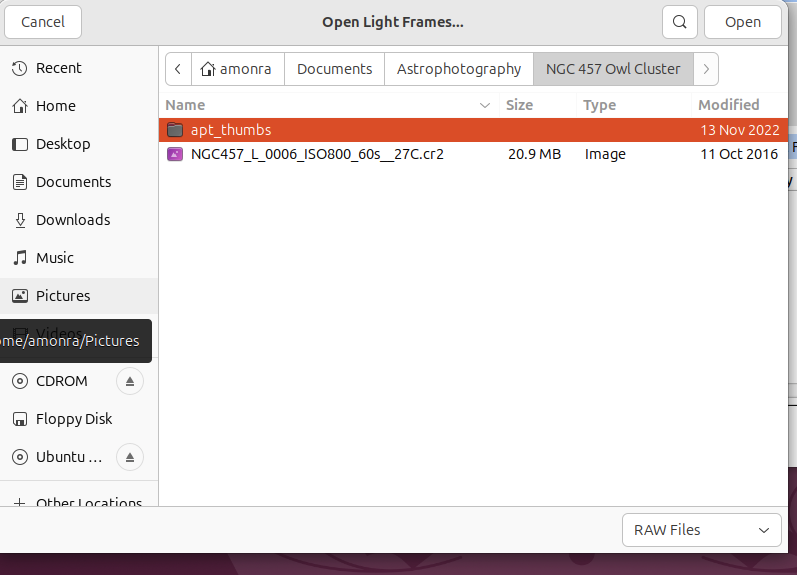
So for me, that's a breaking change.
I also see that the displayed file dialogue is completely different which is quite surprising.
David
-
The first one is from Qt, the second from your platform aka the native (gtk) one.
-
When the platform plugin provides a native file dialog then it is used, otherwise the Qt one is shown.


