
Resizing controls in SplitView
-
Hello, I'm new to QML and Quick, and I'm trying them out with Qt 6.10.
I have some questions about SplitView: the controls inside one of the split views go over the rectangles instead of resizing or "overflowing".
This is my sample code:ApplicationWindow { id: mainWindow visible: true color: "green" ColumnLayout { anchors.fill: parent anchors.margins: 10 spacing: 10 SplitView { id: splitView Layout.fillWidth: true; Layout.fillHeight: true orientation: Qt.Horizontal Rectangle { id: leftPane color: "blue" ColumnLayout { anchors.centerIn: parent RadioButton { text: qsTr("Small") } RadioButton { text: Window.active ? "active" : "inactive"; checked: true;} RadioButton { text: qsTr("Large");} Button { text: qsTr("Button") } RoundButton { text: qsTr("Button"); radius: 10} Switch { text: qsTr("First"); checked: true } Switch { text: qsTr("Second"); checked: true; enabled: false } Switch { text: qsTr("Third")} ComboBox { model: ["First", "Second", "Third"] } Slider { from: 1 value: 25 to: 100 } TextField { placeholderText: qsTr("Enter name") } SpinBox { value: 50 } } } Rectangle { id: rightPane color: "red" SplitView.fillWidth: true Column { anchors.centerIn: parent RadioButton { text: qsTr("Small") } RadioButton { text: Window.active ? "active" : "inactive"; checked: true;} RadioButton { text: qsTr("Large");} } } } RowLayout { spacing: 10 Label { text: qsTr("Footer Text"); color: "white" } Button { text: qsTr("Action"); Layout.fillWidth: true } } } }This is what I get
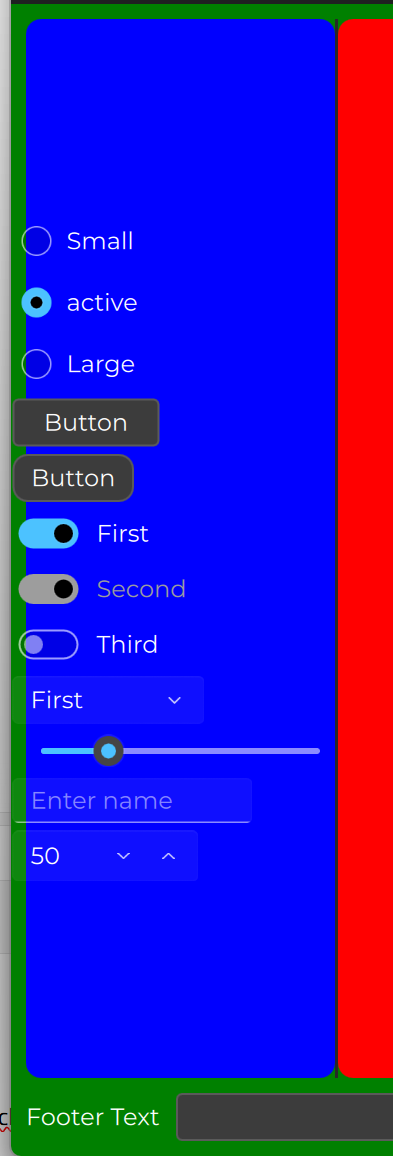
I was expecting the control to resize itself to match the size of the blue rectangle, or to overflow on the right while staying inside the rectangle.
What am I missing? -
If you want controls stay inside blue rectangle anchor layout
Rectangle {
                id: leftPane
                color: "blue"

                ColumnLayout {
                    //anchors.centerIn: parent
                    anchors.left:parent.left
                    anchors.verticalCenter: parent.verticalCenter
//also you can put some margin if you need to
                    anchors.leftMargin: parent.width/20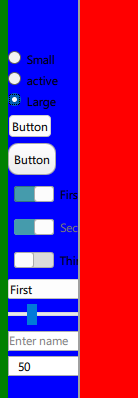
-
If you want controls stay inside blue rectangle anchor layout
Rectangle { id: leftPane color: "blue" ColumnLayout { //anchors.centerIn: parent anchors.left:parent.left anchors.verticalCenter: parent.verticalCenter //also you can put some margin if you need to anchors.leftMargin: parent.width/20@zvoopz said in Resizing controls in SplitView:
If you want controls stay inside blue rectangle anchor layout
Rectangle {
                id: leftPane
                color: "blue"

                ColumnLayout {
                    //anchors.centerIn: parent
                    anchors.left:parent.left
                    anchors.verticalCenter: parent.verticalCenter
//also you can put some margin if you need to
                    anchors.leftMargin: parent.width/20
Oh thanks, it worked!
I've another question.
I added these lines too:anchors.right: parent.right anchors.rightMargin: 10I found out that, in order to create an 'empty' space defined by the right margin, I need to add
Layout.fillWidth: trueto all controls with a width greater thanSplitView.minimumWidth.
Is there a better way than addingLayout.fillWidth: trueto all elements? -
@zvoopz said in Resizing controls in SplitView:
If you want controls stay inside blue rectangle anchor layout
Rectangle {
                id: leftPane
                color: "blue"

                ColumnLayout {
                    //anchors.centerIn: parent
                    anchors.left:parent.left
                    anchors.verticalCenter: parent.verticalCenter
//also you can put some margin if you need to
                    anchors.leftMargin: parent.width/20
Oh thanks, it worked!
I've another question.
I added these lines too:anchors.right: parent.right anchors.rightMargin: 10I found out that, in order to create an 'empty' space defined by the right margin, I need to add
Layout.fillWidth: trueto all controls with a width greater thanSplitView.minimumWidth.
Is there a better way than addingLayout.fillWidth: trueto all elements?@TheEnigmist said in Resizing controls in SplitView:
I added these lines too:
What is your goal? You can anchor either to left or to right, not both
-
You can anchor to both left and right. anchoring the column layout to the parent rectangle and using
Layout.fillWidth: truefor its children is the correct way to go here.I don't really understand the part about the SplitView.minimumWidth here.
-
T TheEnigmist has marked this topic as solved on
-
You can anchor to both left and right. anchoring the column layout to the parent rectangle and using
Layout.fillWidth: truefor its children is the correct way to go here.I don't really understand the part about the SplitView.minimumWidth here.
Yes, @GrecKo is right about the anchor, and the information about the SplitView.minimumWidth is misleading. Sorry about that.
