
See cmake compilation/linker command lines
-
Now that I have changed over to cmake and have Creator 13, which box do I check so that I can see the compiler and linker command lines in the Compile Output pane? :) Old Creator/qmake used to show me compilation/linker command lines. I don't think it is Creator which is hiding these lines actually received from cmake.
I don't care whether that is an option to cmake which generates something in the resulting Makefile to switch on command echoing or whether it's an option at Build time to pass to the makes it will run to do so, just so long as I check/uncheck a box to switching on/off whether I see the commands. Like
makeby default shows commands andmake -ssuppresses that [if it was a useful option in the 1970s it's a useful option now :) ] . -
With CMake you have two steps:
- configure
- build
You have added
--verboseto the configure step.I am mentioning the second point, the
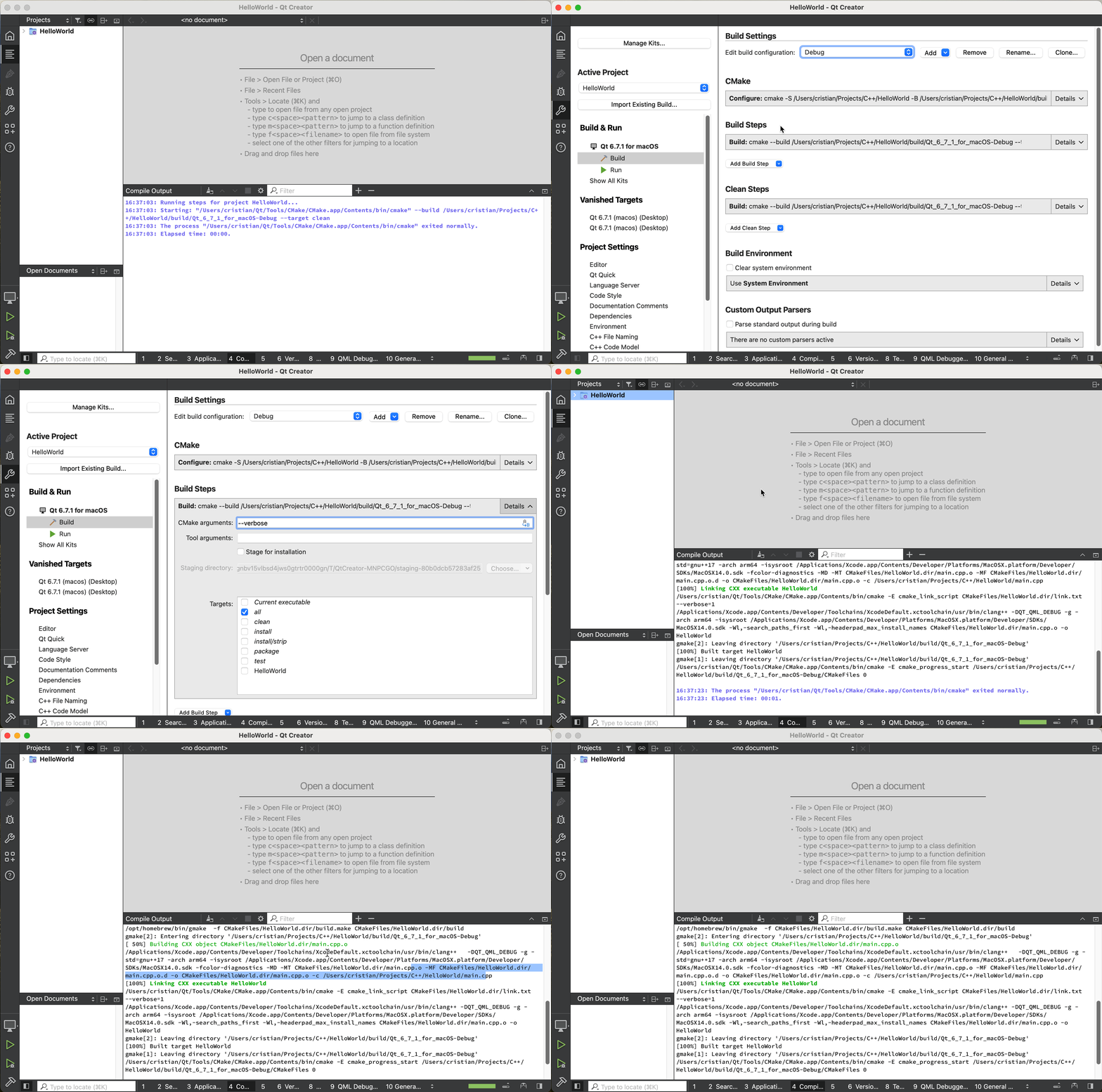
cmake --build --target <some-target> --verbose. See the documentation.I thought the screenshot was enough, but here you go, a screen cast:
-
Just add
--verboseto the CMake build step. See below for details:
-
Just add
--verboseto the CMake build step. See below for details:@cristian-adam
Hi Cristian. Thanks for replying, sorry only just got to look at this (power cut for 10 hours yesterday!). But problems:-
I (don't consider myself) an idiot, but I cannot find where in Creator (13) corresponds to the screenshot you show. I cannot find anywhere with a page like that or where I can see/add to "cmake Build steps". I could show you where i have clicked around and not been able to find it, but that doesn't seem useful... So how exactly do you get to the page you show, please? I just found this

But it doesn't look the same as yours, and adding--verbosethere and rebuilding doesn't seem to have made any difference? -
If the output you show at the bottom with
--verboseis supposed be the answer I requested it is not. It either does not do what I requested or you have nothing to compile so I wouldn't know. I am not asking for more detail on thecding or make/cmake steps (don't care whether I get that or not), I am asking to see the compilation/linker command lines when executed. As presumably not-presently-echoed but-can-be-echoed from the make/Makefile when make compiles/links each time. Than you.
[If you know your Linux make, compare a plain
makecommand --- which does echo commands as they are executed (unless you precede them with an@) --- againstmake -swhich suppresses (does not echo) the command lines, and is how I see compilation output with cmake/Creator 13 when under qmake/Creator older I did see the lines, likemakeinstead ofmake -s.] -
-
With CMake you have two steps:
- configure
- build
You have added
--verboseto the configure step.I am mentioning the second point, the
cmake --build --target <some-target> --verbose. See the documentation.I thought the screenshot was enough, but here you go, a screen cast:
-
With CMake you have two steps:
- configure
- build
You have added
--verboseto the configure step.I am mentioning the second point, the
cmake --build --target <some-target> --verbose. See the documentation.I thought the screenshot was enough, but here you go, a screen cast:
@cristian-adam said in See cmake compilation/linker command lines:
With CMake you have two steps:
Indeed :)
Sorry to have made you screen cast. The bit I was missing/didn't see /hadn't remembered was

I had forgotten about the Details button you need to click at the right to expand the options! I use a variety of environments for work, gets confusing sometimes remembering the ins-and-outs of each one! Thanks, perfect, I now get the command lines.
Just OOI, not vital: if I expect/find useful to always see these, like qmake or make default, is there somewhere I could add/edit in Creator (or elsewhere) to make cmake always be "verbose" or have this
--verboseoption (all projects, all configurations)?Thanks in advance. And if you feel really brave you might like to tackle my new https://forum.qt.io/topic/159855/profiling-analyzing-performance, which is what this was all leading up to! :) Or you might want a peaceful weekend... ;-)
-
 J JonB has marked this topic as solved on
