
Subclassing QFileDialog
-
The MFC code that I am converting to use Qt uses a sub-class of CFileDialog to that uses CDialog::SetTemplate() function to append additional controls defined in a user resource file to the standard dialogue.
The resulting save file dialogue looks like this:
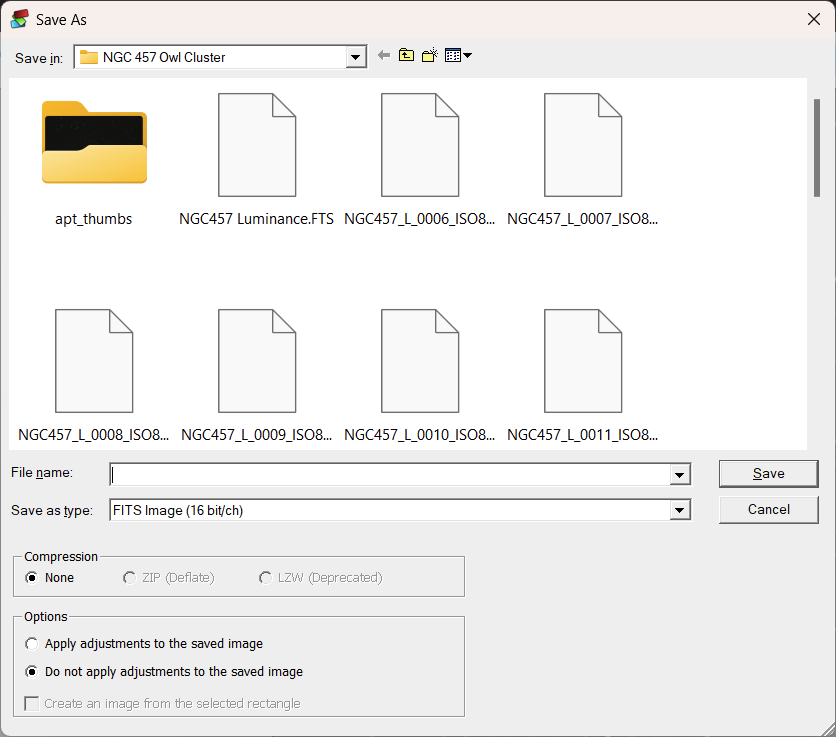
This is very effective, but unfortunately I can't seem to find a way to do this using QFileDialog.
Is there a way to achieve something similar to this in Qt?
Thanks, David
-
I find that really depressing - I so don't want to have to spin my own version of QFileDialog from the ground up.
David
According to the docs, I think its possible if not using the native file dialog.
By default, a platform-native file dialog will be used if the platform has one. In that case, the widgets which would otherwise be used to construct the dialog will not be instantiated, so related accessors such as layout() and itemDelegate() will return null. You can set the DontUseNativeDialog option to ensure that the widget-based implementation will be used instead of the native dialog.
The following add a button at the bottom.
QFileDialog fd; fd.setOption(QFileDialog::DontUseNativeDialog); fd.layout()->addWidget(new QPushButton("Extra button")); -
The MFC code that I am converting to use Qt uses a sub-class of CFileDialog to that uses CDialog::SetTemplate() function to append additional controls defined in a user resource file to the standard dialogue.
The resulting save file dialogue looks like this:
This is very effective, but unfortunately I can't seem to find a way to do this using QFileDialog.
Is there a way to achieve something similar to this in Qt?
Thanks, David
@Perdrix said in Subclassing QFileDialog:
Is there a way to achieve something similar to this in Qt?
QFileDialoginherits fromQDialog.
So you can subclass it and add your own layout with additional things you need.
If you want to replicate the exact same as in your screenshot, there are twoQGroupBoxcontainers with check- and radio buttons... so should not be a big deal.Keep in mind, when you subclass
QFileDialogyou always get the Qt Widget "style" File Dialog and never the platform native one, which, for example, can be invoked using the static methods ofQFileDialog. -
Some guidance on that would be very helpful. It's not clear to me how I'd override its layout and add controls. The way that QFileDialogPrivate::createWidgets() works looks like this will be very difficult without copying the entire code of (at least) that function to override the layout.
Meantime, I'll look deeper into its source code to see whether I can work it out for myself
Thanks, David
-
QFileDialog is not really meant to be overriden. Create your own dialog if you want something special.
-
I find that really depressing - I so don't want to have to spin my own version of QFileDialog from the ground up.
David
But it's the same for every other widget.
When subclassing e.g.QAbstractButtonyou get the interface only... the button is "empty" and needs to be defined and customized by you. Unfortunately there's nothing such as "a little default behavior" and then add your own stuff to it. -
I find that really depressing - I so don't want to have to spin my own version of QFileDialog from the ground up.
David
According to the docs, I think its possible if not using the native file dialog.
By default, a platform-native file dialog will be used if the platform has one. In that case, the widgets which would otherwise be used to construct the dialog will not be instantiated, so related accessors such as layout() and itemDelegate() will return null. You can set the DontUseNativeDialog option to ensure that the widget-based implementation will be used instead of the native dialog.
The following add a button at the bottom.
QFileDialog fd; fd.setOption(QFileDialog::DontUseNativeDialog); fd.layout()->addWidget(new QPushButton("Extra button")); -
 P Perdrix has marked this topic as solved on
-
Woohoo!
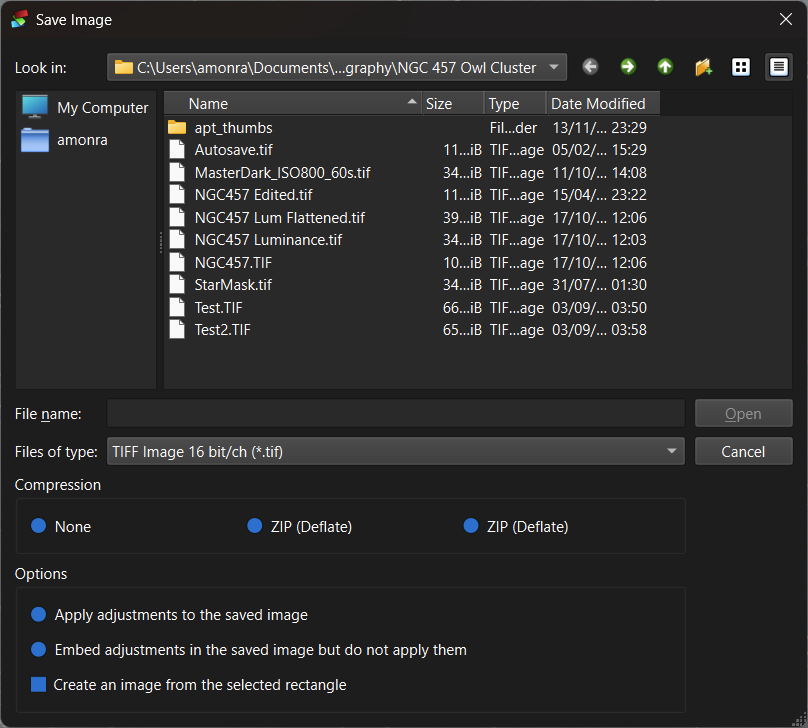
SavePicture.h (part)
namespace DSS
{
	class SavePicture final : public QFileDialog
	{
		Q_OBJECT

	public:
		SavePicture(QWidget* parent = nullptr, const QString& caption = QString(), const QString& directory = QString(), const QString& filter = QString());

		~SavePicture() = default;

		SavePicture(const SavePicture&) = delete;
		SavePicture(SavePicture&&) = delete;
		SavePicture& operator=(const SavePicture& rhs) = delete;

		void retranslateUi(QWidget*);

	private:
		QGroupBox* compressionGroup;
		QHBoxLayout* compressionLayout;
		QRadioButton* compressionNone;
		QRadioButton* compressionZIP;
		QRadioButton* compressionLZW;

		QGroupBox* optionsGroup;
		QVBoxLayout* optionsLayout;
		QRadioButton* applyAdjustments;
		QRadioButton* embedAdjustments;
		QCheckBox* useRectangle;

		QString embedText;
		QString noAdjustments;
SavePicture.cpp (part)
namespace DSS { SavePicture::SavePicture(QWidget* parent, const QString& caption, const QString& directory, const QString& filter) : QFileDialog(parent, caption, directory, filter), compressionGroup(new QGroupBox(this)), compressionLayout(new QHBoxLayout(compressionGroup)), compressionNone(new QRadioButton(compressionGroup)), compressionZIP(new QRadioButton(compressionGroup)), compressionLZW(new QRadioButton(compressionGroup)), optionsGroup(new QGroupBox(this)), optionsLayout(new QVBoxLayout(optionsGroup)), applyAdjustments(new QRadioButton(optionsGroup)), embedAdjustments(new QRadioButton(optionsGroup)), useRectangle(new QCheckBox(optionsGroup)) { compressionGroup->setObjectName("compressionGroup"); compressionLayout->setObjectName("compressionLayout"); compressionNone->setObjectName("compressionNone"); compressionZIP->setObjectName("compressionZIP"); compressionLZW->setObjectName("compressionLZW"); optionsGroup->setObjectName("optionsGroup"); optionsLayout->setObjectName("optionsLayout"); applyAdjustments->setObjectName("applyAdjustments"); embedAdjustments->setObjectName("embedAdjustments"); useRectangle->setObjectName("useRectangle"); compressionGroup->setLayout(compressionLayout); compressionLayout->addWidget(compressionNone); compressionLayout->addWidget(compressionZIP); compressionLayout->addWidget(compressionLZW); optionsGroup->setLayout(optionsLayout); optionsLayout->addWidget(applyAdjustments); optionsLayout->addWidget(embedAdjustments); optionsLayout->addWidget(useRectangle); retranslateUi(this); setOption(QFileDialog::DontUseNativeDialog); QGridLayout* layout{ dynamic_cast<QGridLayout*>(this->layout()) }; layout->addWidget(compressionGroup, layout->rowCount(), 0, 1, 2); layout->addWidget(optionsGroup, layout->rowCount(), 0, 1, 2); } void SavePicture::retranslateUi([[maybe_unused]]QWidget* wdgt) { compressionGroup->setTitle(tr("Compression", "IDD_SAVEPICTURE")); compressionNone->setText(tr("None", "IDC_COMPRESSION_NONE")); compressionZIP->setText(tr("ZIP (Deflate)", "IDC_COMPRESSION_ZIP")); compressionLZW->setText(tr("ZIP (Deflate)", "IDC_COMPRESSION_LZW")); optionsGroup->setTitle(tr("Options", "IDD_SAVEPICTURE")); applyAdjustments->setText(tr("Apply adjustments to the saved image", "IDC_APPLIED")); embedAdjustments->setText(tr("Embed adjustments in the saved image but do not apply them", "IDC_EMBEDDED")); embedText = embedAdjustments->text(); noAdjustments = tr("Do not apply adjustments to the saved image", "IDS_SAVENOADJUSTMENT"); useRectangle->setText(tr("Create an image from the selected rectangle", "IDC_USERECT")); }``` -
This code probably works fine for saving dialogs, but (at least in my X11-environment) opening of a file does not, as the dialog closes as soon as a file is selected. But I found a solution by subclassing QFileDialog. The most important snippets of my Python-code are as follows:
def __init__(self, parent=None): ... # set custom dialog option self.setOption(QFileDialog.DontUseNativeDialog) # add your own widgets to the dialog layg: QGridLayout = self.layout() # the standard layout of QFileDialog is a QGridLayout with 4 rows and 3 columns; # so add your widgets from row 5 onwards ... # redirect accept signal from open button, which is a QDialogButtonBox in # row 2, column 2 itm_open = layg.itemAtPosition(2, 2) itm_open.widget().accepted.connect(self.accept_button) self.show() def accept(self): # override the standard accept function, which is triggered # on file selection logger.debug('accepted via file selection') filename = self.selectedFiles()[0] # I e.g. used the additional widgets to display parts of the contents # of the file; this code follows here ... # and IMPORTANT: do NOT call super().accept(), as this closes # the dialog immediately def accept_button(self): # react on the click of the open button logger.debug('accepted via button') ... # now it is time to call super().accept() super().accept() -
This code probably works fine for saving dialogs, but (at least in my X11-environment) opening of a file does not, as the dialog closes as soon as a file is selected. But I found a solution by subclassing QFileDialog. The most important snippets of my Python-code are as follows:
def __init__(self, parent=None): ... # set custom dialog option self.setOption(QFileDialog.DontUseNativeDialog) # add your own widgets to the dialog layg: QGridLayout = self.layout() # the standard layout of QFileDialog is a QGridLayout with 4 rows and 3 columns; # so add your widgets from row 5 onwards ... # redirect accept signal from open button, which is a QDialogButtonBox in # row 2, column 2 itm_open = layg.itemAtPosition(2, 2) itm_open.widget().accepted.connect(self.accept_button) self.show() def accept(self): # override the standard accept function, which is triggered # on file selection logger.debug('accepted via file selection') filename = self.selectedFiles()[0] # I e.g. used the additional widgets to display parts of the contents # of the file; this code follows here ... # and IMPORTANT: do NOT call super().accept(), as this closes # the dialog immediately def accept_button(self): # react on the click of the open button logger.debug('accepted via button') ... # now it is time to call super().accept() super().accept()@RoXus said in Subclassing QFileDialog:
    itm_open = layg.itemAtPosition(2, 2)
    itm_open.widget().accepted.connect(self.accept_button)
Just an observation. For you or anyone else reading this, obviously this relies on the dialog having a
QGridLayoutand the desired button being positioned in cell (2, 2). Probably a more robust approach is to find theQDialogButtonBox, or better the actual button. From Python you can start frombox = self.findChild(QDialogButtonBox) # or buttons = self.findChildren(QPushButton)Look at the docs for these, you can e.g. add the
objectName()if you know what it is for the button you want, or similar.


