
Skip to content
  • Categories
  • Recent
  • Tags
  • Popular
  • Users
  • Groups
  • Search
  • Get Qt Extensions
  • Unsolved
Collapse
Brand Logo
  1. Home
  2. Qt Development
  3. General and Desktop
  4. QGroupBox title alignment
Forum Updated to NodeBB v4.3 + New Features

QGroupBox title alignment

Scheduled Pinned Locked Moved Unsolved General and Desktop
2 Posts 2 Posters 276 Views 1 Watching
  • Oldest to Newest
  • Newest to Oldest
  • Most Votes
Reply
  • Reply as topic
Log in to reply
This topic has been deleted. Only users with topic management privileges can see it.
  • D Offline
    D Offline
    dan1973
    wrote on last edited by dan1973
    #1

    Hi, My QGrouBox Text is not aligned Properly. it is aligned to be Bottom, instead of Center or VCenter or Top.

    it is not responding to setAlignment(Qt::Center) statements.

    Please help me in resolving this issue.
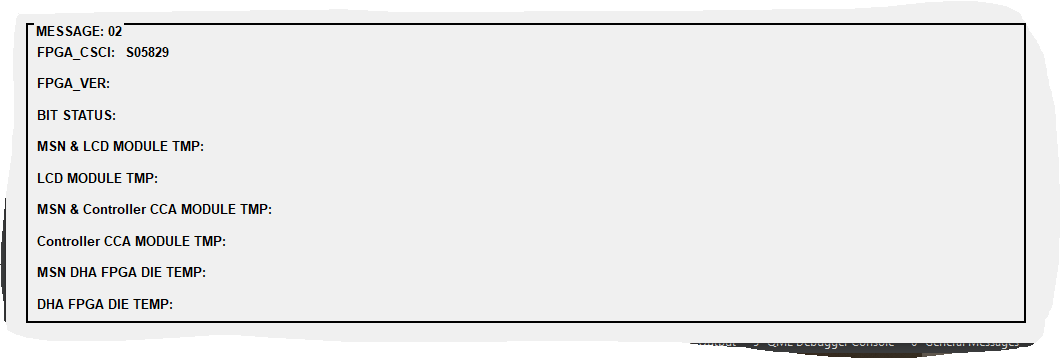
    MsgGrpBx.PNG

     gbxMsg2_1 = new QGroupBox("MESSAGE: 02", this);
        gbxMsg2_1->setFont(QFont("Arial", 10, QFont::Bold));
    gbxMsg2_1->setStyleSheet("QGroupBox {border-style: solid; border-width: 2;}");
        gbxMsg2_1->setAlignment(Qt::AlignTop);
        gbxMsg2_1->setLayout(vbxMsg2_1);
        gbxMsg2_1->setGeometry(20, 680, 1000, 300);
    

    Regards,
    Dan

    1 Reply Last reply
    0
    • sbelaS Offline
      sbelaS Offline
      sbela
      wrote on last edited by
      #2

      Hi!
      Try something like this:

      gbxMsg2_1->setStyleSheet("QGroupBox {border-style: solid; border-width: 2; margin: 10px 10px 10px 10px; } "
              "QGroupBox:title{padding-top: -10px; }");
      

      I would like!

      1 Reply Last reply
      0

      • Login

      • Login or register to search.
      • First post
        Last post
      0
      • Categories
      • Recent
      • Tags
      • Popular
      • Users
      • Groups
      • Search
      • Get Qt Extensions
      • Unsolved