Skip to content
  • Categories
  • Recent
  • Tags
  • Popular
  • Users
  • Groups
  • Search
  • Get Qt Extensions
  • Unsolved
Collapse
Brand Logo
  1. Home
  2. Qt Development
  3. Qt Creator and other tools
  4. Add Android kit
Qt 6.11 is out! See what's new in the release blog

Add Android kit

Scheduled Pinned Locked Moved Solved Qt Creator and other tools
6 Posts 4 Posters 1.4k Views 2 Watching
  • Oldest to Newest
  • Newest to Oldest
  • Most Votes
Reply
  • Reply as topic
Log in to reply
This topic has been deleted. Only users with topic management privileges can see it.
  • R Offline
    R Offline
    realroot
    wrote on last edited by realroot
    #1

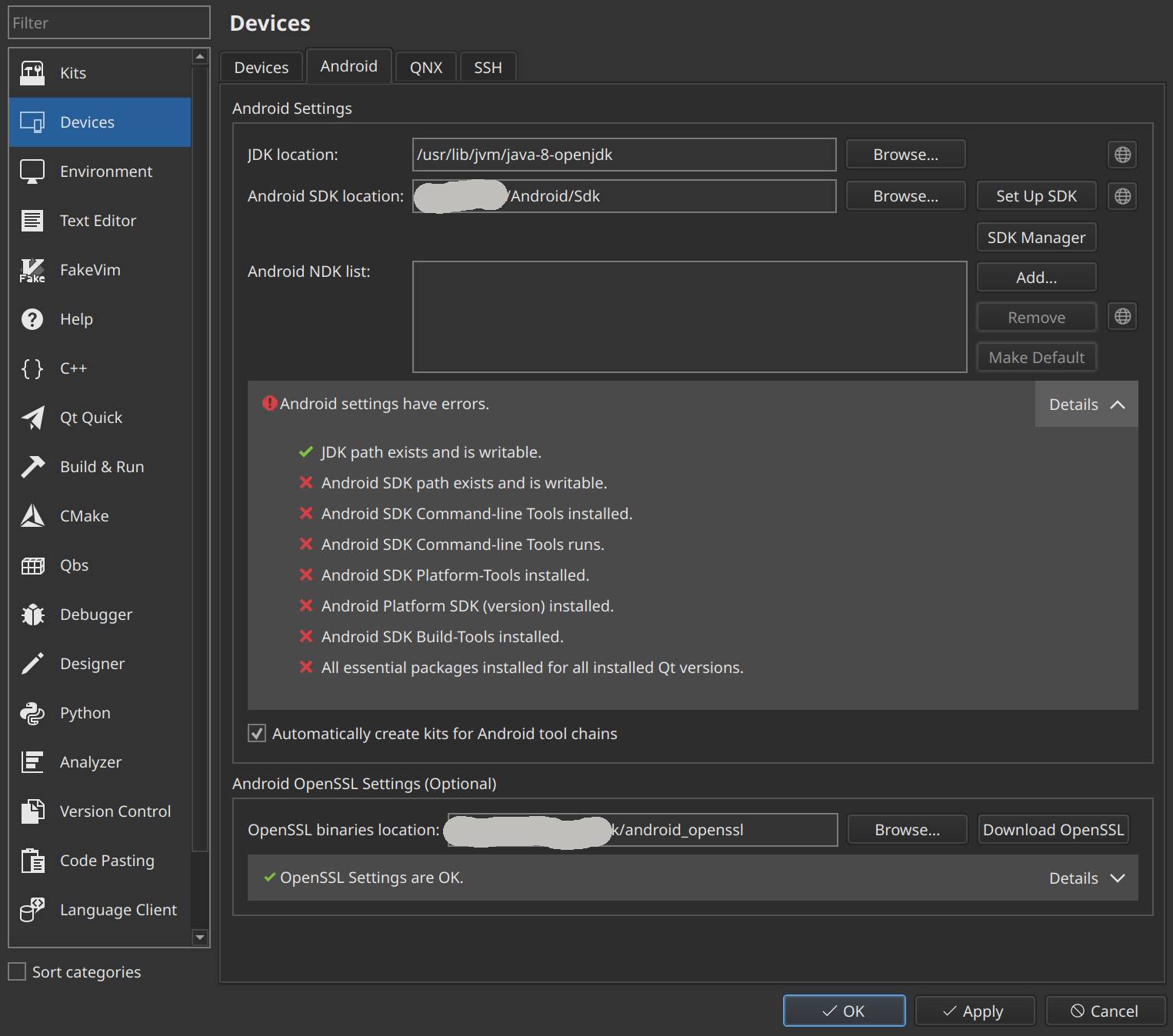
    qtcreator-android.png

    After using Set Up SDK I got the 2nd and 3rd entries fine.
    If I close it I lose them as the image shows.
    Every time I have to download them again.

    I downloaded the files manually and I used Add... but again it is forgotten after closing it.
    And it does not show any new entry fine.

    Not sure to how fix the rest of the list.

    1 Reply Last reply
    0
    • Axel SpoerlA Offline
      Axel SpoerlA Offline
      Axel Spoerl
      Moderators
      wrote on last edited by
      #2

      The SDK installation is broken, probably incomplete.

      Software Engineer
      The Qt Company, Oslo

      1 Reply Last reply
      0
      • JKSHJ Offline
        JKSHJ Offline
        JKSH
        Moderators
        wrote on last edited by
        #3

        Also, Java 8 won't work with the current SDK from Google.

        You'll want Java 17 instead.

        Qt Doc Search for browsers: forum.qt.io/topic/35616/web-browser-extension-for-improved-doc-searches

        1 Reply Last reply
        1
        • cristian-adamC Offline
          cristian-adamC Offline
          cristian-adam
          wrote on last edited by
          #4

          I guess the Android setup should not mark as green a JDK that's not working.

          Axel SpoerlA 1 Reply Last reply
          1
          • R Offline
            R Offline
            realroot
            wrote on last edited by
            #5

            I installed jdk17-openjdk and I set /usr/lib/jvm/java-17-openjdk as JDK location.
            After running Set Up SDK it shows all fine.

            1 Reply Last reply
            1
            • R realroot has marked this topic as solved on
            • cristian-adamC cristian-adam

              I guess the Android setup should not mark as green a JDK that's not working.

              Axel SpoerlA Offline
              Axel SpoerlA Offline
              Axel Spoerl
              Moderators
              wrote on last edited by
              #6

              @cristian-adam said in Add Android kit:

              I guess the Android setup should not mark as green a JDK that's not working.

              The green mark only says that the path exists and is writable.
              AFAIK an SDK is needed to test, if the JDK is compatible.

              Software Engineer
              The Qt Company, Oslo

              1 Reply Last reply
              0

              • Login

              • Login or register to search.
              • First post
                Last post
              0
              • Categories
              • Recent
              • Tags
              • Popular
              • Users
              • Groups
              • Search
              • Get Qt Extensions
              • Unsolved