
QProgressBar
-
I am trying to show vertical text in QProgressBar. It is not showing it.
My code:
pgbr3 = new QProgressBar(this);
    pgbr3->setRange(0, 1000);
    pgbr3->setValue(300);
    pgbr3->setOrientation(Qt::Vertical);
    pgbr3->setGeometry(100, 260, 30, 200);
    pgbr3->setFormat("Completed: %p%   CurVal: %v   Total: %m");
    pgbr3->setTextVisible(true);
Please help me.
thanking you in advance.
-
Qt using Windows style won't show vertical text in QProgressBar.
Even you use fusion style which shows the vertical text, it won't be like what you want, it would look like this: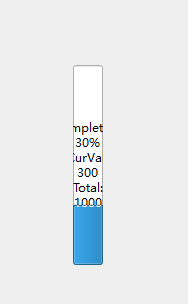
So you'd better not to try to show the text by QProgressBar and find some other way to show it.
-
Qt using Windows style won't show vertical text in QProgressBar.
Even you use fusion style which shows the vertical text, it won't be like what you want, it would look like this:So you'd better not to try to show the text by QProgressBar and find some other way to show it.
-
D dan1973 has marked this topic as solved on
-
D dan1973 has marked this topic as solved on