
C++ Qt 6.7.2 VLC, VLC-Qt
-
Hi,
when I try build app with VLC-Qt I'm getting this errors:

main.obj:-1: error: LNK2019: unresolved external symbol "__declspec(dllimport) class QList<class QString> __cdecl VlcCommon::args(void)" (_imp?args@VlcCommon@@YA?AV?$QList@VQString@@@@XZ) referenced in function main
main.obj:-1: error: LNK2019: unresolved external symbol "__declspec(dllimport) public: __cdecl VlcInstance::VlcInstance(class QList<class QString> const &,class QObject *)" (_imp??0VlcInstance@@QEAA@AEBV?$QList@VQString@@@@PEAVQObject@@@Z) referenced in function main
This is my code:
#include <QApplication>
#include <QMainWindow>
#include <VLCQtCore/Common.h>
#include <VLCQtCore/Instance.h>
#include <VLCQtCore/Media.h>
#include <VLCQtCore/MediaPlayer.h>
#include <VLCQtWidgets/WidgetVideo.h>

int main(int argc, char *argv[])
{
    QApplication app(argc, argv);

    QMainWindow mainWindow;

    VlcWidgetVideo *videoWidget = new VlcWidgetVideo(&mainWindow);

    QList<QString> args = VlcCommon::args();
    VlcInstance *instance = new VlcInstance(args, &mainWindow);
    VlcMediaPlayer *player = new VlcMediaPlayer(instance);
    player->setVideoWidget(videoWidget);

    mainWindow.setCentralWidget(videoWidget);
    mainWindow.resize(800, 600);

    VlcMedia *media = new VlcMedia("path/to/your/video/file.mp4", true, instance);
    player->open(media);
    player->play();

    mainWindow.show();

    return app.exec();
}
But when I try with commented
QList<QString> args ;//= VlcCommon::args();
VlcInstance *instance;// = new VlcInstance(args, &mainWindow);
It compiles and I getting this:
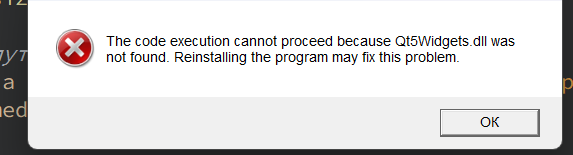
So I don't understand problems with my .libs or something else.
I downloaded VLC-Qt from https://vlc-qt.tano.si/. (Windows 64-bit (MSVC 2013))
Compiler I used for building MSVC 2019 64 bitmy .pro:
QT       += core gui

greaterThan(QT_MAJOR_VERSION, 4): QT += widgets

CONFIG += c++17
TARGET = VlcQtExample
TEMPLATE = app

SOURCES += \
    main.cpp \
    mainwindow.cpp

HEADERS += \
    mainwindow.h

FORMS += \
    mainwindow.ui

INCLUDEPATH += D:/vlc-qt/include

LIBS += -LD:/vlc-qt/lib
LIBS += -lVLCQtCore -lVLCQtWidgets -lVLCQtCored -lVLCQtWidgetsd

qnx: target.path = /tmp/$${TARGET}/bin
else: unix:!android: target.path = /opt/$${TARGET}/bin
!isEmpty(target.path): INSTALLS += target
Thanks for any help
-
You can not mix msvc2019 and 2013 iirc.
Qt Online Installer direct download: https://download.qt.io/official_releases/online_installers/
Visit the Qt Academy at https://academy.qt.io/catalog -
You can not mix msvc2019 and 2013 iirc.
@Christian-Ehrlicher, thanks
-
@artwaw I missed this 🙂
Yes, you can not mix Qt5 and Qt6Qt Online Installer direct download: https://download.qt.io/official_releases/online_installers/
Visit the Qt Academy at https://academy.qt.io/catalog -
@artwaw I missed this 🙂
Yes, you can not mix Qt5 and Qt6@Christian-Ehrlicher is it real use Vlc and Qt 6?
-
As stated on download page:
All SDKs are based on Qt 5.6.1 and VLC 2.2.4.So you can:
- revert to qt 5;
- contact
the VLCthe creator and ask about their plans to port to Qt6; - take a source code of QtVLC and try to port it yourself.
Me myself I'd rather try to use libvlcpp and try to mix it with Qt Multimedia myself. QtVLC is really dated, considering the current Qt5 version.
For more information please re-read.
Kind Regards,
Artur -
As stated on download page:
All SDKs are based on Qt 5.6.1 and VLC 2.2.4.So you can:
- revert to qt 5;
- contact
the VLCthe creator and ask about their plans to port to Qt6; - take a source code of QtVLC and try to port it yourself.
Me myself I'd rather try to use libvlcpp and try to mix it with Qt Multimedia myself. QtVLC is really dated, considering the current Qt5 version.
-
V Vitallll has marked this topic as solved on

