
How to change the style of tree item drop.
-
In My Tree View when i am dragging and dropping a item on another tree item , the below item gets a black band on the top .Also this band does not cover the below item perfectly it is at a slight offset which might be due to me changing the Tree item height and and the row offset.
How can i change the design style of the black band.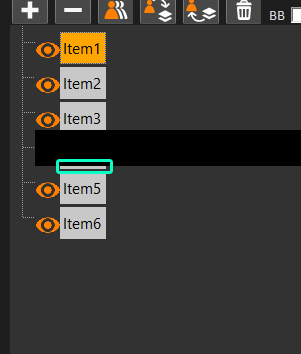
This is my code.
void PixelDelegate::paint(QPainter* painter, const QStyleOptionViewItem& option, const QModelIndex& index) const
{
    int offset = 0;
    int offsetIcon = 0;
    int offsetYAxis = 12;
    const QAbstractItemModel* model = index.model();
    const TreeModel* myModel = (TreeModel*)(model);
    TreeItem* item = myModel->getItem(index);
    Container* cont = item->GetContainer();
    QStyleOptionViewItem newOption = option;
    painter->setBrush(newOption.palette.text());
    newOption.rect.setHeight(option.rect.height() + 4);

    QColor lightGreyColor(211, 211, 211); // RGB values for light grey
    newOption.backgroundBrush = QBrush(lightGreyColor);

    painter->save();
    painter->setRenderHint(QPainter::Antialiasing, true);
    painter->setPen(Qt::NoPen);
    painter->translate(newOption.rect.x(), newOption.rect.y());
    iconPos = newOption.rect.x() / pixelIconValue;
    painter->scale(.4, .4);
    if (option.state & QStyle::State_Selected)
        painter->setBrush(newOption.palette.highlightedText());
    else
        painter->setBrush(newOption.palette.text());

    // Set the icon for EYE
    {
        QString qstrIconName;
        if (cont->GetActive())
            qstrIconName = "EYE_OPEN";
        else
            qstrIconName = "EYE_CLOSE";

        QString qstrIconPath = QCoreApplication::applicationDirPath();
        QPixmap pixmap;
        qstrIconPath = qstrIconPath + "/Icons/" + qstrIconName + ".png";
        pixmap.load(qstrIconPath);
        QImage image = pixmap.toImage();
        painter->drawImage(0, 30, image);
        offset += 20;
        offsetIcon += 50;
     //   offsetYAxis += 20;
        pixelIconValue++;
    }
    painter->scale(1.4, 1.4);
    if (cont->GetGeometry()->GetType() != "NO_TYPE")
    {
        QString qstrIconName = cont->GetGeometry()->GetType().c_str();
        QString qstrIconPath = QCoreApplication::applicationDirPath();
        QPixmap pixmap;
        qstrIconPath = qstrIconPath + "/Icons/" + qstrIconName + ".png";
        pixmap.load(qstrIconPath);
        QImage image = pixmap.toImage();
        painter->drawImage(offsetIcon, offsetYAxis, image);
        offset += 40;
        offsetIcon += 70;
     //   offsetYAxis += 10;
    }


    painter->restore();
    // Draw text
    QString text = index.data(Qt::DisplayRole).toString();
    QFontMetrics fm(option.font);
    int textWidth = fm.width(text);
    int textHeight = fm.height(); // Get the height of the text

    iconPos = option.rect.x();
    newOption.rect.setX(option.rect.x() + offset + 5);
    newOption.rect.setWidth(textWidth + 8);

 //  newOption.rect.setHeight(option.rect.height()); // Maintain the original height
    // Calculate the y-coordinate to center the text vertically
    int centerY = option.rect.y() + (option.rect.height() - textHeight) / 2;
    newOption.rect.setY(centerY);
    QStyledItemDelegate::paint(painter, newOption, index);
}

QSize PixelDelegate::sizeHint(const QStyleOptionViewItem & /* option */,
	const QModelIndex & /* index */) const
{
	return QSize(24, 35);
}