
jump to another condition from for loop in qt creator
-
my code is follows:
void first_page::Self_test() { for(int value =0; value<=120; value++) { QObject::connect(ui->power_off, SIGNAL(clicked()), this, SLOT(on_power_off_clicked())); QThread::msleep(200); ui->progressBar->setValue(value); if(value <= 20) { ui->OS_status->setText("loading..."); if(value ==20) { ui->OS_check->setStyleSheet("border-image: url(:/images/tick4.png)"); ui->OS_status->setText("successful"); } } if(value >20 && value<=40) { ui->HW_status->setText("loading..."); if (value ==40) { ui->HW_check->setStyleSheet("border-image: url(:/images/tick4.png)"); ui->HW_status->setText("successful"); } } if(value >40 && value <= 60) { ui->Mem_status->setText("loading..."); if (value ==60) { ui->Mem_check->setStyleSheet("border-image: url(:/images/tick4.png)"); ui->Mem_status->setText("successful"); } } if(value >60 && value<=80) { ui->CS_status->setText("loading..."); if (value ==80) { ui->CS_check->setStyleSheet("border-image: url(:/images/tick4.png)"); ui->CS_status->setText("successful"); } } if(value >80 && value<=100) { ui->PM_status->setText("loading..."); if (value ==100) { ui->PM_check->setStyleSheet("border-image: url(:/images/tick4.png)"); ui->PM_status->setText("successful"); } } if(value>100) { qDebug() << "wait"; } } this->hide(); second_page my_secondpage; my_secondpage.setModal(true); my_secondpage.exec(); qDebug() << "jump to second page"; } void first_page::on_power_off_clicked() { system("shutdown -P now"); qDebug() << "power_off pressed"; } ...................... my queries: I have a button when it press the system should shutdown but above code not working as I want, even I have connect the on_power_off_clicked(). Please any can help? -
my code is follows:
void first_page::Self_test() { for(int value =0; value<=120; value++) { QObject::connect(ui->power_off, SIGNAL(clicked()), this, SLOT(on_power_off_clicked())); QThread::msleep(200); ui->progressBar->setValue(value); if(value <= 20) { ui->OS_status->setText("loading..."); if(value ==20) { ui->OS_check->setStyleSheet("border-image: url(:/images/tick4.png)"); ui->OS_status->setText("successful"); } } if(value >20 && value<=40) { ui->HW_status->setText("loading..."); if (value ==40) { ui->HW_check->setStyleSheet("border-image: url(:/images/tick4.png)"); ui->HW_status->setText("successful"); } } if(value >40 && value <= 60) { ui->Mem_status->setText("loading..."); if (value ==60) { ui->Mem_check->setStyleSheet("border-image: url(:/images/tick4.png)"); ui->Mem_status->setText("successful"); } } if(value >60 && value<=80) { ui->CS_status->setText("loading..."); if (value ==80) { ui->CS_check->setStyleSheet("border-image: url(:/images/tick4.png)"); ui->CS_status->setText("successful"); } } if(value >80 && value<=100) { ui->PM_status->setText("loading..."); if (value ==100) { ui->PM_check->setStyleSheet("border-image: url(:/images/tick4.png)"); ui->PM_status->setText("successful"); } } if(value>100) { qDebug() << "wait"; } } this->hide(); second_page my_secondpage; my_secondpage.setModal(true); my_secondpage.exec(); qDebug() << "jump to second page"; } void first_page::on_power_off_clicked() { system("shutdown -P now"); qDebug() << "power_off pressed"; } ...................... my queries: I have a button when it press the system should shutdown but above code not working as I want, even I have connect the on_power_off_clicked(). Please any can help?- You connect the same signal to the same slot 121 times. This is not a good idea.
- What are you using
msleep()for? - You set same stylesheet and text on same objects somewhere around 100 times. This is not a good idea.
- Your
secondpageis a local variable, I don't know what "jump to second page" means to you. - The title of your thread is "jump to another condition from for loop in qt creator". What does "jump to another condition from for loop" mean?
- Qt Creator is an IDE. It has nothing to do with whether you can do this sort of thing. That is just a C++ question.
- You do not say whether you see
power_off pressedmessage or not. If you want help don't you think you ought to tell us whether it's hot or not? - You do not check the result from
system("shutdown -P now");so nobody knows whether it works or not. - Why 100 lines of code? Why loops? Just test whether your command works on a 10 line standalone program. Loops are irrelevant.
-
my code is follows:
void first_page::Self_test() { for(int value =0; value<=120; value++) { QObject::connect(ui->power_off, SIGNAL(clicked()), this, SLOT(on_power_off_clicked())); QThread::msleep(200); ui->progressBar->setValue(value); if(value <= 20) { ui->OS_status->setText("loading..."); if(value ==20) { ui->OS_check->setStyleSheet("border-image: url(:/images/tick4.png)"); ui->OS_status->setText("successful"); } } if(value >20 && value<=40) { ui->HW_status->setText("loading..."); if (value ==40) { ui->HW_check->setStyleSheet("border-image: url(:/images/tick4.png)"); ui->HW_status->setText("successful"); } } if(value >40 && value <= 60) { ui->Mem_status->setText("loading..."); if (value ==60) { ui->Mem_check->setStyleSheet("border-image: url(:/images/tick4.png)"); ui->Mem_status->setText("successful"); } } if(value >60 && value<=80) { ui->CS_status->setText("loading..."); if (value ==80) { ui->CS_check->setStyleSheet("border-image: url(:/images/tick4.png)"); ui->CS_status->setText("successful"); } } if(value >80 && value<=100) { ui->PM_status->setText("loading..."); if (value ==100) { ui->PM_check->setStyleSheet("border-image: url(:/images/tick4.png)"); ui->PM_status->setText("successful"); } } if(value>100) { qDebug() << "wait"; } } this->hide(); second_page my_secondpage; my_secondpage.setModal(true); my_secondpage.exec(); qDebug() << "jump to second page"; } void first_page::on_power_off_clicked() { system("shutdown -P now"); qDebug() << "power_off pressed"; } ...................... my queries: I have a button when it press the system should shutdown but above code not working as I want, even I have connect the on_power_off_clicked(). Please any can help? -
- You connect the same signal to the same slot 121 times. This is not a good idea.
- What are you using
msleep()for? - You set same stylesheet and text on same objects somewhere around 100 times. This is not a good idea.
- Your
secondpageis a local variable, I don't know what "jump to second page" means to you. - The title of your thread is "jump to another condition from for loop in qt creator". What does "jump to another condition from for loop" mean?
- Qt Creator is an IDE. It has nothing to do with whether you can do this sort of thing. That is just a C++ question.
- You do not say whether you see
power_off pressedmessage or not. If you want help don't you think you ought to tell us whether it's hot or not? - You do not check the result from
system("shutdown -P now");so nobody knows whether it works or not. - Why 100 lines of code? Why loops? Just test whether your command works on a 10 line standalone program. Loops are irrelevant.
@JonB
First of all thank you for your comment.
Basically I want to design a spectrum analyzer UI on QT creator.
This is initial version of project.
I want to check the status of different modules before launch actual spectrum window. For that purpose I tried to write code let me explain what I want to do actually in this window.
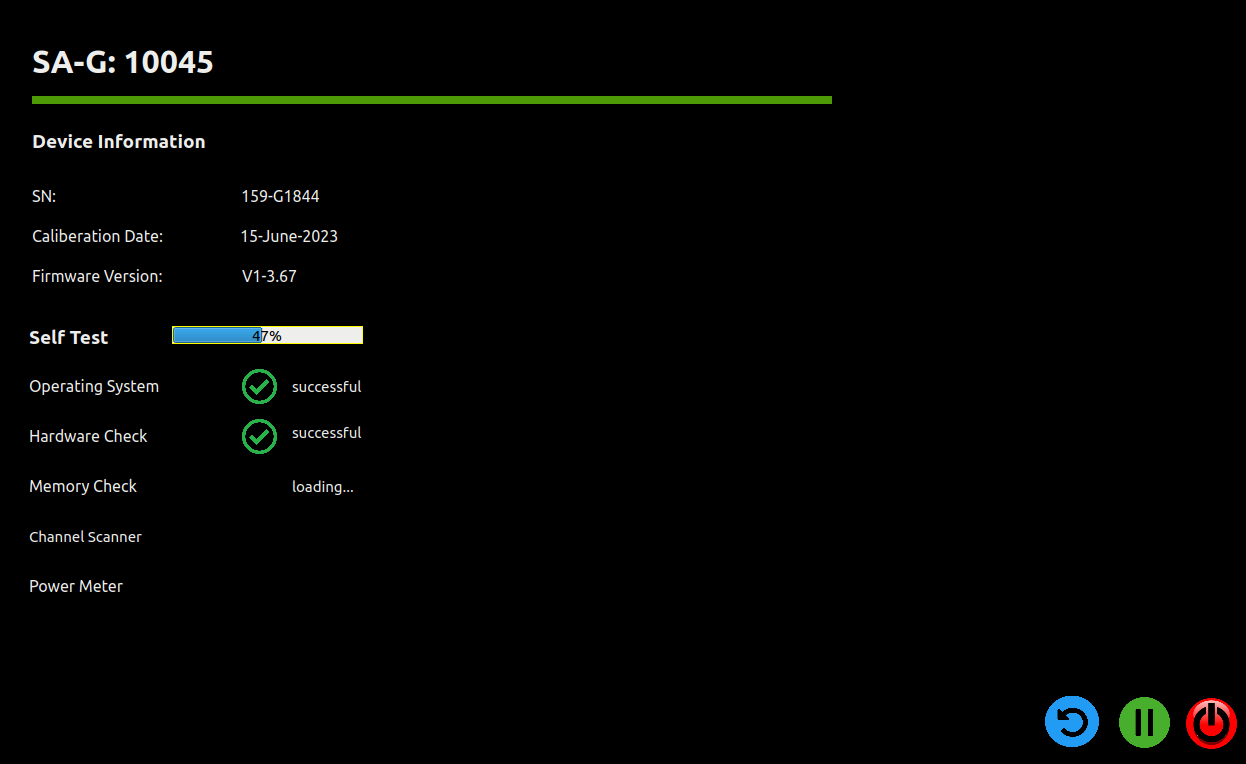
As shown in picture there are three option for user "restart", "Stop" and "Shutdown"
I want to jump to another respective condition when one of the three button is pressed.#include "first_page.h" #include "ui_first_page.h" #include "QDebug" first_page::first_page(QWidget *parent) : QDialog(parent), ui(new Ui::first_page) { ui->setupUi(this); timer1 = new QTimer(this); connect(timer1, SIGNAL(timeout()), this,SLOT(my_delay1())); setWindowFlags(Qt::Dialog | Qt::FramelessWindowHint | Qt::WindowTitleHint); timer1->start(1000); } first_page::~first_page() { delete ui; } void first_page::Self_test() { for(int value =0; value<=120; value++) { QObject::connect(ui->power_off, SIGNAL(clicked()), this, SLOT(on_power_off_clicked())); QThread::msleep(200); ui->progressBar->setValue(value); if(value <= 20) { ui->OS_status->setText("loading..."); if(value ==20) { ui->OS_check->setStyleSheet("border-image: url(:/images/tick4.png)"); ui->OS_status->setText("successful"); } } if(value >20 && value<=40) { ui->HW_status->setText("loading..."); if (value ==40) { ui->HW_check->setStyleSheet("border-image: url(:/images/tick4.png)"); ui->HW_status->setText("successful"); } } if(value >40 && value <= 60) { ui->Mem_status->setText("loading..."); if (value ==60) { ui->Mem_check->setStyleSheet("border-image: url(:/images/tick4.png)"); ui->Mem_status->setText("successful"); } } if(value >60 && value<=80) { ui->CS_status->setText("loading..."); if (value ==80) { ui->CS_check->setStyleSheet("border-image: url(:/images/tick4.png)"); ui->CS_status->setText("successful"); } } if(value >80 && value<=100) { ui->PM_status->setText("loading..."); if (value ==100) { ui->PM_check->setStyleSheet("border-image: url(:/images/tick4.png)"); ui->PM_status->setText("successful"); } } if(value>100) { qDebug() << "wait"; } } this->hide(); second_page my_secondpage; my_secondpage.setModal(true); my_secondpage.exec(); qDebug() << "jump to second page"; } void first_page::my_delay1() { Self_test(); qDebug() << "selfTest started"; } void first_page::on_restart_clicked() { qDebug() << "restart pressed"; } void first_page::on_pause_pross_clicked() { qDebug() << "Pause pressed"; } void first_page::on_power_off_clicked() { // // system("shutdown -P now"); qDebug() << "power_off pressed"; }I have pasted all the code related to this window. This is my first window that will popup after the startup window.
Please help me how I can do this?
If one of button from "restart", "Pause" and "shutdown " pressed then how I can jump to respective condition.
for example if "Pause" is pressed then it must stop the progressbarr and selftesting until "Resume" it. -
- You connect the same signal to the same slot 121 times. This is not a good idea.
- What are you using
msleep()for? - You set same stylesheet and text on same objects somewhere around 100 times. This is not a good idea.
- Your
secondpageis a local variable, I don't know what "jump to second page" means to you. - The title of your thread is "jump to another condition from for loop in qt creator". What does "jump to another condition from for loop" mean?
- Qt Creator is an IDE. It has nothing to do with whether you can do this sort of thing. That is just a C++ question.
- You do not say whether you see
power_off pressedmessage or not. If you want help don't you think you ought to tell us whether it's hot or not? - You do not check the result from
system("shutdown -P now");so nobody knows whether it works or not. - Why 100 lines of code? Why loops? Just test whether your command works on a 10 line standalone program. Loops are irrelevant.
-
- You connect the same signal to the same slot 121 times. This is not a good idea.
- What are you using
msleep()for? - You set same stylesheet and text on same objects somewhere around 100 times. This is not a good idea.
- Your
secondpageis a local variable, I don't know what "jump to second page" means to you. - The title of your thread is "jump to another condition from for loop in qt creator". What does "jump to another condition from for loop" mean?
- Qt Creator is an IDE. It has nothing to do with whether you can do this sort of thing. That is just a C++ question.
- You do not say whether you see
power_off pressedmessage or not. If you want help don't you think you ought to tell us whether it's hot or not? - You do not check the result from
system("shutdown -P now");so nobody knows whether it works or not. - Why 100 lines of code? Why loops? Just test whether your command works on a 10 line standalone program. Loops are irrelevant.
@JonB said in jump to another condition from for loop in qt creator:
What are you using msleep() for?
This msleep() is just used to slow down the progressbar process, without this msleep() the progress bar complete 100% within very short time and user cannot observe that.
-
@JonB said in jump to another condition from for loop in qt creator:
What are you using msleep() for?
This msleep() is just used to slow down the progressbar process, without this msleep() the progress bar complete 100% within very short time and user cannot observe that.


