Problem related to QPdfWriter (almost apparently)
-
Some years ago I arranged a Qt app for Windows Desktop, able to connect via USB an analyzer to a PC. Inside the analyzer a FDTI USB-TO-RS232 converter converts signals for the use of serial communication.
The program works as follows: a txt file is selected that contains a list of measurements that must be performed on the unit under test. This part is OK.
After every measurement, the value is saved on a text file related to the serial number of the unit under test; at the end I obtain a complete report of the unit. All the fields are separated by a tab, so I can read a kind of table with ten fields (ten columns) and a number of lines according to the type of unit.
A step further is to send to a PDF file all the values, in such a way the end report is a PDF file containing the above mentioned table.
To do this I used QPdfWriter and QPainter, obtaining directly the desired report and avoiding to take the txt file with all results, open it, copy all data in a word template e print it in PDF mode: this last procedure too slow and poor performing for a production line.
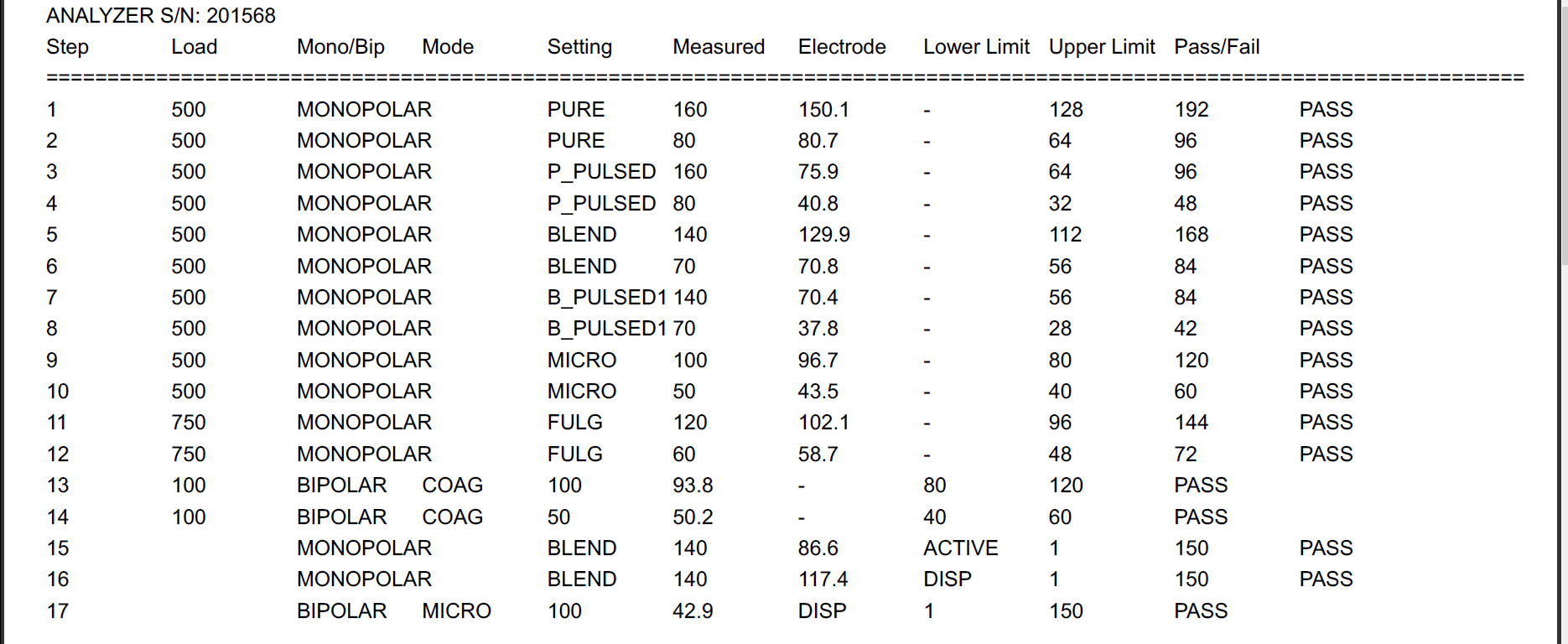
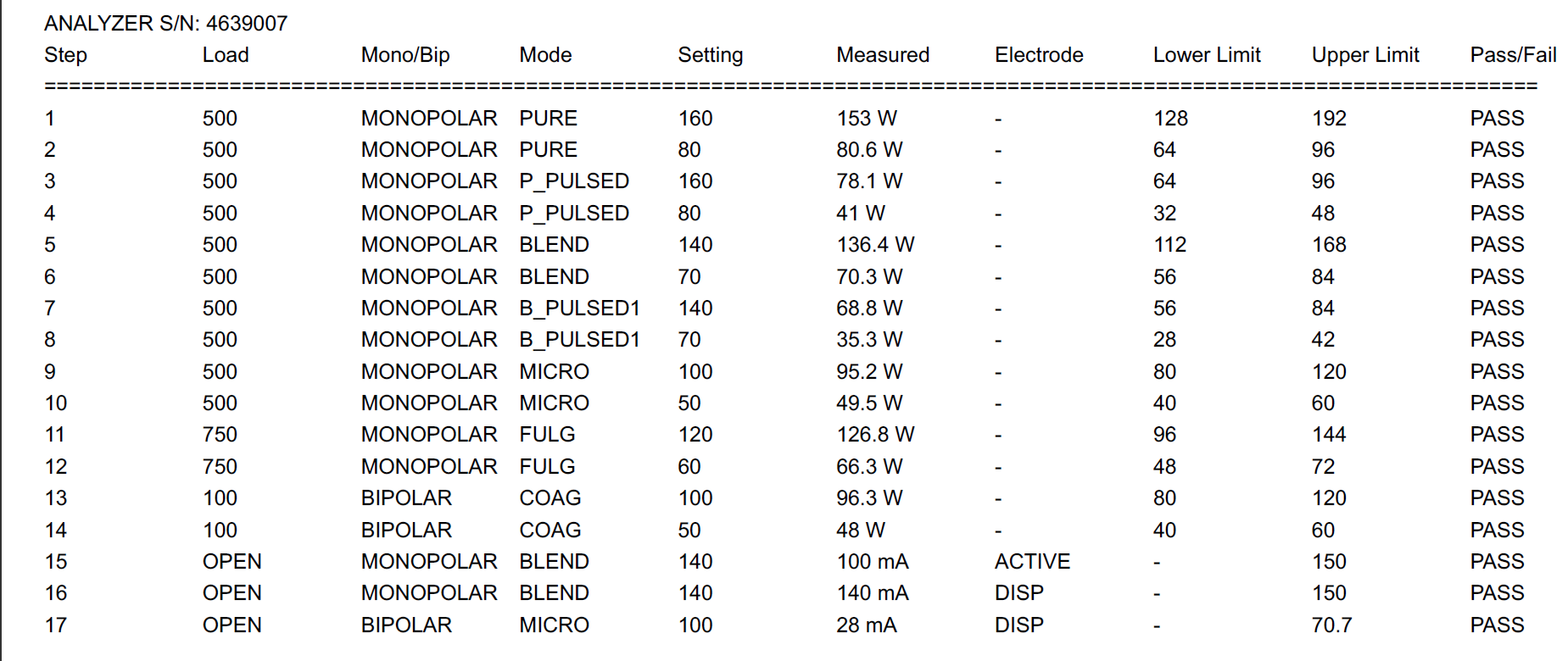
This app is used in Testing Dept where I work: in this Testing Dept recently laptops have been replaced with some brand new. I copied my app to test the unit in the new laptops, where O.S. is the same, and all software related to my app still remain the same, but I found a different printed PDF, with tab dimension from fields completely different and bad aligned.The following is the part that provide to obtain the PDF printed report:
QPdfWriter writer(ReportToBePrinted);
QPainter painter(&writer);
QFont TitleFont("Arial", 20, QFont::Bold); // font setting for header and reports
QFont SubTitleFont("Arial", 16, QFont::Bold);
QFont TextFont("Arial",8,QFont::Normal);
writer.setPageSize(QPagedPaintDevice::A4); // set page
/*** 14/06/16 SELECTION OF MODEL LOGO /
painter.drawPixmap(QRect(100,100,LogoWSel.toInt(),LogoHSel.toInt()),QPixmap(CARTELLA_LOGHI+LogoSel));
painter.setFont(TitleFont);
painter.drawText(4000,1400,ReportIntSel);; // writes text in header section: Title
painter.setFont(SubTitleFont);
painter.drawText(3000,1800,"HF OUTPUT POWER & LEAKAGE CURRENTS"); // writes text in header section: SubTitle
/*****************************************************/
painter.setFont(TextFont);
QFile Report(CARTELLA_REPORT+ComboTestPrint+"_"+ SnTestprint +".report"); // creates a QFile "Report" variable, corresponding to the txt file that contains the performed measurements
QString line;
quint8 count = 0;
quint16 LineInc = 1500; // vertical spacing from header linesReport.open(QIODevice::ReadOnly); QTextStream in (&Report); while (!in.atEnd()) { line = in.readLine(); painter.drawText(100,LineInc,line); LineInc+=200; // vertical space from lines of measurements count++; } painter.end();Enclosed pictures show a Good report with the right format, all fields tabulated in a good way, right distances from different columns; a Bad Report, with fields not perfectly tabulated and a different distance from columns (compare the steps 13 and 14 from the two reports).
My executable is the same; the only changement was in the Laptops. It seems PDf printing phase to be "hardware dependent".
Any possible solution will be very appreciated.
Paolo