
Creator 10.0.0 giving seemingly false warning
-
Hi all -
I've noticed Creator gives me a warning "Failed to load project. Issues and "Project > Build" setting show more information about the failure."
There's nothing in the Issues pane, and I see no errors in my Build window. Is this a false alarm?
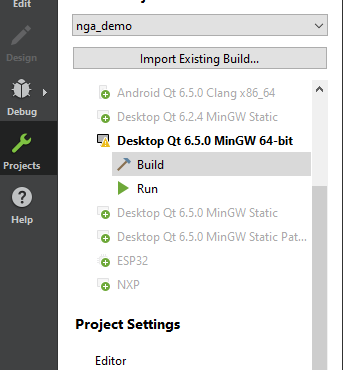
EDIT:
I can make this warning go away when I change this line in my CMakeLists.txt file from:
project(nga_demo VERSION ${NGA_VERSION_MAJOR}.${NGA_VERSION_MINOR} LANGUAGES CXX)to:
project(nga_demo VERSION ${NGA_VERSION_MAJOR}.${NGA_VERSION_MINOR} LANGUAGES C CXX)but I don't really understand this, either.
Thanks...
-
Hi all -
I've noticed Creator gives me a warning "Failed to load project. Issues and "Project > Build" setting show more information about the failure."
There's nothing in the Issues pane, and I see no errors in my Build window. Is this a false alarm?
EDIT:
I can make this warning go away when I change this line in my CMakeLists.txt file from:
project(nga_demo VERSION ${NGA_VERSION_MAJOR}.${NGA_VERSION_MINOR} LANGUAGES CXX)to:
project(nga_demo VERSION ${NGA_VERSION_MAJOR}.${NGA_VERSION_MINOR} LANGUAGES C CXX)but I don't really understand this, either.
Thanks...
Hovering the kit should display a text description of the warning.
Note that CMake has
CandCXXas default langguages, you don't need to explicit mentionLANGUAGES C CXX.The Qt wizard is only enabling the
CXXlanguage, which skips theClanguage compiler detection. -
Hovering the kit should display a text description of the warning.
Note that CMake has
CandCXXas default langguages, you don't need to explicit mentionLANGUAGES C CXX.The Qt wizard is only enabling the
CXXlanguage, which skips theClanguage compiler detection.@cristian-adam thanks. FYI: there's a bug in 6.5.0 that (won't affect most people) which causes the multimedia module not to be included in a static Qt build. The workaround is to include the languages as I showed above.
EDIT:
Updated to 10.0.1; doesn't seem to be happening anymore.
-
 M mzimmers has marked this topic as solved on
