
Qt 6.11 is out! See what's new in the release
blog
QListWidget IconMode ,set selected style
-
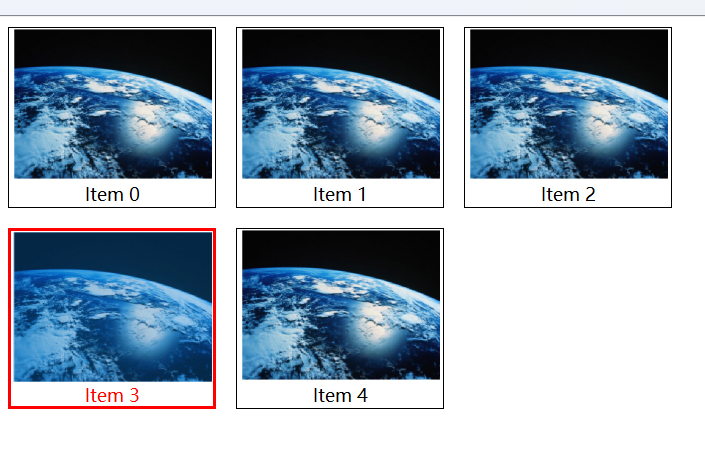
This is the screenshot when selecting Item3.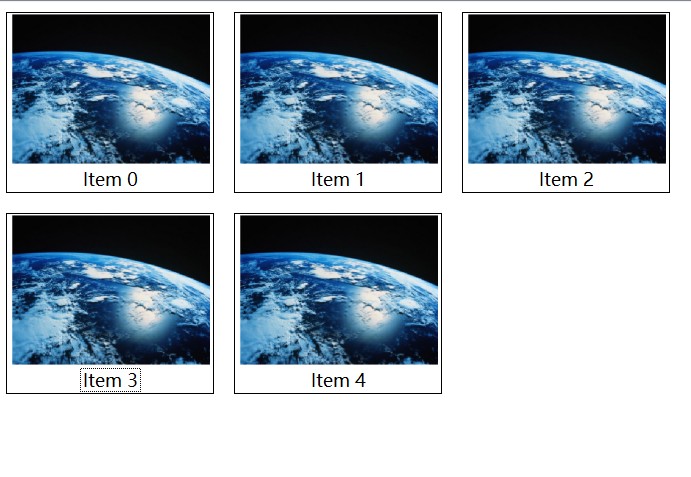
This is the screenshot after selecting Item 3 and clicking the blank part of the QListWidget window.The text part of Item3 now has dotted border.My question is how to change the item style in the second screenshot to make it consistent with the item style in the first screenshot .
#mystyle.qss QListWidget::item:selected { background-color: transparent; color: red; border: 3px solid red; } QListWidget::item { margin:10px; border: 1px solid black; } -
This is the screenshot when selecting Item3.
This is the screenshot after selecting Item 3 and clicking the blank part of the QListWidget window.The text part of Item3 now has dotted border.My question is how to change the item style in the second screenshot to make it consistent with the item style in the first screenshot .
#mystyle.qss
QListWidget::item:selected {
    background-color: transparent;
    color: red;
    border: 3px solid red;
}

QListWidget::item {
    margin:10px;
    border: 1px solid black;
}
