
Skip to content
  • Categories
  • Recent
  • Tags
  • Popular
  • Users
  • Groups
  • Search
  • Get Qt Extensions
  • Unsolved
Collapse
Brand Logo
  1. Home
  2. Qt Development
  3. Qt Creator and other tools
  4. Navigating windows
Qt 6.11 is out! See what's new in the release blog

Navigating windows

Scheduled Pinned Locked Moved Unsolved Qt Creator and other tools
4 Posts 3 Posters 417 Views 2 Watching
  • Oldest to Newest
  • Newest to Oldest
  • Most Votes
Reply
  • Reply as topic
Log in to reply
This topic has been deleted. Only users with topic management privileges can see it.
  • A Offline
    A Offline
    Anonymous_Banned275
    wrote on last edited by
    #1

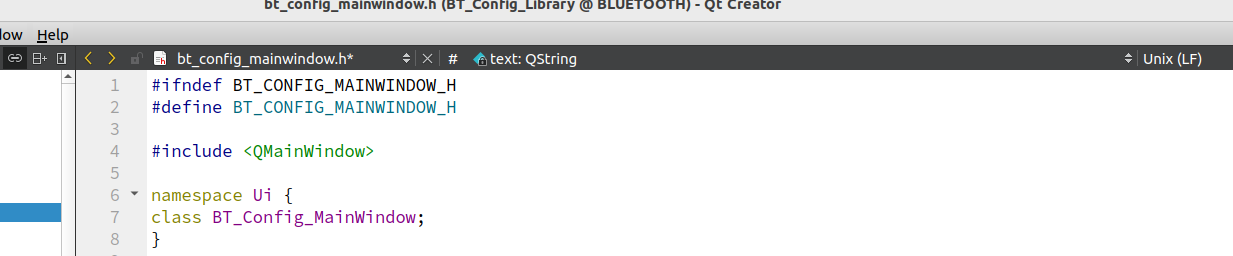
    I can "select" window ( up / down arrows" , I can switch between cpp and header window - is there a way to simply "go back " to former / previous window?
    1b9982ca-e925-4f8e-86b5-3fdca7fc3cc5-image.png

    Christian EhrlicherC 1 Reply Last reply
    0
    • Christian EhrlicherC Christian Ehrlicher moved this topic from General and Desktop on
    • A Anonymous_Banned275

      I can "select" window ( up / down arrows" , I can switch between cpp and header window - is there a way to simply "go back " to former / previous window?

      1b9982ca-e925-4f8e-86b5-3fdca7fc3cc5-image.png

      Christian EhrlicherC Offline
      Christian EhrlicherC Offline
      Christian Ehrlicher
      Lifetime Qt Champion
      wrote on last edited by
      #2

      The hotkey is Alt+Tab

      Qt Online Installer direct download: https://download.qt.io/official_releases/online_installers/
      Visit the Qt Academy at https://academy.qt.io/catalog

      A 1 Reply Last reply
      0
      • Christian EhrlicherC Christian Ehrlicher

        The hotkey is Alt+Tab

        A Offline
        A Offline
        Anonymous_Banned275
        wrote on last edited by
        #3

        @Christian-Ehrlicher Thanks, but that is OS "window switching". I am looking for switching in QT. QT keeps a list of used windows , so there should be a way to navigate such list .

        Chris KawaC 1 Reply Last reply
        0
        • A Anonymous_Banned275

          @Christian-Ehrlicher Thanks, but that is OS "window switching". I am looking for switching in QT. QT keeps a list of used windows , so there should be a way to navigate such list .

          Chris KawaC Online
          Chris KawaC Online
          Chris Kawa
          Lifetime Qt Champion
          wrote on last edited by
          #4

          @AnneRanch It's the yellow arrows on the toolbar in your picture. I don't know linux shortcut but on Windows it's Alt+left arrow. If you hover over it the shortcut is in the tooltip.

          If you have a media keyboard or mouse it's also assigned to the "back" button if they have one e.g. I have a mouse with a back/forward button that can be used in a browser and works in Qt Creator too.

          1 Reply Last reply
          1

          • Login

          • Login or register to search.
          • First post
            Last post
          0
          • Categories
          • Recent
          • Tags
          • Popular
          • Users
          • Groups
          • Search
          • Get Qt Extensions
          • Unsolved