
Skip to content
  • Categories
  • Recent
  • Tags
  • Popular
  • Users
  • Groups
  • Search
  • Get Qt Extensions
  • Unsolved
Collapse
Brand Logo
  1. Home
  2. Qt Development
  3. General and Desktop
  4. QWizard stylesheet
Forum Updated to NodeBB v4.3 + New Features

QWizard stylesheet

Scheduled Pinned Locked Moved Unsolved General and Desktop
1 Posts 1 Posters 250 Views
  • Oldest to Newest
  • Newest to Oldest
  • Most Votes
Reply
  • Reply as topic
Log in to reply
This topic has been deleted. Only users with topic management privileges can see it.
  • ivanicyI Offline
    ivanicyI Offline
    ivanicy
    wrote on last edited by ivanicy
    #1

    Hello!

    I am developing a QWizard but I have problems with the stylesheet.

    I have this right now:
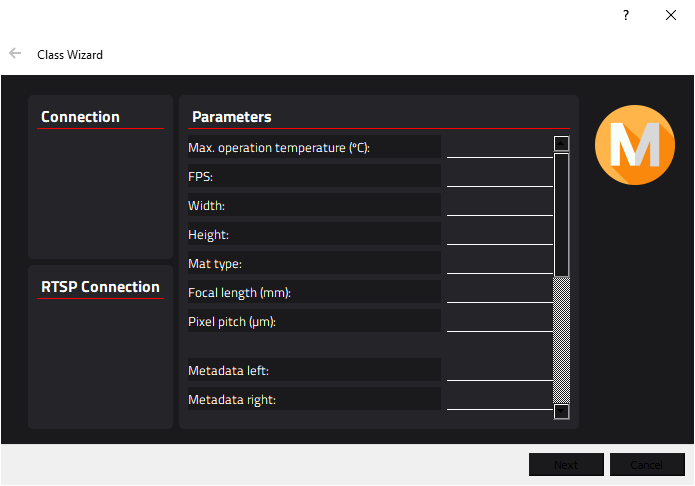
    4b5cb25b-46a6-4403-9ada-abba18ae8c41-image.png

    I have a QWizardPage that it is a QWidget, and it has a correct background color but the window is still white and I don't know how to change it.

    Here is my launching code:

    void MainWindow::on_actionOpen_wizard_triggered()
    {
        WizardExample *wizard = new WizardExample();
        wizard->setAttribute(Qt::WA_DeleteOnClose);
        wizard->setStyleSheet("QWizard QWidget {background: #1A1A1D;}");
        wizard->show();
    }
    

    This "QWizard QWidget" is because if I don't put "QWidget" there, the result is:
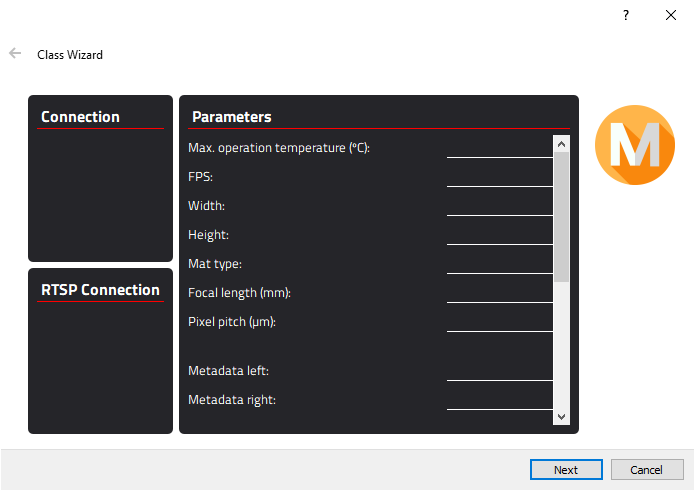
    08e9b8bc-303a-45fa-b4d1-367f5eb19639-image.png

    I need to give stylesheet to all widgets in the wizard.

    How can I fix it?? Which is the correct stylesheet for it?

    Thank you very much!

    1 Reply Last reply
    0

    • Login

    • Login or register to search.
    • First post
      Last post
    0
    • Categories
    • Recent
    • Tags
    • Popular
    • Users
    • Groups
    • Search
    • Get Qt Extensions
    • Unsolved