
Skip to content
  • Categories
  • Recent
  • Tags
  • Popular
  • Users
  • Groups
  • Search
  • Get Qt Extensions
  • Unsolved
Collapse
Brand Logo
  1. Home
  2. Qt Development
  3. Qt Creator and other tools
  4. File Changed error
Qt 6.11 is out! See what's new in the release blog

File Changed error

Scheduled Pinned Locked Moved Unsolved Qt Creator and other tools
3 Posts 2 Posters 482 Views 1 Watching
  • Oldest to Newest
  • Newest to Oldest
  • Most Votes
Reply
  • Reply as topic
Log in to reply
This topic has been deleted. Only users with topic management privileges can see it.
  • A Offline
    A Offline
    Anonymous_Banned275
    wrote on last edited by
    #1

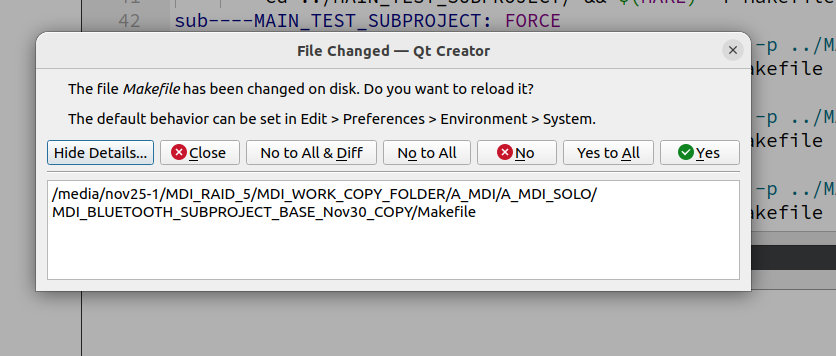
    A new , clean, subproject giving consistently this error.

    Is the path too long ?
    9fc7c564-8f1b-4322-901a-3d6e7daae21e-image.png

    1 Reply Last reply
    0
    • Christian EhrlicherC Online
      Christian EhrlicherC Online
      Christian Ehrlicher
      Lifetime Qt Champion
      wrote on last edited by
      #2

      Simply close the Makefile (as you don't need to either edit or view it) would be a first step.

      Qt Online Installer direct download: https://download.qt.io/official_releases/online_installers/
      Visit the Qt Academy at https://academy.qt.io/catalog

      A 1 Reply Last reply
      1
      • Christian EhrlicherC Christian Ehrlicher

        Simply close the Makefile (as you don't need to either edit or view it) would be a first step.

        A Offline
        A Offline
        Anonymous_Banned275
        wrote on last edited by
        #3

        @Christian-Ehrlicher That does not help, the project won't build. I "fixed it" renaming the project and building another one.

        1 Reply Last reply
        0

        • Login

        • Login or register to search.
        • First post
          Last post
        0
        • Categories
        • Recent
        • Tags
        • Popular
        • Users
        • Groups
        • Search
        • Get Qt Extensions
        • Unsolved