
Slot function executes on ui->show function
-
qt version: 5.12.8
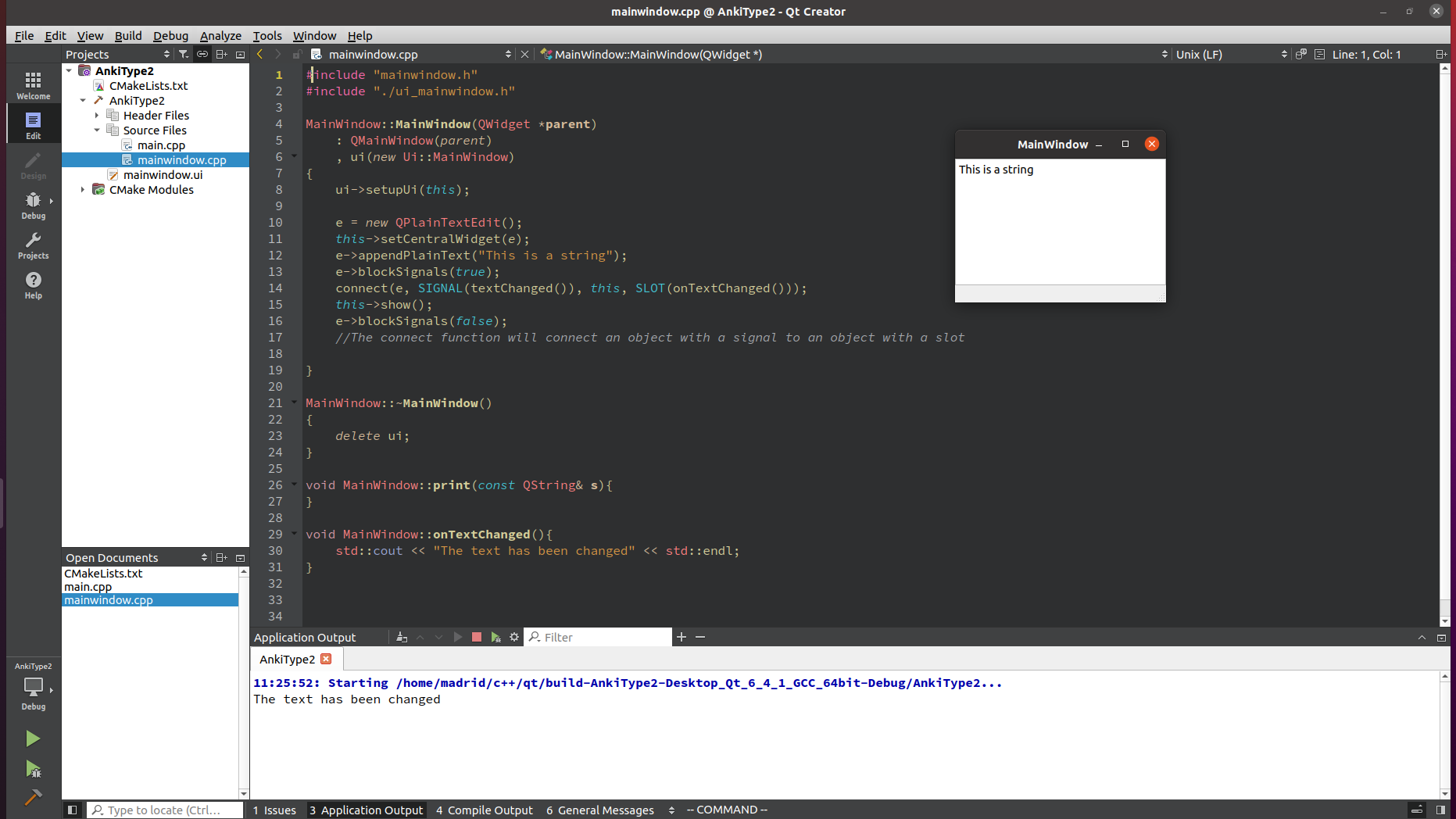
system: Ubuntu 20.04 focalThe slot function prints "This is a string" to the console and that is how I know the slot function executes. I have attached a screenshot showing that on my machine.
May I ask what your version of qt and platform is?
Also, I only provided the version and system information. What other details could be provided regarding my configuration?Thank you for the note on the call to QMainWindow::show(), I will make sure to call it in main().
Screenshot:
-
@mpergand I just tried that, it didn't work. I also tried moving e->blockSignals(true); before setting e as the centralwidget. As such:
e->blockSignals(true);
this->setCentralWiget(e);
I also have new unknown behavior. When I click into and out of the application window the slot function is not executed, however, when I Alt-Tab into the window the slot function is executed once and the console prints out that the text has been changed. When I Alt-Tab out of the window the slot function is executed four time and the console indicates as such. This occurs whether the blockSignals() function is placed before or after the appendPlainText() and setCentralWidget().
Is this behavior specific only to my configuration?
-
Use a debugger and set a breakpoint to your slot. The slot can not be executed by the signal you connect since it's done after the appendPlainText() call and this function does not delay anything.
For me this also works fine on Linux
class MainWindow : public QMainWindow { public: MainWindow(QWidget *parent = nullptr) : QMainWindow(parent) { auto e = new QPlainTextEdit(); setCentralWidget(e); e->appendPlainText("This is a string"); connect(e, &QPlainTextEdit::textChanged, this, &MainWindow::onTextChanged); show(); } void onTextChanged() { std::cout << "The text has been changed" << std::endl; } }; int main(int argc, char *argv[]) { QApplication a(argc, argv); MainWindow w; return a.exec(); } -
qt version: 5.12.8
system: Ubuntu 20.04 focalThe slot function prints "This is a string" to the console and that is how I know the slot function executes. I have attached a screenshot showing that on my machine.
May I ask what your version of qt and platform is?
Also, I only provided the version and system information. What other details could be provided regarding my configuration?Thank you for the note on the call to QMainWindow::show(), I will make sure to call it in main().
Screenshot:
-
@mpergand I just tried that, it didn't work. I also tried moving e->blockSignals(true); before setting e as the centralwidget. As such:
e->blockSignals(true);
this->setCentralWiget(e);
I also have new unknown behavior. When I click into and out of the application window the slot function is not executed, however, when I Alt-Tab into the window the slot function is executed once and the console prints out that the text has been changed. When I Alt-Tab out of the window the slot function is executed four time and the console indicates as such. This occurs whether the blockSignals() function is placed before or after the appendPlainText() and setCentralWidget().
Is this behavior specific only to my configuration?
@qutie123 said in Slot function executes on ui->show function:
when I Alt-Tab into the window the slot function is executed once and the console prints out that the text has been changed. When I Alt-Tab out of the window the slot function is executed four time
This should not be happening at all. To diagnose you need to do as @Christian-Ehrlicher has said by running under debugger and placing a breakpoint on your slot to find out where it seems to be being called from.
One thought: because you use Designer you will be using auto-connect to slots by name. I wonder whether something from there is somehow connected to your
onTextChanged()slot, by accident?? -
@JonB Could you point me to documentation regarding the auto-connect to slots by name feature. How would I check what connections currently exist?
@Christian-Ehrlicher I tried running the code provided and the slot function was executed. I am moving forward with the debugging.
-
@JonB Could you point me to documentation regarding the auto-connect to slots by name feature. How would I check what connections currently exist?
@Christian-Ehrlicher I tried running the code provided and the slot function was executed. I am moving forward with the debugging.
@qutie123 said in Slot function executes on ui->show function:
How would I check what connections currently exist?
https://doc.qt.io/qt-6/designer-using-a-ui-file.html#automatic-connections
But your slot does not match the criteria
-
qt version: 5.12.8
system: Ubuntu 20.04 focalThe slot function prints "This is a string" to the console and that is how I know the slot function executes. I have attached a screenshot showing that on my machine.
May I ask what your version of qt and platform is?
Also, I only provided the version and system information. What other details could be provided regarding my configuration?Thank you for the note on the call to QMainWindow::show(), I will make sure to call it in main().
Screenshot:
-
@JonB @Christian-Ehrlicher
I was able to fix the problem by by using qmake and building from the terminal. The .pro file is below.QT += core gui QT += widgets greaterThan(QT_MAJOR_VERSION, X): QT += widgets TEMPLATE = app TARGET = Examples00 INCLUDEPATH += . # Input SOURCES += main.cpp/ mainwindow.cpp HEADERS += mainwindow.h FORMS += mainwindow.uiThe slot function is executed once when running the program executable the first time so I am back to my initial problem. As I am new to debugging, could someone explain to me what I should look for (As reasons why the slot function is executed once on the initial run of the program).
To clarify further. I ran the program in debug mode and the before changing any text in the application or alt-tabbing in or out, the slot function was executed once. I know this because on the initial run in debug mode I was able to continue the GDB debugger one step forward in the program execution, that step being the onTextChanged() function being called and the console printing out the statement "The text has been changed: 1 many times".
I will do more analysis on why building the program with qmake and executing from the terminal fixed the alt-tab problem, perhaps by using qmake inside qt creator and seeing the results.
Any advice regarding the debugging would be helpful, thank you!
-
@JonB @Christian-Ehrlicher
I was able to fix the problem by by using qmake and building from the terminal. The .pro file is below.QT += core gui QT += widgets greaterThan(QT_MAJOR_VERSION, X): QT += widgets TEMPLATE = app TARGET = Examples00 INCLUDEPATH += . # Input SOURCES += main.cpp/ mainwindow.cpp HEADERS += mainwindow.h FORMS += mainwindow.uiThe slot function is executed once when running the program executable the first time so I am back to my initial problem. As I am new to debugging, could someone explain to me what I should look for (As reasons why the slot function is executed once on the initial run of the program).
To clarify further. I ran the program in debug mode and the before changing any text in the application or alt-tabbing in or out, the slot function was executed once. I know this because on the initial run in debug mode I was able to continue the GDB debugger one step forward in the program execution, that step being the onTextChanged() function being called and the console printing out the statement "The text has been changed: 1 many times".
I will do more analysis on why building the program with qmake and executing from the terminal fixed the alt-tab problem, perhaps by using qmake inside qt creator and seeing the results.
Any advice regarding the debugging would be helpful, thank you!
@qutie123 said in Slot function executes on ui->show function:
on the initial run in debug mode I was able to continue the GDB debugger one step forward in the program execution, that step being the onTextChanged() function being called and the console printing out the statement "The text has been changed: 1 many times".
Then look at the backtrace from where this function was called.

