
Skip to content
  • Categories
  • Recent
  • Tags
  • Popular
  • Users
  • Groups
  • Search
  • Get Qt Extensions
  • Unsolved
Collapse
Brand Logo
  1. Home
  2. Qt Development
  3. General and Desktop
  4. QGraphicstextItem is not visible
Forum Updated to NodeBB v4.3 + New Features

QGraphicstextItem is not visible

Scheduled Pinned Locked Moved Unsolved General and Desktop
4 Posts 2 Posters 437 Views
  • Oldest to Newest
  • Newest to Oldest
  • Most Votes
Reply
  • Reply as topic
Log in to reply
This topic has been deleted. Only users with topic management privileges can see it.
  • T Offline
    T Offline
    tushu
    wrote on last edited by tushu
    #1

    I have many QGraphicsItem inside my QGraphicsScene. Each QGraphicsItem has some text inside it.
    QGraphicsItem's are coloured with some color. ( here color is yellow )
    But the issue is, when I apply color to QGraphicsItem, text inside it gets hidden.
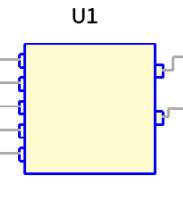
    Q1.PNG

    In above rectangle, there is a text inside it but I have applied a pale yellow color to rectangle and because of that, text inside it is getting hidden.

    class myRect: public QGraphicsRectItem
    
    QRectF Rect( some co-ordinates)
    myRect* rect = new myRect(Rect);
    rect->setBrush(QBrush(QColor("#FFFACA")));
    
    class myText : public QGraphicsTextItem 
    
    
    myText* text = new myText(some text);
    text->DrawText( some co-ordinates);
    

    How to make the inside text visible ?

    1 Reply Last reply
    0
    • cfdevC Offline
      cfdevC Offline
      cfdev
      wrote on last edited by
      #2

      @tushu said in QGraphicstextItem is not visible:

      In above rectangle, there is a text inside it but I have applied a pale yellow color to rectangle and because of that, text inside it is getting hidden.

      Maybe the Z position of QGraphicstextItem ?

      T 1 Reply Last reply
      4
      • cfdevC cfdev

        @tushu said in QGraphicstextItem is not visible:

        In above rectangle, there is a text inside it but I have applied a pale yellow color to rectangle and because of that, text inside it is getting hidden.

        Maybe the Z position of QGraphicstextItem ?

        T Offline
        T Offline
        tushu
        wrote on last edited by
        #3

        @cfdev Thank you for your reply.

        Your suggestion is working. :)

        1 Reply Last reply
        0
        • cfdevC Offline
          cfdevC Offline
          cfdev
          wrote on last edited by
          #4

          Nice! don't forget to mark resolve your post ;)

          1 Reply Last reply
          0

          • Login

          • Login or register to search.
          • First post
            Last post
          0
          • Categories
          • Recent
          • Tags
          • Popular
          • Users
          • Groups
          • Search
          • Get Qt Extensions
          • Unsolved