
hide cell from tablewidget
-
hello,
I wanna hide specific cells from qtablewidget. But its not working
that code :tablewidget->cellWidget(rowindex,colindex)->hide(); // it crashesis there any other way i can do this?
@Nevez said in hide cell from tablewidget:
// it crashes
Q_ASSERT(tablewidget->item(rowindex,colindex));
Q_ASSERT(tablewidget->cellWidget(rowindex,colindex));
I imagine this will fail. I suspect you have not put a widget into
tablewidget->item(rowindex,colindex)--- either it has nothing in it, or it does not have aQWidget. -
@JonB said in hide cell from tablewidget:
Q_ASSERT(tablewidget->item(rowindex,colindex));
Q_ASSERT(tablewidget->cellWidget(rowindex,colindex));Q_ASSERT(tablewidget->cellWidget(rowindex,colindex));it gives error here.
so how can i hide custom indexed cells in tablewidget without adding widgets ?
-
@JonB said in hide cell from tablewidget:
Q_ASSERT(tablewidget->item(rowindex,colindex));
Q_ASSERT(tablewidget->cellWidget(rowindex,colindex));Q_ASSERT(tablewidget->cellWidget(rowindex,colindex));it gives error here.
so how can i hide custom indexed cells in tablewidget without adding widgets ?
@Nevez
What is a "custom indexed" cell?So since you have not done any
tablewidget->setCellWidget(rowindex,colindex,widget)there is no widget in the cell andcellWidget(rowindex,colindex)will never be right.So what do you have in the cell, and what exactly do you mean by "hide"? It has a
QTableWidgetItemjust showing some text. You might blank out the text. There is no direct call to "hide" aQTableWidgetItem. According to https://forum.qt.io/topic/90416/how-to-hide-cellwidget-of-qtablewidget/6 you would have to overrideQTableWidget::paintEvent()and do your "hiding" there during the painting. Or there is an approach with aQStyledItemDeletegatein https://stackoverflow.com/questions/59645024/how-to-manage-visibility-of-data-in-pyqt5-qtablewidgetitem. -
thanks for the answer. For now, I continued by deleting the text in the item.
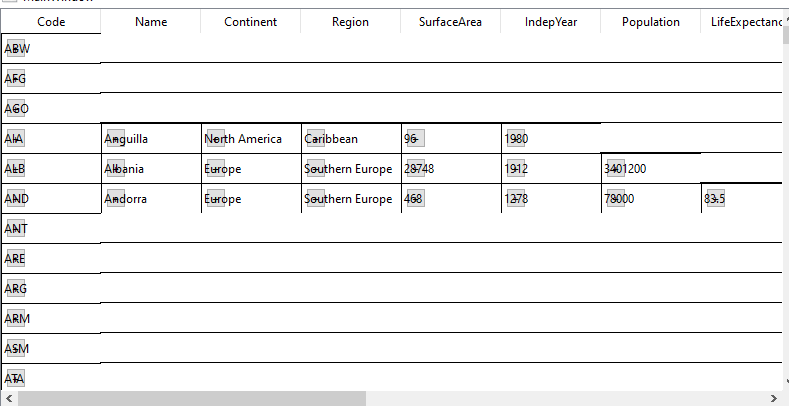
because if I try to add widgets the process will become very heavy and take long time.I also added a button to the cells with the paint function using qstyleditemdelegate. But this overlapped with the text.
How can I solve this?
-
thanks for the answer. For now, I continued by deleting the text in the item.
because if I try to add widgets the process will become very heavy and take long time.I also added a button to the cells with the paint function using qstyleditemdelegate. But this overlapped with the text.
How can I solve this?
@Nevez said in hide cell from tablewidget:
because if I try to add widgets the process will become very heavy and take long time.
Indeed!
I also added a button to the cells with the paint function using qstyleditemdelegate. But this overlapped with the text.
QStyledItemDelegate::paint() says
Whenever possible, use the option while painting. Especially its
rectvariable to decide where to drawSo on entry
option.rectstates the whole cell's rectangle to draw into. If you put something like a button into that area you need to change the rectangle to exclude the area it occupies so that what you pass onto the default painter method for the text is only passed the remaining unoccupied area.

