Skip to content
  • Categories
  • Recent
  • Tags
  • Popular
  • Users
  • Groups
  • Search
  • Get Qt Extensions
  • Unsolved
Collapse
Brand Logo
  1. Home
  2. Qt Development
  3. General and Desktop
  4. Show message
Qt 6.11 is out! See what's new in the release blog

Show message

Scheduled Pinned Locked Moved Solved General and Desktop
10 Posts 5 Posters 895 Views 3 Watching
  • Oldest to Newest
  • Newest to Oldest
  • Most Votes
Reply
  • Reply as topic
Log in to reply
This topic has been deleted. Only users with topic management privileges can see it.
  • J Offline
    J Offline
    jackfr
    wrote on last edited by jackfr
    #1

    279251997_397070438935182_4946146774310369081_n.jpg

    Can i create this kind of message with qt (without a boutton of confirmation like QMessageBox)
    thank you

    Pl45m4P 1 Reply Last reply
    0
    • J jackfr

      279251997_397070438935182_4946146774310369081_n.jpg

      Can i create this kind of message with qt (without a boutton of confirmation like QMessageBox)
      thank you

      Pl45m4P Offline
      Pl45m4P Offline
      Pl45m4
      wrote on last edited by
      #2

      @jackfr

      Show a QWidget without any buttons.


      If debugging is the process of removing software bugs, then programming must be the process of putting them in.

      ~E. W. Dijkstra

      J 1 Reply Last reply
      1
      • Pl45m4P Pl45m4

        @jackfr

        Show a QWidget without any buttons.

        J Offline
        J Offline
        jackfr
        wrote on last edited by
        #3
        This post is deleted!
        1 Reply Last reply
        0
        • mrjjM Offline
          mrjjM Offline
          mrjj
          Lifetime Qt Champion
          wrote on last edited by
          #4

          Hi
          But if there is no button to get rid of the Message,
          how should user then close it ?
          Also, Do you want the round corner etc also or was it just to show "without buttons" ?

          J 1 Reply Last reply
          1
          • mrjjM mrjj

            Hi
            But if there is no button to get rid of the Message,
            how should user then close it ?
            Also, Do you want the round corner etc also or was it just to show "without buttons" ?

            J Offline
            J Offline
            jackfr
            wrote on last edited by
            #5

            @mrjj in fact I want when I press the button there is a message that will be displayed for 5s after it closes automatically

            Pl45m4P JonBJ mrjjM 3 Replies Last reply
            0
            • J jackfr

              @mrjj in fact I want when I press the button there is a message that will be displayed for 5s after it closes automatically

              Pl45m4P Offline
              Pl45m4P Offline
              Pl45m4
              wrote on last edited by
              #6

              @jackfr

              Then you need to start a timer and close/hide/destruct your widget automatically.


              If debugging is the process of removing software bugs, then programming must be the process of putting them in.

              ~E. W. Dijkstra

              1 Reply Last reply
              3
              • J jackfr

                @mrjj in fact I want when I press the button there is a message that will be displayed for 5s after it closes automatically

                JonBJ Offline
                JonBJ Offline
                JonB
                wrote on last edited by
                #7

                @jackfr
                A plain QLabel or QWidget can show a message/text. Set off a QTimer to get rid of it when 5 seconds have passed.

                1 Reply Last reply
                2
                • J jackfr

                  @mrjj in fact I want when I press the button there is a message that will be displayed for 5s after it closes automatically

                  mrjjM Offline
                  mrjjM Offline
                  mrjj
                  Lifetime Qt Champion
                  wrote on last edited by
                  #8

                  @jackfr
                  Hi
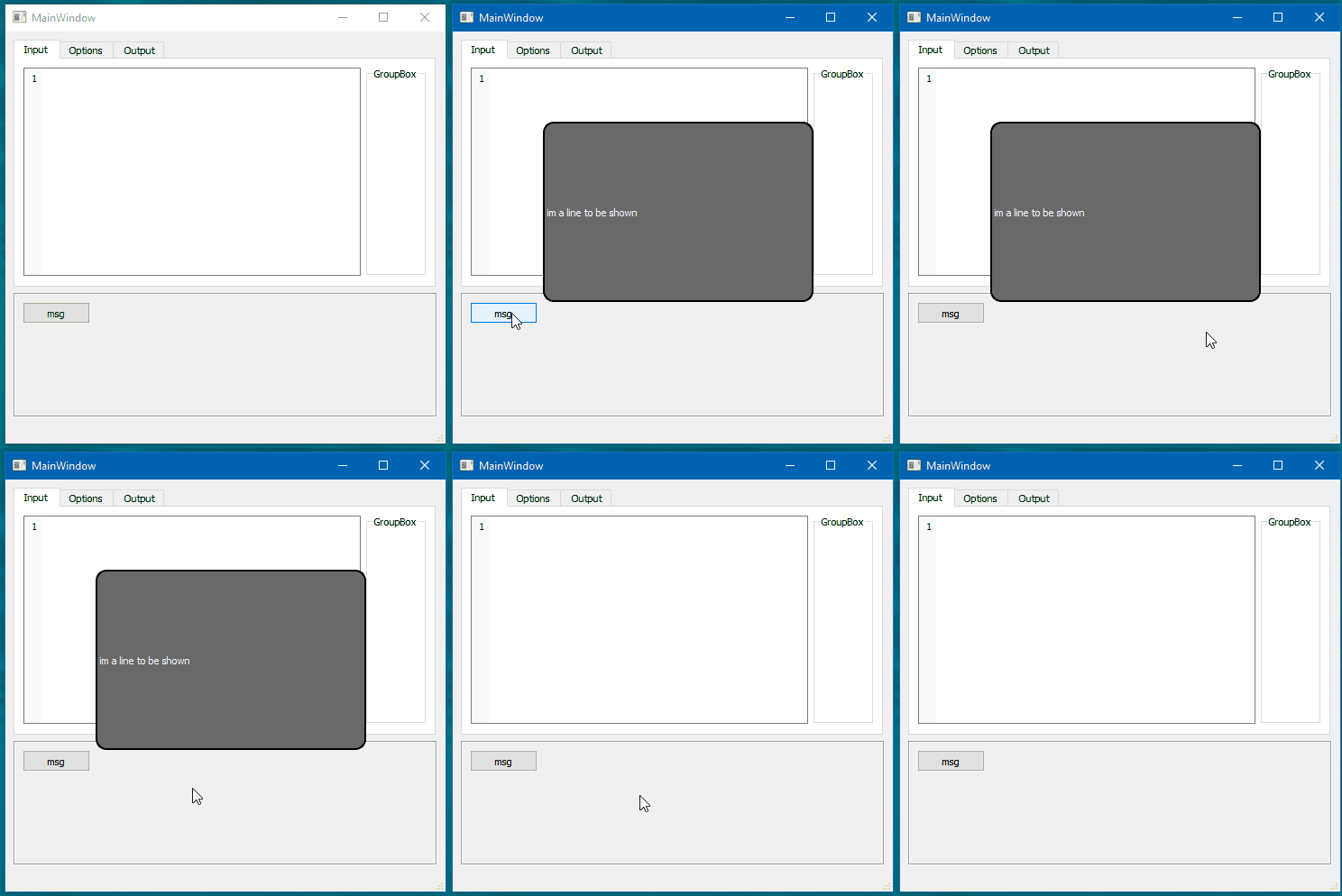
                  Small sample to get you going.

                  
                  void ShowMsg(QWidget *parent, QString msg )
                  {
                      QLabel *msgbox = new QLabel (parent);
                      msgbox->setGeometry(100, 100, 300, 200); // size of the popup
                      msgbox->setText(msg);
                      msgbox->setStyleSheet("margin-left: 0px; border: 2px solid black; border-radius: 12px; background: #686a69; color: white;");
                      msgbox->show();
                   // this fire a timer after 5 secs and close and deletes the qlabel.
                      QTimer::singleShot(5 * 1000, parent, [msgbox]() {
                          msgbox->close();
                          msgbox->deleteLater();
                      });
                  }
                  
                  void EditorMainWin::on_pushButton_pressed()
                  {
                      ShowMsg(this, "im a line to be shown");
                  }
                  

                  gives you
                  alt text

                  J 1 Reply Last reply
                  2
                  • Chris KawaC Offline
                    Chris KawaC Offline
                    Chris Kawa
                    Lifetime Qt Champion
                    wrote on last edited by
                    #9

                    Just a little note to what @mrjj posted. It's always a good idea to tie timer connections (any other too actually) to objects the slot operates on. Otherwise you're running a risk of calling methods on objects that don't exist anymore. If something deletes the message box before the timeout, the lambda would crash, so it's better to tie the connection to msgbox and not parent.

                    Also, deleting a widget will close it first anyway, so in this case you can shorten it to:

                    QTimer::singleShot(5 * 1000, msgbox, &QWidget::deleteLater);
                    
                    1 Reply Last reply
                    2
                    • mrjjM mrjj

                      @jackfr
                      Hi
                      Small sample to get you going.

                      
                      void ShowMsg(QWidget *parent, QString msg )
                      {
                          QLabel *msgbox = new QLabel (parent);
                          msgbox->setGeometry(100, 100, 300, 200); // size of the popup
                          msgbox->setText(msg);
                          msgbox->setStyleSheet("margin-left: 0px; border: 2px solid black; border-radius: 12px; background: #686a69; color: white;");
                          msgbox->show();
                       // this fire a timer after 5 secs and close and deletes the qlabel.
                          QTimer::singleShot(5 * 1000, parent, [msgbox]() {
                              msgbox->close();
                              msgbox->deleteLater();
                          });
                      }
                      
                      void EditorMainWin::on_pushButton_pressed()
                      {
                          ShowMsg(this, "im a line to be shown");
                      }
                      

                      gives you
                      alt text

                      J Offline
                      J Offline
                      jackfr
                      wrote on last edited by
                      #10

                      @mrjj thank you

                      1 Reply Last reply
                      0

                      • Login

                      • Login or register to search.
                      • First post
                        Last post
                      0
                      • Categories
                      • Recent
                      • Tags
                      • Popular
                      • Users
                      • Groups
                      • Search
                      • Get Qt Extensions
                      • Unsolved