
QSerialPort example not reading data (Qt5.15.2, linux)
-
I am trying to read from a device using an usb cable. I am successfully doing this in a python script (not using Qt), yet for some reason even the standard Qt example doesn't seem to READ the data being send by the device and it is driving me nuts.
I am using wireshark to peek on what is going back and forward, and when using my python script or the original app that was delivered with it, the capture file shows a bunch of "malformed packages" but it does the job every time and the capture data is more or less the same every run.
If I run my Qt script it is a different story, after the first malformed package it seems to wait until the device has send all the data, ignores all of it and starts reconnecting to every other device on the bus.. ?
I'am using the "blockingmaster" example from the examples and the only thing I changed is I hardcoded the timeouts and the data to be send:while (!m_quit) { //![6] //! [7] if (currentPortNameChanged) { serial.close(); serial.setPortName(currentPortName); if (!serial.open(QIODevice::ReadWrite)) { emit error(tr("Can't open %1, error code %2") .arg(m_portName).arg(serial.error())); return; } } //! [7] //! [8] // write request QByteArray init={}; init.append('C'); /// CHANGED serial.write(init); if(!serial.waitForBytesWritten(10000)){ // CHANGED timeout, extra wait for write emit error(tr("C not written")); return; } /// CHANGED Send date, QByteArray data={}; QDateTime cur = QDateTime::currentDateTime(); data.append(static_cast<char>(cur.toString("yy").toInt())); data.append(static_cast<char>(cur.toString("M").toInt())); data.append(static_cast<char>(cur.toString("d").toInt())); data.append(static_cast<char>(cur.toString("h").toInt())); data.append(static_cast<char>(cur.toString("m").toInt())); serial.write(data); /// CHANGED end if (serial.waitForBytesWritten(30000)) { // CHANGED timeout //! [8] //! [10] // read response if (serial.waitForReadyRead(10000)) {// CHANGED timeout QByteArray responseData = serial.readAll(); while (serial.waitForReadyRead(1000))// CHANGED timeout responseData += serial.readAll(); const QString response = QString::fromUtf8(responseData); //! [12] emit this->response(response); //! [10] //! [11] //! [12] } else { emit timeout(tr("Wait read response timeout %1") .arg(QTime::currentTime().toString())); } //! [9] //! [11] } else { emit timeout(tr("Wait write request timeout %1") .arg(QTime::currentTime().toString())); } //! [9] //! [13] m_mutex.lock(); m_cond.wait(&m_mutex); if (currentPortName != m_portName) { currentPortName = m_portName; currentPortNameChanged = true; } else { currentPortNameChanged = false; } currentWaitTimeout = m_waitTimeout; currentRequest = m_request; m_mutex.unlock(); }Successful sync (part, list goes on)

Qt failed sync (part)
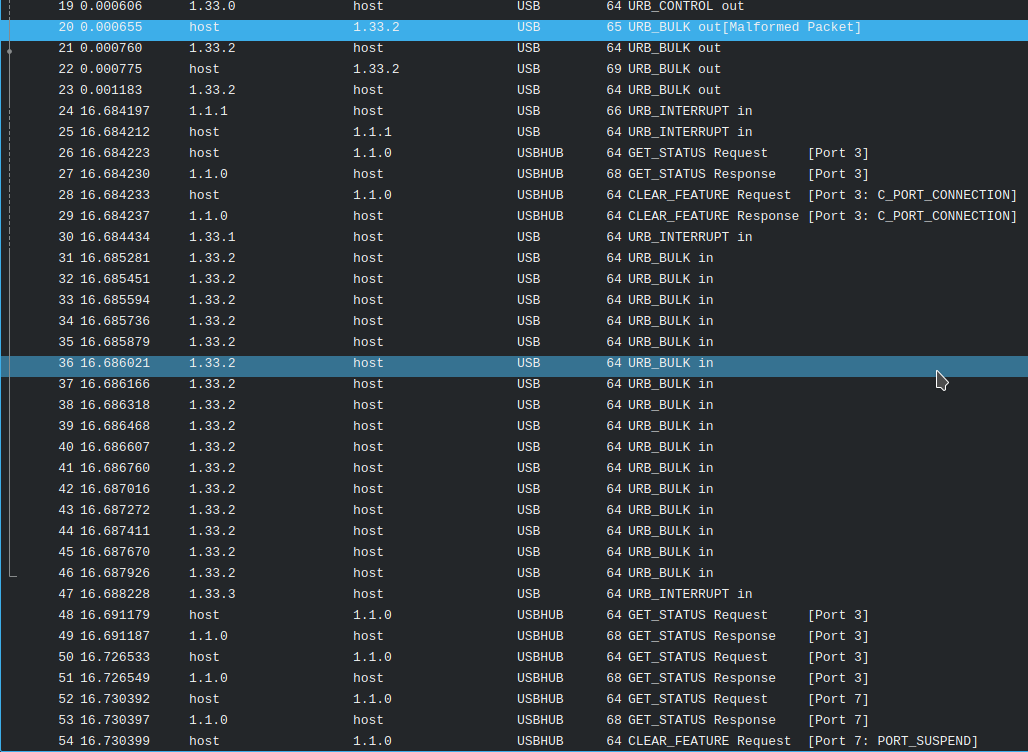
Is the some error correction going on that I don't know about, any hints or tips?
ps. Happy to send you the full capture files, just don't know how to upload them here.
-
I am trying to read from a device using an usb cable. I am successfully doing this in a python script (not using Qt), yet for some reason even the standard Qt example doesn't seem to READ the data being send by the device and it is driving me nuts.
I am using wireshark to peek on what is going back and forward, and when using my python script or the original app that was delivered with it, the capture file shows a bunch of "malformed packages" but it does the job every time and the capture data is more or less the same every run.
If I run my Qt script it is a different story, after the first malformed package it seems to wait until the device has send all the data, ignores all of it and starts reconnecting to every other device on the bus.. ?
I'am using the "blockingmaster" example from the examples and the only thing I changed is I hardcoded the timeouts and the data to be send:while (!m_quit) { //![6] //! [7] if (currentPortNameChanged) { serial.close(); serial.setPortName(currentPortName); if (!serial.open(QIODevice::ReadWrite)) { emit error(tr("Can't open %1, error code %2") .arg(m_portName).arg(serial.error())); return; } } //! [7] //! [8] // write request QByteArray init={}; init.append('C'); /// CHANGED serial.write(init); if(!serial.waitForBytesWritten(10000)){ // CHANGED timeout, extra wait for write emit error(tr("C not written")); return; } /// CHANGED Send date, QByteArray data={}; QDateTime cur = QDateTime::currentDateTime(); data.append(static_cast<char>(cur.toString("yy").toInt())); data.append(static_cast<char>(cur.toString("M").toInt())); data.append(static_cast<char>(cur.toString("d").toInt())); data.append(static_cast<char>(cur.toString("h").toInt())); data.append(static_cast<char>(cur.toString("m").toInt())); serial.write(data); /// CHANGED end if (serial.waitForBytesWritten(30000)) { // CHANGED timeout //! [8] //! [10] // read response if (serial.waitForReadyRead(10000)) {// CHANGED timeout QByteArray responseData = serial.readAll(); while (serial.waitForReadyRead(1000))// CHANGED timeout responseData += serial.readAll(); const QString response = QString::fromUtf8(responseData); //! [12] emit this->response(response); //! [10] //! [11] //! [12] } else { emit timeout(tr("Wait read response timeout %1") .arg(QTime::currentTime().toString())); } //! [9] //! [11] } else { emit timeout(tr("Wait write request timeout %1") .arg(QTime::currentTime().toString())); } //! [9] //! [13] m_mutex.lock(); m_cond.wait(&m_mutex); if (currentPortName != m_portName) { currentPortName = m_portName; currentPortNameChanged = true; } else { currentPortNameChanged = false; } currentWaitTimeout = m_waitTimeout; currentRequest = m_request; m_mutex.unlock(); }Successful sync (part, list goes on)
Qt failed sync (part)
Is the some error correction going on that I don't know about, any hints or tips?
ps. Happy to send you the full capture files, just don't know how to upload them here.
1.) The [malformed package] warning is a setting in Wireshark, I disabled every protocol except from USB (and related) and that message is gone now.
2.) Looking at the capture files and comparing them, it seems that where my Python script starts receiving data, Qt somehow waits until the data is send, ignores it (don't even see it in wireshark) and then somehow triggers an "URB_INTERRUPT in" coming from the address 1.1.1, which I guess is the root hub or bus or something (anyone knows where I can see what is connected to an specific address?).
It seems to reload every device on the bus as suddenly the device I am trying to read becomes available under a different address and the sequence of packages seems to be the same as when I unplug and plug the device. (also the device itself is actually reset)So for some unknown reason, all goes well my packages look all the same, yet on the moment the device starts to send data, the original program receives the data while my QT script seems to trigger an interrupt forcing the hole bus/hub to reload resulting in my device reconnecting.
Does that make sense to anyone?
-
@huppeldepup said in QSerialPort example not reading data (Qt5.15.2, linux):
QByteArray data={};
QDateTime cur = QDateTime::currentDateTime();
data.append(static_cast<char>(cur.toString("yy").toInt()));
data.append(static_cast<char>(cur.toString("M").toInt()));
data.append(static_cast<char>(cur.toString("d").toInt()));
data.append(static_cast<char>(cur.toString("h").toInt()));
data.append(static_cast<char>(cur.toString("m").toInt()));Is the other end receiving these five bytes, and are they the five bytes you are expecting? If not, the other end may not be reacting/sending the response you expect.
-
Hi, thanks for your reply.
Yes I am sure the 5 bytes are send correctly and the devices responds with the regular "empty" response (something equal to TCP ACK or something). It is almost like the kernel module is crashing and restarting. This as Wireshark doesn't intercept me the incoming packages either (probably because device gets re-connected to a different address by this mysterious interrupt) even due I am absolutely sure it is sending data (the device shows it on the display.)
I dist-upgraded my computer as there supposed to be some issues within the AMD-Ryzen chipset modules and I am close to compiling my application on OSX and hopefully Windows as well.
I would not be surprised if this is a edge-case situation related to an edgy kernel module specific to my system (story of my life ;()
It remains very strange that both Python and and JAVA do not seem to endure this issue.
I'll keep you posted. -
For what its worth, if you are seeing malformed USB blocks read in that that's a problem with the USB/serial service. It would stand to reason that by the time it makes it to the Linux serial tty layer that Qt won't know what to do with it, if the kernel doesn't throw it out before then.
-
Hi Thanks for your reply.
The malformed package notification(s) had to do with WireShark and was/is resolved by disabling every protocol other than the USB related ones.I stand with you that it seems the linux kernel is holding on to my packages. This as when you look at the timestamps of the capture, the interrupt occurred AFTER all data is send. If I would be guessing; there is a buffer-overflow occurring within the kernel module on the end of the read what makes the kernel reload the module.
Now the weird thing is that I have a JAVA application that works correctly and reversed engineered a Python script that also works correctly. Based on that python script, I am now building the Qt version (C++) and this for some reason fails no-matter how I write my script.
Both the JAVA and the Python apps read byte-by-byte and are just checking or there is data in wait. Yet in Qt the waitForReadyRead (and related methods) do not return anything and do not seem to work. Also just trying to read the first byte fails, I have been trying multiple approaches but there seems to be some protocol mismatch or misunderstanding going on here.So there must be something in the QT library that either defaults to a different protocol setting, forces some kind of error-correction, using an internal buffer or something that I do not know about.
By now I would kill in order to find out what is going on.
-
don't be too quick to judge the linux kernel. Async serial an async over USB are quite mature. You don't comment on the exact usb->serial being used and my suspicions are first a nonconforming serial device, and second, a poorly designed serial packet protocol that does braindead things like make timing assumptions instead of requiring concrete packet framing structure.
-
Yeah, we are on the same line, the device is absolutely brain-dead, nonconforming and poorly designed and yes I do think it is assuming timings or worse (just blindly dumping data)
My assumptions towards the kernel are not to "put blame", I just try to understand what is happening in order to find a solution.I can not change the device (unfortunately), I can however change my program.
This is my tested and working python script, it sort of proves your point.. but it works.
Is there any way I can do this within QT?ser = serial.Serial(device, baudrate=9600, timeout=1, bytesize=8, stopbits=1, parity='N') ser.flushInput() ser.flushOutput() ser.write(b'C') time.sleep(.1) now = datetime.now() for d in [ "%y","%m", "%d","%H", "%M" ]: part = now.strftime(d) ser.write(chr(int(part)).encode()) dump_file = [] c = 0 x = 0 # this seems to be set much higher in the original tool cycle_count = 10 while True: if c > cycle_count: if verbose: print("imported %d bytes" % len(dump_file)) ser.close() break c = c + 1 time.sleep(0.1) if verbose: print(f'Searching for entries {c} tries left') while ser.in_waiting > 0: x = x + 1 if verbose: print(f'Reading byte {x}') dump_file.append(to_signed(ser.read(1))) # reset the cycle count here, should allow us to use a even lower cycle count. c = 0 if ser.is_open: ser.close() return dump_file -
poor devices mean all bets are off. If hardware manufacturers dont pay attention to standards then it's all a crap shoot. I deal with this crap every day. customers define protocols that don't pass any approval process and marketing says "just give us money and we'll make it work". Worst part of it is that the customer is suppose to be the expert but in reality the black boxes are designed by PhDs who know their experimental fields really well but are an abomination to any standards focused computer engineer...and "maybe" if you're lucky the phd or grad assistant who wrote the firmware had a couple programming courses...but most just happily clone some arduino or RPI example and calls it good. I jest you not...I'm seeing freaking software "cpu speed dependent" timing loops in code that has to service network peripherals.
-
Yeah, we are on the same line, the device is absolutely brain-dead, nonconforming and poorly designed and yes I do think it is assuming timings or worse (just blindly dumping data)
My assumptions towards the kernel are not to "put blame", I just try to understand what is happening in order to find a solution.I can not change the device (unfortunately), I can however change my program.
This is my tested and working python script, it sort of proves your point.. but it works.
Is there any way I can do this within QT?ser = serial.Serial(device, baudrate=9600, timeout=1, bytesize=8, stopbits=1, parity='N') ser.flushInput() ser.flushOutput() ser.write(b'C') time.sleep(.1) now = datetime.now() for d in [ "%y","%m", "%d","%H", "%M" ]: part = now.strftime(d) ser.write(chr(int(part)).encode()) dump_file = [] c = 0 x = 0 # this seems to be set much higher in the original tool cycle_count = 10 while True: if c > cycle_count: if verbose: print("imported %d bytes" % len(dump_file)) ser.close() break c = c + 1 time.sleep(0.1) if verbose: print(f'Searching for entries {c} tries left') while ser.in_waiting > 0: x = x + 1 if verbose: print(f'Reading byte {x}') dump_file.append(to_signed(ser.read(1))) # reset the cycle count here, should allow us to use a even lower cycle count. c = 0 if ser.is_open: ser.close() return dump_file@huppeldepup said in QSerialPort example not reading data (Qt5.15.2, linux):
for d in [ "%y","%m", "%d","%H", "%M" ]:
part = now.strftime(d)
ser.write(chr(int(part)).encode())Bad engineer! No Cookie!
you need to get the timestamp once and then parse the static return value. Here you recalculate the current time and pump out a single character every iteration. This kind of code has the potential to insert random delays at random points in the output as a consequence of multitasking OS.Always build a complete packet in a buffer and send it as a single operation.
-
Thanks for sharing my pain, I can not agree more with you about the amount of crap being sold.
I am developing a program to be used in a very small niche, the device I am trying to support is some kind of an prototype device that is being sold as being a actual product in combination with a desktop application that is even worse. My goal is to come up with a solution that can replace both on the long term, yet a lot of people are using this device and so I am sort of required to support it. I understand there are no guaranties to be given and it is impossible to create something that is proven to work (original software fails regularly too), but is there something I can do?.. I mean it works under python.Should I try my luck with a raw socket connection maybe, are there other libs around that could do the trick.
If it works 80% of the times... it is probably doing better than the original software.
-
looks like you are also doing direct file IO in your loops, which can cause further random delays. As I say, all bets are off unless you can trust the device and have good specs in the form of a guranteed interface control document from the vendor.
-
Looking at the project as a hole, it has all been "trail and error" so forget about an API, specs or even a simple document. It simply is not there.
I probably could de-compile the JAVA app see what the hell is happening there but I am pretty sure it will come down to the python script I already shared. Again, the hole project seems to be "trail and error" and my Python script is already doing a better job at reading and processing the data on the device then the original application itself.
-
This post is deleted!
