
Skip to content
  • Categories
  • Recent
  • Tags
  • Popular
  • Users
  • Groups
  • Search
  • Get Qt Extensions
  • Unsolved
Collapse
Brand Logo
  1. Home
  2. Qt Development
  3. General and Desktop
  4. QTableView style looks like Excel table

QTableView style looks like Excel table

Scheduled Pinned Locked Moved Unsolved General and Desktop
2 Posts 1 Posters 397 Views 1 Watching
  • Oldest to Newest
  • Newest to Oldest
  • Most Votes
Reply
  • Reply as topic
Log in to reply
This topic has been deleted. Only users with topic management privileges can see it.
  • A Offline
    A Offline
    Alexey Serebryakov
    wrote on last edited by Alexey Serebryakov
    #1

    Hi guys,

    I have not strong skills in QSS/CSS. Could any one help me? I need that my QTableView looks like MS Excel/Access table. The same 3-D borders, selection, bumping/sunken cells and so on. Something like this
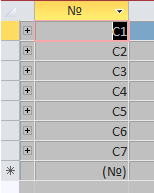
    4edbf0e0-57dd-4bd0-bbd4-b4f36e0bd294-image.png

    Also, how can I format table cell by QSS?

    Thanks a lot,
    Alex.

    A 1 Reply Last reply
    0
    • A Alexey Serebryakov

      Hi guys,

      I have not strong skills in QSS/CSS. Could any one help me? I need that my QTableView looks like MS Excel/Access table. The same 3-D borders, selection, bumping/sunken cells and so on. Something like this
      4edbf0e0-57dd-4bd0-bbd4-b4f36e0bd294-image.png

      Also, how can I format table cell by QSS?

      Thanks a lot,
      Alex.

      A Offline
      A Offline
      Alexey Serebryakov
      wrote on last edited by
      #2

      @Alexey-Serebryakov UP

      1 Reply Last reply
      0

      • Login

      • Login or register to search.
      • First post
        Last post
      0
      • Categories
      • Recent
      • Tags
      • Popular
      • Users
      • Groups
      • Search
      • Get Qt Extensions
      • Unsolved