
Grid layout doesn't work well
-
Hi!
I want to arrange the rectangles as shown in the figure.
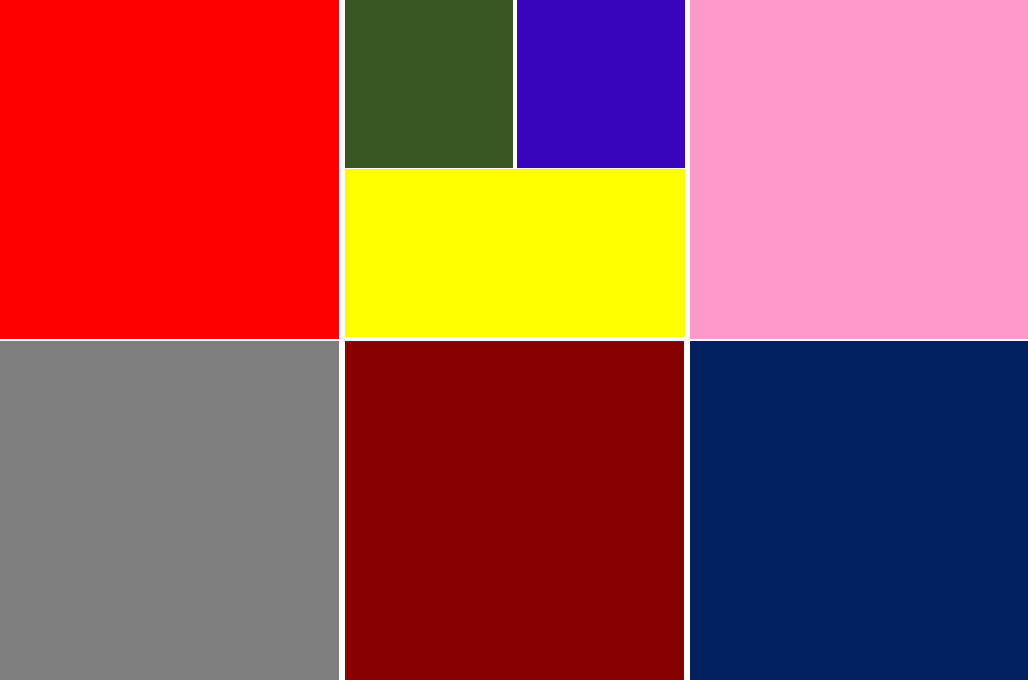
I implemented it using GridLayout, but it looks like the following, and I can't arrange it as I want.
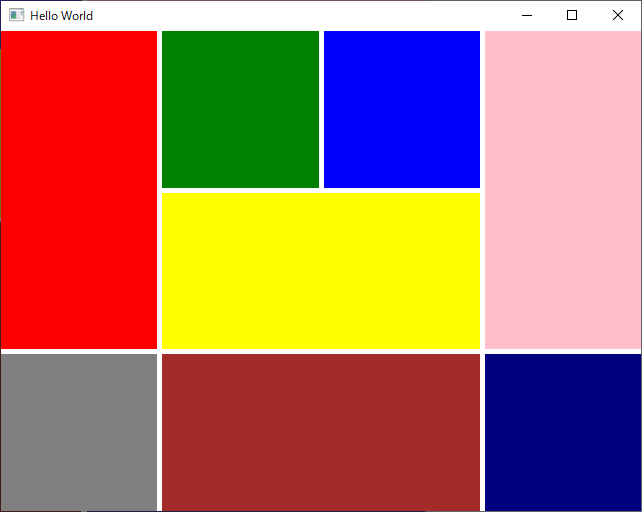
Below is my code.
Does anyone know the cause?
Thank you.GridLayout{ id: gird anchors.fill: parent Rectangle{ color: "red" Layout.fillWidth: true Layout.fillHeight: true Layout.column: 0 Layout.row: 0 Layout.columnSpan: 2 Layout.rowSpan: 2 } Rectangle{ color: "green" Layout.fillHeight: true Layout.fillWidth: true Layout.column: 2 Layout.row: 0 Layout.columnSpan: 1 Layout.rowSpan: 1 } Rectangle{ color: "blue" Layout.fillHeight: true Layout.fillWidth: true Layout.column: 3 Layout.row: 0 Layout.columnSpan: 1 Layout.rowSpan: 1 } Rectangle{ color: "yellow" Layout.fillHeight: true Layout.fillWidth: true Layout.column: 2 Layout.row: 1 Layout.columnSpan: 2 Layout.rowSpan: 1 } Rectangle{ color: "pink" Layout.fillHeight: true Layout.fillWidth: true Layout.column: 4 Layout.row: 0 Layout.columnSpan: 2 Layout.rowSpan: 2 } Rectangle{ color: "gray" Layout.fillHeight: true Layout.fillWidth: true Layout.column: 0 Layout.row: 2 Layout.columnSpan: 2 Layout.rowSpan: 2 } Rectangle{ color: "brown" Layout.fillHeight: true Layout.fillWidth: true Layout.column: 2 Layout.row: 2 Layout.columnSpan: 2 Layout.rowSpan: 2 } Rectangle{ color: "navy" Layout.fillHeight: true Layout.fillWidth: true Layout.column: 4 Layout.row: 2 Layout.columnSpan: 2 Layout.rowSpan: 2 } } -
Set a preferred height / width.
GridLayout{ id: gird anchors.fill: parent Rectangle{ color: "red" Layout.fillWidth: true Layout.fillHeight: true Layout.preferredWidth: 50 Layout.preferredHeight: 50 Layout.column: 0 Layout.row: 0 Layout.columnSpan: 2 Layout.rowSpan: 2 } Rectangle{ color: "green" Layout.fillHeight: true Layout.fillWidth: true Layout.column: 2 Layout.row: 0 Layout.columnSpan: 1 Layout.rowSpan: 1 } Rectangle{ color: "blue" Layout.fillHeight: true Layout.fillWidth: true Layout.column: 3 Layout.row: 0 Layout.columnSpan: 1 Layout.rowSpan: 1 } Rectangle{ color: "yellow" Layout.fillHeight: true Layout.fillWidth: true Layout.column: 2 Layout.row: 1 Layout.columnSpan: 2 Layout.rowSpan: 1 } Rectangle{ color: "pink" Layout.fillHeight: true Layout.fillWidth: true Layout.column: 4 Layout.row: 0 Layout.columnSpan: 2 Layout.rowSpan: 2 } Rectangle{ color: "gray" Layout.fillHeight: true Layout.fillWidth: true Layout.preferredWidth: 50 Layout.preferredHeight: 50 Layout.column: 0 Layout.row: 2 Layout.columnSpan: 2 Layout.rowSpan: 2 } Rectangle{ color: "brown" Layout.fillHeight: true Layout.fillWidth: true Layout.preferredWidth: 50 Layout.column: 2 Layout.row: 2 Layout.columnSpan: 2 Layout.rowSpan: 2 } Rectangle{ color: "navy" Layout.fillHeight: true Layout.fillWidth: true Layout.preferredWidth: 50 Layout.preferredHeight: 50 Layout.column: 4 Layout.row: 2 Layout.columnSpan: 2 Layout.rowSpan: 2 } } -
Unfortunately I don't know the cause, it is probably GridLayout's bad implementation, but I can suggest a workaround:
import QtQuick
import QtQuick.Window
import QtQuick.Layouts

Window {
  width: 640
  height: 480
  visible: true
  title: qsTr("Hello World")

  component StretchedRect: Rectangle {
    Layout.fillHeight: true
    Layout.fillWidth: true
    Layout.preferredWidth: Layout.columnSpan
    Layout.preferredHeight: Layout.rowSpan
  }

  GridLayout{
    id: gird
    anchors.fill: parent

    rows: 4
    columns: 6

    StretchedRect {
      color: "red"
      Layout.columnSpan: 2
      Layout.rowSpan: 2
    }

    StretchedRect {
      color: "green"
      Layout.columnSpan: 1
      Layout.rowSpan: 1
    }

    StretchedRect {
      color: "blue"
      Layout.columnSpan: 1
      Layout.rowSpan: 1
    }

    StretchedRect {
      color: "pink"
      Layout.columnSpan: 2
      Layout.rowSpan: 2
    }

    StretchedRect {
      color: "yellow"
      Layout.columnSpan: 2
      Layout.rowSpan: 1
    }

    StretchedRect {
      color: "gray"
      Layout.columnSpan: 2
      Layout.rowSpan: 2
    }

    StretchedRect {
      color: "brown"
      Layout.columnSpan: 2
      Layout.rowSpan: 2
    }

    StretchedRect {
      color: "navy"
      Layout.columnSpan: 2
      Layout.rowSpan: 2
    }
  }
}
Let me explain:
Since you want to arrange the rectangles in 6x4 grid.
I put therows: 4 columns: 6properties in the
GridLayoutThat allows to reduce clutter removing all the
Layout.columnandLayout.rowfrom theRectanglessince their position is implied.
Caution: the order ofRectanglesis now significant. I had to place the yellow one bellow the pink one.
And finally setting theLayout.prefferedWidthandLayout.prefferedHeightfor each rectangle to its correspondingcolumnSpanandrowSpan, forced theGridLayoutto arrange them as you wanted.HTH.
-
Set a preferred height / width.
GridLayout{ id: gird anchors.fill: parent Rectangle{ color: "red" Layout.fillWidth: true Layout.fillHeight: true Layout.preferredWidth: 50 Layout.preferredHeight: 50 Layout.column: 0 Layout.row: 0 Layout.columnSpan: 2 Layout.rowSpan: 2 } Rectangle{ color: "green" Layout.fillHeight: true Layout.fillWidth: true Layout.column: 2 Layout.row: 0 Layout.columnSpan: 1 Layout.rowSpan: 1 } Rectangle{ color: "blue" Layout.fillHeight: true Layout.fillWidth: true Layout.column: 3 Layout.row: 0 Layout.columnSpan: 1 Layout.rowSpan: 1 } Rectangle{ color: "yellow" Layout.fillHeight: true Layout.fillWidth: true Layout.column: 2 Layout.row: 1 Layout.columnSpan: 2 Layout.rowSpan: 1 } Rectangle{ color: "pink" Layout.fillHeight: true Layout.fillWidth: true Layout.column: 4 Layout.row: 0 Layout.columnSpan: 2 Layout.rowSpan: 2 } Rectangle{ color: "gray" Layout.fillHeight: true Layout.fillWidth: true Layout.preferredWidth: 50 Layout.preferredHeight: 50 Layout.column: 0 Layout.row: 2 Layout.columnSpan: 2 Layout.rowSpan: 2 } Rectangle{ color: "brown" Layout.fillHeight: true Layout.fillWidth: true Layout.preferredWidth: 50 Layout.column: 2 Layout.row: 2 Layout.columnSpan: 2 Layout.rowSpan: 2 } Rectangle{ color: "navy" Layout.fillHeight: true Layout.fillWidth: true Layout.preferredWidth: 50 Layout.preferredHeight: 50 Layout.column: 4 Layout.row: 2 Layout.columnSpan: 2 Layout.rowSpan: 2 } }Thanks you for answering.
It works very well.
But I can't understand meaning of "50". -
Unfortunately I don't know the cause, it is probably GridLayout's bad implementation, but I can suggest a workaround:
import QtQuick
import QtQuick.Window
import QtQuick.Layouts

Window {
  width: 640
  height: 480
  visible: true
  title: qsTr("Hello World")

  component StretchedRect: Rectangle {
    Layout.fillHeight: true
    Layout.fillWidth: true
    Layout.preferredWidth: Layout.columnSpan
    Layout.preferredHeight: Layout.rowSpan
  }

  GridLayout{
    id: gird
    anchors.fill: parent

    rows: 4
    columns: 6

    StretchedRect {
      color: "red"
      Layout.columnSpan: 2
      Layout.rowSpan: 2
    }

    StretchedRect {
      color: "green"
      Layout.columnSpan: 1
      Layout.rowSpan: 1
    }

    StretchedRect {
      color: "blue"
      Layout.columnSpan: 1
      Layout.rowSpan: 1
    }

    StretchedRect {
      color: "pink"
      Layout.columnSpan: 2
      Layout.rowSpan: 2
    }

    StretchedRect {
      color: "yellow"
      Layout.columnSpan: 2
      Layout.rowSpan: 1
    }

    StretchedRect {
      color: "gray"
      Layout.columnSpan: 2
      Layout.rowSpan: 2
    }

    StretchedRect {
      color: "brown"
      Layout.columnSpan: 2
      Layout.rowSpan: 2
    }

    StretchedRect {
      color: "navy"
      Layout.columnSpan: 2
      Layout.rowSpan: 2
    }
  }
}
Let me explain:
Since you want to arrange the rectangles in 6x4 grid.
I put therows: 4 columns: 6properties in the
GridLayoutThat allows to reduce clutter removing all the
Layout.columnandLayout.rowfrom theRectanglessince their position is implied.
Caution: the order ofRectanglesis now significant. I had to place the yellow one bellow the pink one.
And finally setting theLayout.prefferedWidthandLayout.prefferedHeightfor each rectangle to its correspondingcolumnSpanandrowSpan, forced theGridLayoutto arrange them as you wanted.HTH.

