Skip to content
  • Categories
  • Recent
  • Tags
  • Popular
  • Users
  • Groups
  • Search
  • Get Qt Extensions
  • Unsolved
Collapse
Brand Logo
  1. Home
  2. Qt Development
  3. General and Desktop
  4. Top UI Fixed
Qt 6.11 is out! See what's new in the release blog

Top UI Fixed

Scheduled Pinned Locked Moved Unsolved General and Desktop
2 Posts 2 Posters 233 Views 1 Watching
  • Oldest to Newest
  • Newest to Oldest
  • Most Votes
Reply
  • Reply as topic
Log in to reply
This topic has been deleted. Only users with topic management privileges can see it.
  • I Offline
    I Offline
    IknowQT
    wrote on last edited by
    #1

    2047b8e1-8b62-424a-b11d-17e718f22d8d-image.png

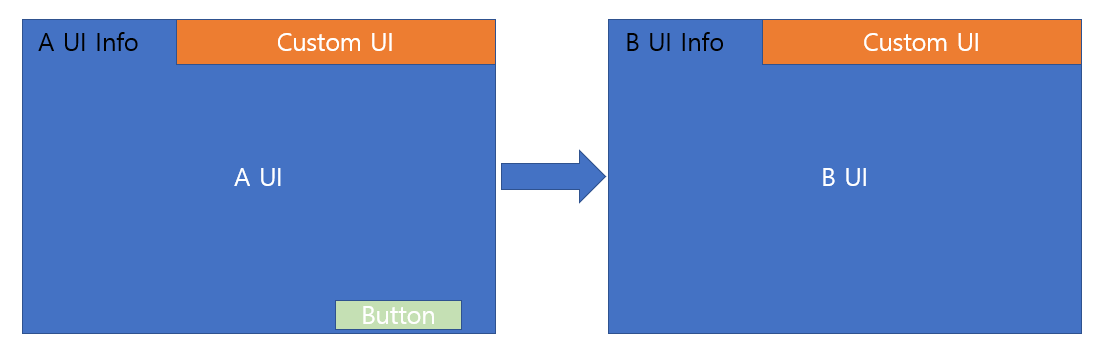
    Is this layout possible?
    I want to place Custom Ui at the top of the screen and fix it, what should I do?

    For example, if you place Customui on top of A ui and click the button, the screen will switch to B ui, but you want to keep Custom ui on top.

    1 Reply Last reply
    0
    • Kent-DorfmanK Offline
      Kent-DorfmanK Offline
      Kent-Dorfman
      wrote on last edited by
      #2

      I think it will depend upon who is the parent of CustomIU, the top level screen object or one of the A/B UI? If you manage CustomUI as it's own "window" and use some clever signalling then it is doable.

      The dystopian literature that served as a warning in my youth has become an instruction manual in my elder years.

      1 Reply Last reply
      0

      • Login

      • Login or register to search.
      • First post
        Last post
      0
      • Categories
      • Recent
      • Tags
      • Popular
      • Users
      • Groups
      • Search
      • Get Qt Extensions
      • Unsolved