
Skip to content
  • Categories
  • Recent
  • Tags
  • Popular
  • Users
  • Groups
  • Search
  • Get Qt Extensions
  • Unsolved
Collapse
Brand Logo
  1. Home
  2. Qt Development
  3. Qt Creator and other tools
  4. SVG file in qhelpgenerator / assistant
Forum Updated to NodeBB v4.3 + New Features

SVG file in qhelpgenerator / assistant

Scheduled Pinned Locked Moved Unsolved Qt Creator and other tools
24 Posts 6 Posters 4.1k Views 3 Watching
  • Oldest to Newest
  • Newest to Oldest
  • Most Votes
Reply
  • Reply as topic
Log in to reply
This topic has been deleted. Only users with topic management privileges can see it.
  • S Offline
    S Offline
    ScumCoder
    wrote on last edited by
    #21

    It's been 2.5 years, and there's still zero reaction to this issue.
    I still can't browse qch help containing svg files:

    qt.png

    Maybe it's me who is doing something wrong here? No way me and OP are the only two people who care about this.

    Christian EhrlicherC 1 Reply Last reply
    0
    • S ScumCoder

      It's been 2.5 years, and there's still zero reaction to this issue.
      I still can't browse qch help containing svg files:

      qt.png

      Maybe it's me who is doing something wrong here? No way me and OP are the only two people who care about this.

      Christian EhrlicherC Offline
      Christian EhrlicherC Offline
      Christian Ehrlicher
      Lifetime Qt Champion
      wrote on last edited by
      #22

      The bug report is wrong. It's not a QtCreator issue but QTexEdit (?) which does not support it. So the correct persons are not aware of the problem.

      Qt Online Installer direct download: https://download.qt.io/official_releases/online_installers/
      Visit the Qt Academy at https://academy.qt.io/catalog

      1 Reply Last reply
      0
      • S Offline
        S Offline
        ScumCoder
        wrote on last edited by
        #23

        I finally managed to get proper help back again, so I'm sharing the solution juuuust in case some other lost soul comes here in search of an answer.

        1. Clone the QtCreator source code.
        2. Checkout version v7.0.2 (this is the last version that supports Qt5).
        3. Build it against Qt5.
        4. Select "QtWebEngine" as the help renderer.

        Not only did rolling back to v7.0.2 + Qt5 give me proper help, but it also fixed a whole plethora of other annoying bugs.
        And even if there was any actual functionality added since that version, I didn't notice it, so I didn't even lose anything.
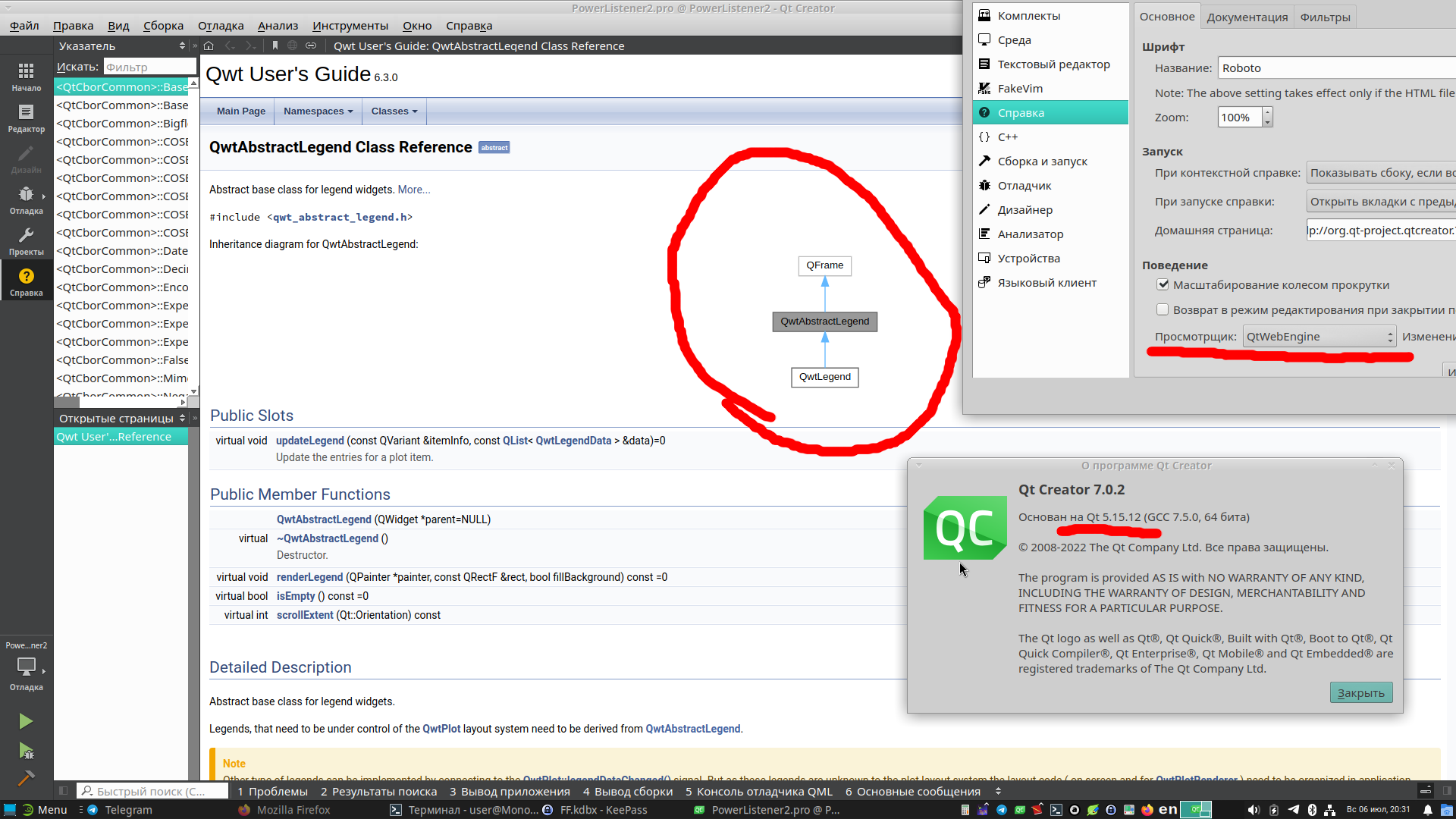
        Снимок экрана_2025-07-06_20-31-22.png

        1 Reply Last reply
        0
        • S Offline
          S Offline
          svanimisetti
          wrote last edited by
          #24

          @ScumCoder - thanks for posting this solution. Is there way I can select QtWebEngine from pre-build assistant.exe which I installed using pip install pyside6 in my conda environment?

          1 Reply Last reply
          0

          • Login

          • Login or register to search.
          • First post
            Last post
          0
          • Categories
          • Recent
          • Tags
          • Popular
          • Users
          • Groups
          • Search
          • Get Qt Extensions
          • Unsolved