
Skip to content
  • Categories
  • Recent
  • Tags
  • Popular
  • Users
  • Groups
  • Search
  • Get Qt Extensions
  • Unsolved
Collapse
Brand Logo
  1. Home
  2. Qt Development
  3. General and Desktop
  4. Stylesheet with tableView
Qt 6.11 is out! See what's new in the release blog

Stylesheet with tableView

Scheduled Pinned Locked Moved Unsolved General and Desktop
8 Posts 2 Posters 2.2k Views 1 Watching
  • Oldest to Newest
  • Newest to Oldest
  • Most Votes
Reply
  • Reply as topic
Log in to reply
This topic has been deleted. Only users with topic management privileges can see it.
  • F Offline
    F Offline
    fres
    wrote on last edited by fres
    #1

    Hi! I'm new with stylesheet with QT design.
    I don't know how to color the contour line of the tableview in the middle. I don't want to color the contour line header.
    Actually, i have this:
    help.png

    But when i write this : border: 2px outset rgb(85, 170, 127) ; on the stylesheet of the tableview in the middle, I get this (which is not what I want):
    help1.png

    I want to remove the color around the vertical and horitontal header.
    I don't want to set 2px on the header also.

    1 Reply Last reply
    0
    • mrjjM Offline
      mrjjM Offline
      mrjj
      Lifetime Qt Champion
      wrote on last edited by
      #2

      Hi

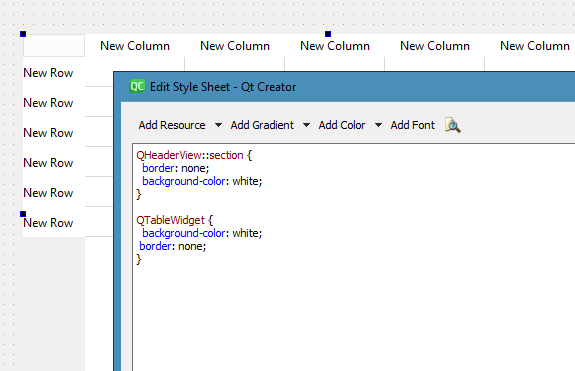
      "I want to remove the color around the vertical and horitontal header."

      Like this ? so it flat ?
      alt text

      1 Reply Last reply
      1
      • F Offline
        F Offline
        fres
        wrote on last edited by fres
        #3

        Where do I write the code you've mention?
        I have this :
        ok1.png
        When I click on "tableWiget", and then go to the styleSheet :

        ok2.png

        I still have the green color on the header
        ok3.png

        So in which stylesheet do I write the code ?

        1 Reply Last reply
        0
        • mrjjM Offline
          mrjjM Offline
          mrjj
          Lifetime Qt Champion
          wrote on last edited by
          #4

          Hi
          Directly on the table widget should be fine.

          1 Reply Last reply
          0
          • F Offline
            F Offline
            fres
            wrote on last edited by
            #5

            Okay ! Well, as I said, i wrote the code on the stylesheet of the tableWidget, but it didn't remove the color of the vertical / horizontal header

            mrjjM 1 Reply Last reply
            0
            • F fres

              Okay ! Well, as I said, i wrote the code on the stylesheet of the tableWidget, but it didn't remove the color of the vertical / horizontal header

              mrjjM Offline
              mrjjM Offline
              mrjj
              Lifetime Qt Champion
              wrote on last edited by
              #6

              @fres

              Hi
              well maybe you have conflicting elements in the stylesheet

              The pic of stylesheet you show is not using Selectors ( like name or type)
              so it could be a side effect.

              1 Reply Last reply
              0
              • F Offline
                F Offline
                fres
                wrote on last edited by
                #7

                Oh okay! I will figure out how to use Selectors. I got a last question. I actually have this:
                manu.png

                I want to use this color to some cells of the tableview like this:allloa1.png

                Of course, there is an error. I don't know how to put this particular color into some cell of my tableview. Thanks again!

                mrjjM 1 Reply Last reply
                0
                • F fres

                  Oh okay! I will figure out how to use Selectors. I got a last question. I actually have this:
                  manu.png

                  I want to use this color to some cells of the tableview like this:allloa1.png

                  Of course, there is an error. I don't know how to put this particular color into some cell of my tableview. Thanks again!

                  mrjjM Offline
                  mrjjM Offline
                  mrjj
                  Lifetime Qt Champion
                  wrote on last edited by mrjj
                  #8

                  @fres

                  Hi
                  Its explained here with selectors
                  https://doc.qt.io/qt-5/stylesheet-examples.html#complex-selector-example

                  --

                  The syntax is a bit different for QLinearGradient when outside a stylesheet

                  https://doc.qt.io/qt-5/qlineargradient.html

                  You can use it via a brush

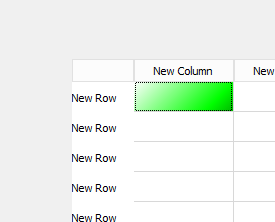
                    QLinearGradient linearGrad(QPointF(0, 0), QPointF(100, 100));
                    linearGrad.setColorAt(0, Qt::white);
                    linearGrad.setColorAt(0.5, Qt::green);
                    linearGrad.setColorAt(1, Qt::black);
                    QBrush b(linearGrad);
                    ui->tableWidget->item(0, 0)->setBackground(b);
                  

                  alt text

                  1 Reply Last reply
                  1

                  • Login

                  • Login or register to search.
                  • First post
                    Last post
                  0
                  • Categories
                  • Recent
                  • Tags
                  • Popular
                  • Users
                  • Groups
                  • Search
                  • Get Qt Extensions
                  • Unsolved