
Skip to content
  • Categories
  • Recent
  • Tags
  • Popular
  • Users
  • Groups
  • Search
  • Get Qt Extensions
  • Unsolved
Collapse
Brand Logo
  1. Home
  2. Qt Development
  3. General and Desktop
  4. Stylesheet with tableView

Stylesheet with tableView

Scheduled Pinned Locked Moved Unsolved General and Desktop
8 Posts 2 Posters 1.3k Views 1 Watching
  • Oldest to Newest
  • Newest to Oldest
  • Most Votes
Reply
  • Reply as topic
Log in to reply
This topic has been deleted. Only users with topic management privileges can see it.
  • F Offline
    F Offline
    fres
    wrote on last edited by fres
    #1

    Hi! I'm new with stylesheet with QT design.
    I don't know how to color the contour line of the tableview in the middle. I don't want to color the contour line header.
    Actually, i have this:
    help.png

    But when i write this : border: 2px outset rgb(85, 170, 127) ; on the stylesheet of the tableview in the middle, I get this (which is not what I want):
    help1.png

    I want to remove the color around the vertical and horitontal header.
    I don't want to set 2px on the header also.

    1 Reply Last reply
    0
    • mrjjM Offline
      mrjjM Offline
      mrjj
      Lifetime Qt Champion
      wrote on last edited by
      #2

      Hi

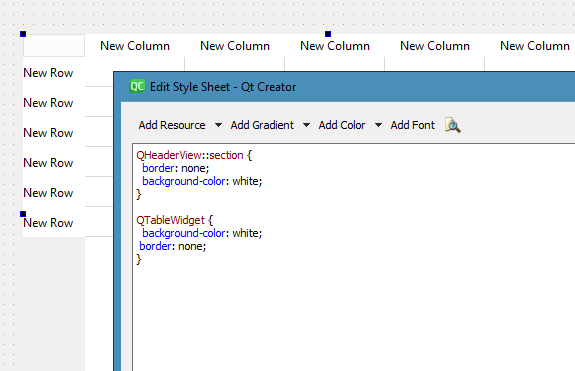
      "I want to remove the color around the vertical and horitontal header."

      Like this ? so it flat ?
      alt text

      1 Reply Last reply
      1
      • F Offline
        F Offline
        fres
        wrote on last edited by fres
        #3

        Where do I write the code you've mention?
        I have this :
        ok1.png
        When I click on "tableWiget", and then go to the styleSheet :

        ok2.png

        I still have the green color on the header
        ok3.png

        So in which stylesheet do I write the code ?

        1 Reply Last reply
        0
        • mrjjM Offline
          mrjjM Offline
          mrjj
          Lifetime Qt Champion
          wrote on last edited by
          #4

          Hi
          Directly on the table widget should be fine.

          1 Reply Last reply
          0
          • F Offline
            F Offline
            fres
            wrote on last edited by
            #5

            Okay ! Well, as I said, i wrote the code on the stylesheet of the tableWidget, but it didn't remove the color of the vertical / horizontal header

            mrjjM 1 Reply Last reply
            0
            • F fres

              Okay ! Well, as I said, i wrote the code on the stylesheet of the tableWidget, but it didn't remove the color of the vertical / horizontal header

              mrjjM Offline
              mrjjM Offline
              mrjj
              Lifetime Qt Champion
              wrote on last edited by
              #6

              @fres

              Hi
              well maybe you have conflicting elements in the stylesheet

              The pic of stylesheet you show is not using Selectors ( like name or type)
              so it could be a side effect.

              1 Reply Last reply
              0
              • F Offline
                F Offline
                fres
                wrote on last edited by
                #7

                Oh okay! I will figure out how to use Selectors. I got a last question. I actually have this:
                manu.png

                I want to use this color to some cells of the tableview like this:allloa1.png

                Of course, there is an error. I don't know how to put this particular color into some cell of my tableview. Thanks again!

                mrjjM 1 Reply Last reply
                0
                • F fres

                  Oh okay! I will figure out how to use Selectors. I got a last question. I actually have this:
                  manu.png

                  I want to use this color to some cells of the tableview like this:allloa1.png

                  Of course, there is an error. I don't know how to put this particular color into some cell of my tableview. Thanks again!

                  mrjjM Offline
                  mrjjM Offline
                  mrjj
                  Lifetime Qt Champion
                  wrote on last edited by mrjj
                  #8

                  @fres

                  Hi
                  Its explained here with selectors
                  https://doc.qt.io/qt-5/stylesheet-examples.html#complex-selector-example

                  --

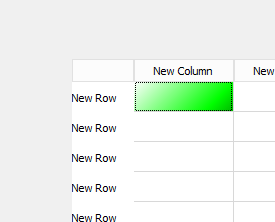
                  The syntax is a bit different for QLinearGradient when outside a stylesheet

                  https://doc.qt.io/qt-5/qlineargradient.html

                  You can use it via a brush

                    QLinearGradient linearGrad(QPointF(0, 0), QPointF(100, 100));
                    linearGrad.setColorAt(0, Qt::white);
                    linearGrad.setColorAt(0.5, Qt::green);
                    linearGrad.setColorAt(1, Qt::black);
                    QBrush b(linearGrad);
                    ui->tableWidget->item(0, 0)->setBackground(b);
                  

                  alt text

                  1 Reply Last reply
                  1

                  • Login

                  • Login or register to search.
                  • First post
                    Last post
                  0
                  • Categories
                  • Recent
                  • Tags
                  • Popular
                  • Users
                  • Groups
                  • Search
                  • Get Qt Extensions
                  • Unsolved