
Skip to content
  • Categories
  • Recent
  • Tags
  • Popular
  • Users
  • Groups
  • Search
  • Get Qt Extensions
  • Unsolved
Collapse
Brand Logo
  1. Home
  2. Qt Development
  3. General and Desktop
  4. 16:24:37: The program has unexpectedly finished.
Forum Updated to NodeBB v4.3 + New Features

16:24:37: The program has unexpectedly finished.

Scheduled Pinned Locked Moved Unsolved General and Desktop
6 Posts 4 Posters 509 Views 2 Watching
  • Oldest to Newest
  • Newest to Oldest
  • Most Votes
Reply
  • Reply as topic
Log in to reply
This topic has been deleted. Only users with topic management privileges can see it.
  • A Offline
    A Offline
    Anonymous_Banned275
    wrote on last edited by
    #1
    This post is deleted!
    JonBJ 1 Reply Last reply
    0
    • SeDiS Offline
      SeDiS Offline
      SeDi
      wrote on last edited by
      #2

      Using the debugger - with thoughtfully set breakpoints - is usually the best bet to quickly find and eliminate a problem. However, I often make extensive use of debugging output, especially if the problem is hard to reproduce. That way I can narrow down the whereabouts of the origin.

      1 Reply Last reply
      0
      • A Anonymous_Banned275

        This post is deleted!

        JonBJ Offline
        JonBJ Offline
        JonB
        wrote on last edited by
        #3

        @AnneRanch
        If you are lucky you will not have to "step thru". Simply run the program from the debugger. Hopefully when the "crash" happens it will stop and the debugger will will kick in. Then all you have to do is examine the stack trace window and trace back to a line in your code which caused the problem. Without needing to place breakpoints or do any stepping.

        1 Reply Last reply
        1
        • A Offline
          A Offline
          Anonymous_Banned275
          wrote on last edited by
          #4

          Well - after enabling "stop when abort..."
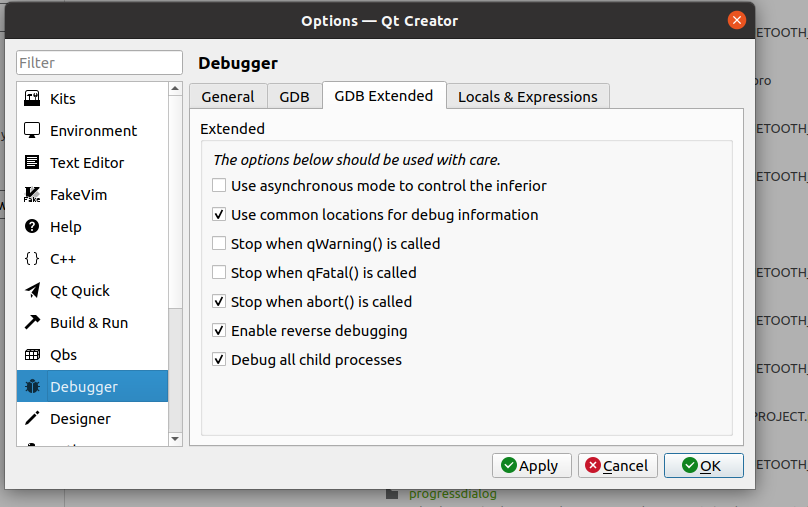
          e5f1c373-9b48-4034-b7b2-584c5af67ab7-image.png

          and removing all breakpoints up to suspected problem and running "debug" I am getting this

          4dd1697e-a667-418e-a7d3-9130994e091c-image.png

          which really does not help much to identify the problem area.
          I guess I will experiment more with the "GDB extended" options.

          Actually wonder what "reverse debugging" does.

          JonBJ Pl45m4P 2 Replies Last reply
          0
          • A Anonymous_Banned275

            Well - after enabling "stop when abort..."

            e5f1c373-9b48-4034-b7b2-584c5af67ab7-image.png

            and removing all breakpoints up to suspected problem and running "debug" I am getting this

            4dd1697e-a667-418e-a7d3-9130994e091c-image.png

            which really does not help much to identify the problem area.
            I guess I will experiment more with the "GDB extended" options.

            Actually wonder what "reverse debugging" does.

            JonBJ Offline
            JonBJ Offline
            JonB
            wrote on last edited by
            #5

            @AnneRanch said in 16:24:37: The program has unexpectedly finished.:

            which really does not help much to identify the problem area.

            Yes, it does. I you read my answer and act on it

            Then all you have to do is examine the stack trace window and trace back to a line in your code which caused the problem.

            1 Reply Last reply
            1
            • A Anonymous_Banned275

              Well - after enabling "stop when abort..."

              e5f1c373-9b48-4034-b7b2-584c5af67ab7-image.png

              and removing all breakpoints up to suspected problem and running "debug" I am getting this

              4dd1697e-a667-418e-a7d3-9130994e091c-image.png

              which really does not help much to identify the problem area.
              I guess I will experiment more with the "GDB extended" options.

              Actually wonder what "reverse debugging" does.

              Pl45m4P Offline
              Pl45m4P Offline
              Pl45m4
              wrote on last edited by
              #6

              @AnneRanch

              "Segfault" indicates what kind of issue you are facing (probably some bad/unallowed memory access).
              Debug and check for example if you manually delete something before the crash.


              If debugging is the process of removing software bugs, then programming must be the process of putting them in.

              ~E. W. Dijkstra

              1 Reply Last reply
              0

              • Login

              • Login or register to search.
              • First post
                Last post
              0
              • Categories
              • Recent
              • Tags
              • Popular
              • Users
              • Groups
              • Search
              • Get Qt Extensions
              • Unsolved