
QLabel with resizedText
-
Hi,
I would like to have a subclass of QLabel, where the text's width will have a 50% of QLabel's width:
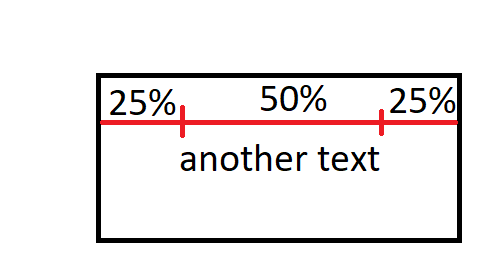
my resizeEvent:
int textWidth = fontMetrics().horizontalAdvance(text());And here is the problem: I know that I have to use create QFont variable, setPixelSize() and set this font in QLabel like this: setFont(font).
But how can I calculate textWidth to setPixelSize? -
Hi,
I would like to have a subclass of QLabel, where the text's width will have a 50% of QLabel's width:
my resizeEvent:
int textWidth = fontMetrics().horizontalAdvance(text());And here is the problem: I know that I have to use create QFont variable, setPixelSize() and set this font in QLabel like this: setFont(font).
But how can I calculate textWidth to setPixelSize?- But how can I calculate textWidth to setPixelSize?
Normally you would simply reduce point size until your text fits the area.
something like this. all credits to @SebastienL
void scalePainterFontSizeToFit(QPainter &painter, QFont &r_font, float _heightToFitIn)
{
    float oldFontSize, newFontSize, oldHeight;

    // Init
    oldFontSize=r_font.pointSizeF();

    // Loop
    for (int i=0 ; i<3 ; i++)
    {
        oldHeight = painter.fontMetrics().boundingRect('D').height();
        newFontSize = (_heightToFitIn / oldHeight) * oldFontSize;
        r_font.setPointSizeF(newFontSize);
        painter.setFont(r_font);
        oldFontSize = newFontSize;
        //qDebug() << "OldFontSize=" << oldFontSize << "HtoFitIn=" << _heightToFitIn << "  fontHeight=" << oldHeight << "  newFontSize=" << newFontSize;
    }

    // End
    r_font.setPointSizeF(newFontSize);
    painter.setFont(r_font);
}
from
https://forum.qt.io/topic/28131/how-to-calcuate-font-size-to-fit-a-text-inside-a-given-rectangle/13Disclaimer. Not tested how well this code works. Its was more for the concept overall.
