
QML Extension make install gives Errors
-
Nobody an idea what I could check?
-
Hi
On windows, to use Designer plugins (with Creator) it has to be compiled as 32 bit as Creator is a 32 bit app.
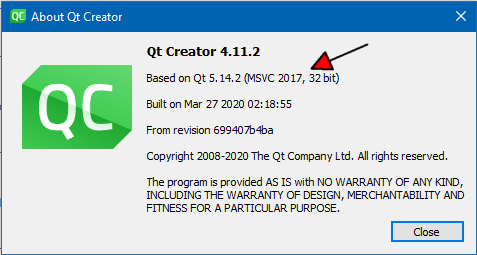
I would assume the same goes for QML plugins.
Must use same compiler and Qt version.
You seems to compile to 64 bit and that would explain the
"File format not recognized" -
Well Im on Linux and my Creator says:

So it should be 64 bit or not?
-
Well Im on Linux and my Creator says:
So it should be 64 bit or not?
Yes. correct. and Qt 5.14 using gcc around 5.3
and in release mode. ( normally)But it seems its a strip command that gives an error?
-
Yes but what does that mean.
The strange thing is in debug it looks like it creates the lib as you can see in the screenshot above.
-
Yes but what does that mean.
The strange thing is in debug it looks like it creates the lib as you can see in the screenshot above.
well it seems to call strip on the qmldir and hence the error
Not sure why. -
well what does strip anyway? in debug it wasn't even called
-
well what does strip anyway? in debug it wasn't even called
@sandro4912
Not sure what it is used for.
I wondering if you have anything extra in the .pro file ?
https://forum.qt.io/topic/39263/resolved-installs-add-strip-command-to-makefile -
pro file looks like this:
TEMPLATE = lib
TARGET = fileio
QT += qml quick
CONFIG += plugin c++11

TARGET = $$qtLibraryTarget($$TARGET)
uri = org.example.io

# Input
SOURCES += \
        fileio.cpp \
        fileio_plugin.cpp

HEADERS += \
        fileio.h \
        fileio_plugin.h

DISTFILES = qmldir

!equals(_PRO_FILE_PWD_, $$OUT_PWD) {
    copy_qmldir.target = $$OUT_PWD/qmldir
    copy_qmldir.depends = $$_PRO_FILE_PWD_/qmldir
    copy_qmldir.commands = $(COPY_FILE) "$$replace(copy_qmldir.depends, /, $$QMAKE_DIR_SEP)" "$$replace(copy_qmldir.target, /, $$QMAKE_DIR_SEP)"
    QMAKE_EXTRA_TARGETS += copy_qmldir
    PRE_TARGETDEPS += $$copy_qmldir.target
}

qmldir.files = qmldir
unix {
    installPath = $$[QT_INSTALL_QML]/$$replace(uri, \., /)
    qmldir.path = $$installPath
    target.path = $$installPath
    INSTALLS += target qmldir
}
I did not modify it at all. I just let Creator autocreate it. I choosed "QT Quick 2 Extension Plugin" as project template
-
@sandro4912, if you are still interested... ;) Just change file permissions and remove execution rights:
chmod -x /home/sandro/Qt/5.14.2/gcc_64/qml/org/example/io/qmldiror
cd /home/sandro/Qt/5.14.2/gcc_64/qml/org/example/io
chmod -x qmldir
