Skip to content
  • Categories
  • Recent
  • Tags
  • Popular
  • Users
  • Groups
  • Search
  • Get Qt Extensions
  • Unsolved
Collapse
Brand Logo
  1. Home
  2. Qt Development
  3. General and Desktop
  4. Signals and Slots to connect two windows

Signals and Slots to connect two windows

Scheduled Pinned Locked Moved Solved General and Desktop
8 Posts 3 Posters 2.4k Views 2 Watching
  • Oldest to Newest
  • Newest to Oldest
  • Most Votes
Reply
  • Reply as topic
Log in to reply
This topic has been deleted. Only users with topic management privileges can see it.
  • D Offline
    D Offline
    DouglinhasZN
    wrote on last edited by
    #1

    Hi,
    I am trying to use signals and slots so that when the user double-clicks on a row from my database table, it will open up the second window with the information from the table auto-populated into the fields in that new table:
    bf5fa2ac-b7ae-4fee-9d17-4d91335a1260-image.png
    However, when creating the signals I can't find the new window, any clue on how to do this via qt designer?
    Thanks

    1 Reply Last reply
    0
    • Chris KawaC Online
      Chris KawaC Online
      Chris Kawa
      Lifetime Qt Champion
      wrote on last edited by Chris Kawa
      #2

      You can't. Each window becomes a separate .ui file loaded at runtime into different instances of some classes. There's no way the designer can know how you'll use these files so there's no way to connect anything between them.

      The designer generates a .ui file that translates into C++ code that operates on a QWidget pointer that you give it via parameter of setupUI call. This information is not available when you design your widget. It's only available at runtime, after you already created instances of these widgets. Remember that a connect statememnt takes two pointers - sender and receiver. Designer has access only to the sender in this case.

      D 1 Reply Last reply
      1
      • Chris KawaC Chris Kawa

        You can't. Each window becomes a separate .ui file loaded at runtime into different instances of some classes. There's no way the designer can know how you'll use these files so there's no way to connect anything between them.

        The designer generates a .ui file that translates into C++ code that operates on a QWidget pointer that you give it via parameter of setupUI call. This information is not available when you design your widget. It's only available at runtime, after you already created instances of these widgets. Remember that a connect statememnt takes two pointers - sender and receiver. Designer has access only to the sender in this case.

        D Offline
        D Offline
        DouglinhasZN
        wrote on last edited by
        #3

        @Chris-Kawa
        Mhmmm a lot of what you said went over my head (beginner), but is it not possible just on Qt Designer or is it also not possible using PyQT5 and hard coding it?

        Chris KawaC 1 Reply Last reply
        0
        • D DouglinhasZN

          @Chris-Kawa
          Mhmmm a lot of what you said went over my head (beginner), but is it not possible just on Qt Designer or is it also not possible using PyQT5 and hard coding it?

          Chris KawaC Online
          Chris KawaC Online
          Chris Kawa
          Lifetime Qt Champion
          wrote on last edited by
          #4

          @DouglinhasZN I'll try to simplify - each window in the designer becomes a separate object when you run your app. Those objects do not exist when you're designing them so that's why you can't connect them in designer.

          Once your app starts and those objects are created you can connect them. So to naswer your question - yes, you can and should connect them from code.

          D 1 Reply Last reply
          1
          • Chris KawaC Chris Kawa

            @DouglinhasZN I'll try to simplify - each window in the designer becomes a separate object when you run your app. Those objects do not exist when you're designing them so that's why you can't connect them in designer.

            Once your app starts and those objects are created you can connect them. So to naswer your question - yes, you can and should connect them from code.

            D Offline
            D Offline
            DouglinhasZN
            wrote on last edited by DouglinhasZN
            #5

            @Chris-Kawa Ah I see thank you
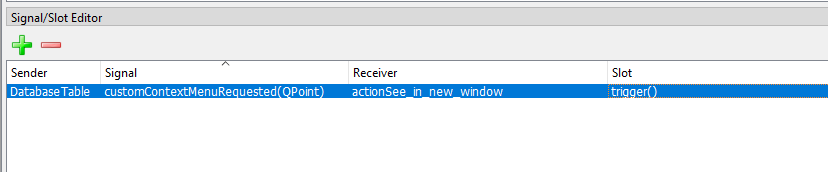
            On a different note, would you happen to know if its possible to create a right clickable menu in each row of a table?
            I want so that when the user right clicks a row, it will display a menu "see in more detail" and when clicked it would show this new window that i will hardcode in.
            But is it possible to add this menu using qt designer? I am attempting by using Action Editor and Signal/slot but no luck yet
            cf75322b-77da-493f-ba21-3f514653aba5-image.png
            2b98109e-3355-4514-8c62-32ffeff0204d-image.png

            1 Reply Last reply
            0
            • Chris KawaC Online
              Chris KawaC Online
              Chris Kawa
              Lifetime Qt Champion
              wrote on last edited by
              #6

              But is it possible to add this menu using qt designer?

              No. It's the same thing. This menu will be a separate object created at runtime. You don't have access to anything but your window in the designer.

              You could "cheat" in designer by creating a menu in the menu bar and then detaching it in code, but that would be kinda ugly hack.
              I'd suggest to just create that menu and connect it in code.

              1 Reply Last reply
              2
              • D Offline
                D Offline
                DouglinhasZN
                wrote on last edited by
                #7

                @Chris-Kawa Thank you. Solved!

                Pablo J. RoginaP 1 Reply Last reply
                0
                • D DouglinhasZN

                  @Chris-Kawa Thank you. Solved!

                  Pablo J. RoginaP Offline
                  Pablo J. RoginaP Offline
                  Pablo J. Rogina
                  wrote on last edited by
                  #8

                  @DouglinhasZN said in Signals and Slots to connect two windows:

                  Solved!

                  would you mind sharing how you solved it? Thanks.

                  Upvote the answer(s) that helped you solve the issue
                  Use "Topic Tools" button to mark your post as Solved
                  Add screenshots via postimage.org
                  Don't ask support requests via chat/PM. Please use the forum so others can benefit from the solution in the future

                  1 Reply Last reply
                  0

                  • Login

                  • Login or register to search.
                  • First post
                    Last post
                  0
                  • Categories
                  • Recent
                  • Tags
                  • Popular
                  • Users
                  • Groups
                  • Search
                  • Get Qt Extensions
                  • Unsolved