
QML SortFilterProxyModel in Qt 6.12: Composable, Range and Regular-expression filters
-
In Qt 6.10 we introduced a declarative
SortFilterProxyModelfor QML. It lets you sort and filter data of anyQAbstractItemModeldirectly in QML, without changing the source model and without writing a C++QSortFilterProxyModelsubclass. If you haven’t seen it yet, the introductory post, QML Model: Sort and filter the data on the fly, walks through the basics using a process table viewer application.Many of you tried it and sent us feedback. Thank you! In Qt 6.12, it adds new filter types, makes
FunctionFiltersimpler to write, and cleans up a few names that didn’t follow Qt conventions. This post goes through the changes using the same process table viewer, so you can take the snippets from the post and update them as you read.Changes from Qt 6.10 to Qt 6.12
Qt 6.10 Qt 6.12 Assigning the source model model: processModelsourceModel: processModel(modelis deprecated)FunctionFilterOne argument of a helper RoleDatacomponent typeEach role is its own typed argument: filter(cpuUsage: real)FunctionSorterfunction sort(lhs, rhs)function compare(lhs, rhs)(sortis deprecated)Inverting a filter invert: trueinverted: true(renamed in 6.11)Filtering by a range of values Write a FunctionFilterNew: RangeFilterFiltering by a regular expression Write a FunctionFilterNew: RegExpFilterCombining filters with AND / OR Not possible (all filters are always ANDed) New: AllOfFilterandAnyOfFilter, which can be nestedSortFilterProxyModelis still a tech preview in Qt 6.12, so its API can still change in response to your feedback.Revisiting the process table viewer in Qt 6.12
As in the post, we use a
processModelthat exposes one row per running process with the rolespid,name,uid,stateandcpuUsage, and show it in aTableView. In Qt 6.12, the basic setup looks like this:import QtQuick import QtQuick.Controls import QtQml.Models ApplicationWindow { width: 800 height: 600 visible: true ProcessModel { id: processModel } SortFilterProxyModel { id: processProxyModel sourceModel: processModel // was: model: processModel sorters: [ RoleSorter { roleName: "uid" } ] filters: [ FunctionFilter { function filter(cpuUsage: real): bool { return cpuUsage > 0 } } ] } TableView { anchors.fill: parent model: processProxyModel delegate: Rectangle { implicitWidth: 120 implicitHeight: 30 border.width: 1 Text { anchors.centerIn: parent text: display } } } }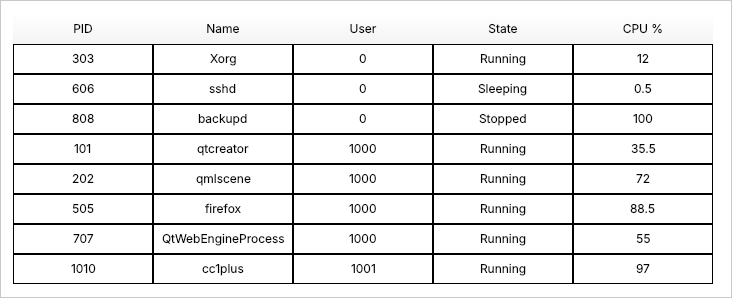
Two things changed compared to Qt 6.10: the source model is set with
sourceModel, and the filter function takes the role it needs directly as an argument. The following sections describe both.sourceModelreplacesmodelSortFilterProxyModelis a proxy model, and proxy models in Qt already have asourceModelproperty. Having a second property calledmodelcaused confusion, especially because views also have amodelproperty. In Qt 6.12, usesourceModel:SortFilterProxyModel { sourceModel: processModel }The
modelproperty still works but is deprecated. It now also accepts only aQAbstractItemModel, which matches what was supported in practice.A simpler
FunctionFilterIn Qt 6.10, a
FunctionFilterreceived the row’s data through a helper component that you had to declare yourself:// Qt 6.10 FunctionFilter { component RoleData: QtObject { property real cpuUsage } function filter(data: RoleData): bool { return data.cpuUsage > filter.text } }In Qt 6.12, you list the roles you need as typed arguments of
filter(). Each argument name must match a role name in the source model, and the proxy model passes in that role’s value for the row:// Qt 6.12 FunctionFilter { function filter(cpuUsage: real): bool { return cpuUsage > Number(filter.text) } }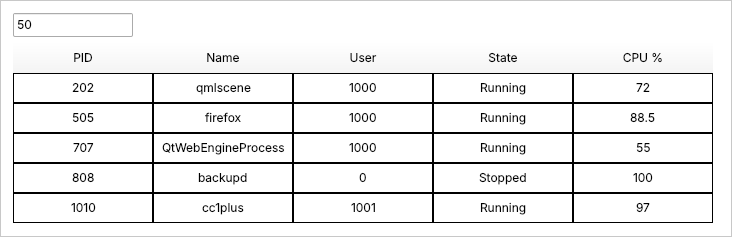
Several roles can be used at once:
FunctionFilter {
    function filter(name: string, cpuUsage: real): bool {
        return name.startsWith("qt") && cpuUsage > 10
    }
}
If an argument name doesn’t match any role, you get a warning that names it.
Filtering a range of values with
RangeFilterIn the post, we used a
FunctionFilterto show only processes above a CPU threshold. Range checks like this are common, so Qt 6.12 adds a dedicatedRangeFilter. It keeps the rows where the value ofroleNameis betweenminimumandmaximum:SortFilterProxyModel { id: processProxyModel sourceModel: processModel filters: [ RangeFilter { roleName: "cpuUsage" minimum: 70 maximum: 100 } ] }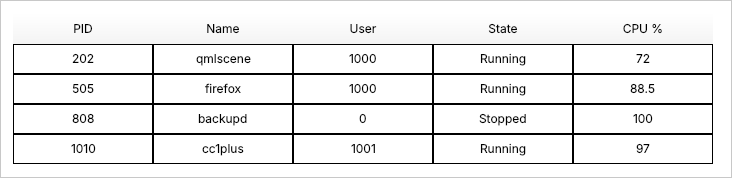
Both ranges are inclusive by default. To leave the boundary value itself out, wrap it in
exclusive():RangeFilter { roleName: "cpuUsage" minimum: exclusive(0) // cpuUsage > 0, idle processes are hidden }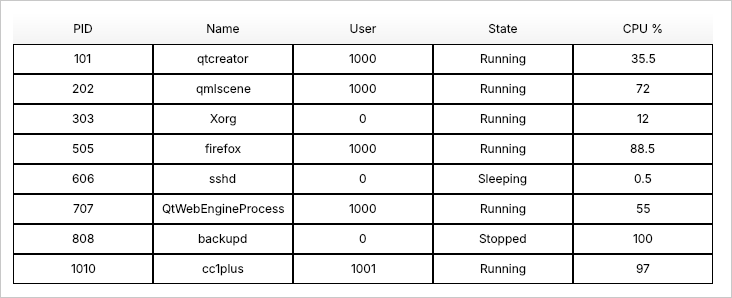
Set only
minimumor onlymaximumto get an open-ended range. Because the ranges are ordinary properties, you can bind them to UI controls, and the view updates as the user drags:RangeSlider { id: cpuRange from: 0; to: 100 first.value: 10; second.value: 100 } SortFilterProxyModel { sourceModel: processModel filters: RangeFilter { roleName: "cpuUsage" minimum: cpuRange.first.value maximum: cpuRange.second.value } }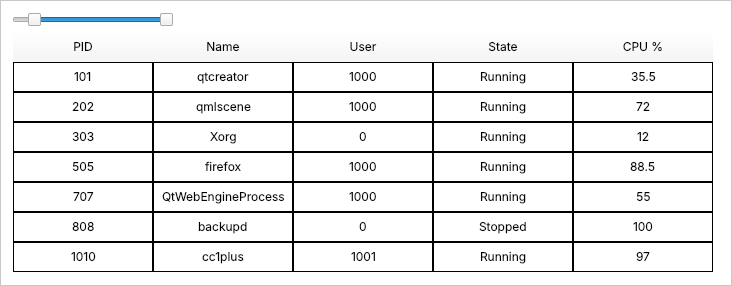
Filtering with
RegExpFilterThe post also showed how to filter the table with a JavaScript regular expression inside a
FunctionFilter. In Qt 6.12, useRegExpFilterinstead. Assign a regular expression literal toregExp:SortFilterProxyModel { sourceModel: processModel filters: RegExpFilter { roleName: "name" regExp: /^qt/i // names starting with "qt", any case } }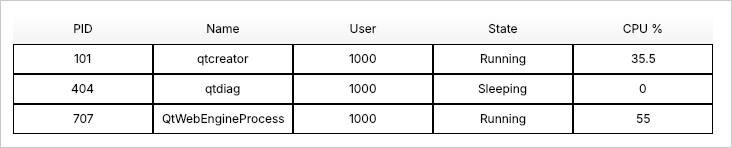
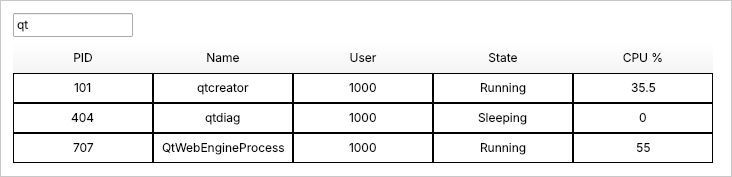
For a search field, build the expression from the text. An empty pattern lets every row through, so the full table shows while the field is empty:
TextField {
    id: filter
    placeholderText: qsTr("Filter process name")
}

SortFilterProxyModel {
    sourceModel: processModel
    filters: RegExpFilter {
        roleName: "name"
        regExp: new RegExp(filter.text, "i")
    }
}
Like every filter,
RegExpFilterchecks all columns by default. If you know which column holds the data, setcolumnto skip the other columns.Combining filters with
AllOfFilterandAnyOfFilterIn Qt 6.10, every filter in the
filterslist had to accept a row for it to be shown. This is a logical AND, and there was no way to express “this or that”. Qt 6.12 adds two filters that group other filters:AllOfFilteraccepts a row when all of its child filters accept it (AND).AnyOfFilteraccepts a row when at least one of its child filters accepts it (OR).
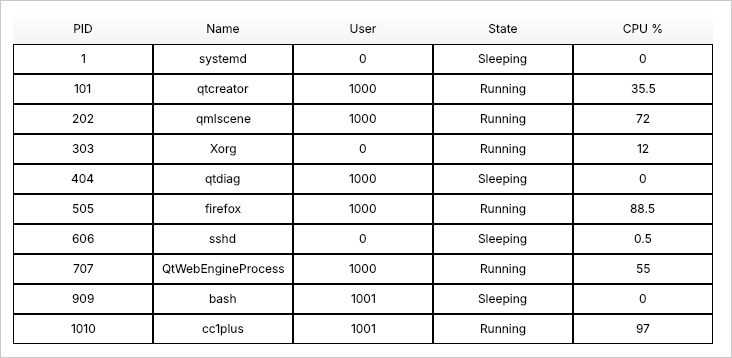
Child filters are declared directly inside the group. For example, to show processes that are either running or sleeping:
SortFilterProxyModel {
    sourceModel: processModel
    filters: AnyOfFilter {
        ValueFilter {
            roleName: "state";
            value: "Running"
        }
        ValueFilter {
            roleName: "state";
            value: "Sleeping"
        }
    }
}
Groups can be nested to build any condition. This filter shows processes that belong to the current user or use more than 50% CPU, and whose name matches the search field:
filters: AllOfFilter {
    RegExpFilter {
        roleName: "name"
        regExp: new RegExp(filter.text, "i")
    }
    AnyOfFilter {
        ValueFilter {
            roleName: "uid"
            value: currentUid
        }
        RangeFilter {
            roleName: "cpuUsage"
            minimum: exclusive(50)
        }
    }
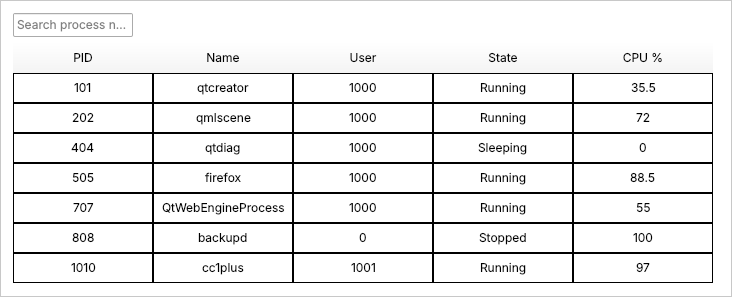
}
A group is itself a filter, so
enabledandinvertedapply to the whole group. This makes it easy to switch a set of conditions on and off from a single control:CheckBox { id: busyOrMine; text: qsTr("Only my or busy processes") } AnyOfFilter { enabled: busyOrMine.checked ValueFilter { roleName: "uid" value: currentUid } RangeFilter { roleName: "cpuUsage" minimum: exclusive(50) } }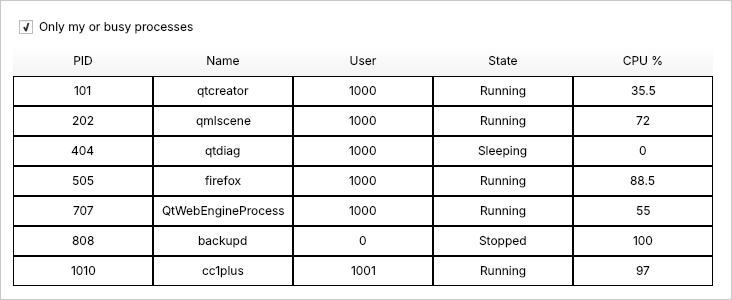
When a group is disabled, it lets every row through, so only the rest of the filters apply.
FunctionSorter:sortbecomescompareA
FunctionSortermethod returns a negative number, zero or a positive number, so it compares two rows rather than sorting them. In Qt 6.12, the method is calledcompare(). Thesort()name still works, but it prints a deprecation warning.The following sorter lists running processes first:
FunctionSorter {
    component ProcessData: QtObject {
        property string state
    }
    function compare(lhs: ProcessData, rhs: ProcessData): int {
        const rank = s => s === "Running" ? 0 : 1
        return rank(lhs.state) - rank(rhs.state)
    }
}
Always give the arguments and the return value of
compare()explicit types, as shown above. Untypedcompare()functions are not supported.invertis nowinvertedTo follow the Qt property naming convention, the
invertproperty of all filters was renamed toinvertedin Qt 6.11:ValueFilter { roleName: "uid" value: 0 inverted: true // hide processes owned by root }Putting it all together
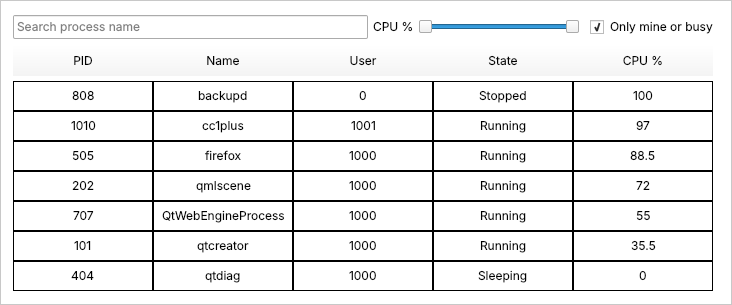
Here is the process viewer with a field to filter process name, a CPU range slider and an toggle to show busy processes. It is sorted by CPU usage and then by name:
import QtQuick
import QtQuick.Controls
import QtQuick.Layouts
import QtQml.Models

ApplicationWindow {
    width: 900
    height: 600
    visible: true
    title: qsTr("Process viewer")

    property int currentUid: 1000   // the current user's id

    ProcessModel { id: processModel }

    SortFilterProxyModel {
        id: processProxyModel
        sourceModel: processModel

        filters: [
            RegExpFilter {
                roleName: "name"
                regExp: new RegExp(filter.text, "i")
            },
            RangeFilter {
                roleName: "cpuUsage"
                minimum: cpuRange.first.value
                maximum: cpuRange.second.value
            },
            AnyOfFilter {
                enabled: busyOrMine.checked
                ValueFilter {
                    roleName: "uid";
                    value: currentUid
                }
                RangeFilter {
                    roleName: "cpuUsage";
                    minimum: exclusive(50)
                }
            }
        ]

        sorters: [
            RoleSorter {
                roleName: "cpuUsage"
                sortOrder: Qt.DescendingOrder
                priority: 0
            },
            StringSorter {
                roleName: "name"
                caseSensitivity: Qt.CaseInsensitive
                priority: 1
            }
        ]
    }

    ColumnLayout {
        anchors.fill: parent

        RowLayout {
            TextField {
                id: filter
                placeholderText: qsTr("Filter process name")
                Layout.fillWidth: true
            }
            Label { text: qsTr("CPU %") }
            RangeSlider {
                id: cpuRange
                from: 0; to: 100
                first.value: 0; second.value: 100
            }
            CheckBox {
                id: busyOrMine
                text: qsTr("Only mine or busy")
            }
        }

        HorizontalHeaderView {
            syncView: tableView
            Layout.fillWidth: true
        }

        TableView {
            id: tableView
            Layout.fillWidth: true
            Layout.fillHeight: true
            clip: true
            model: processProxyModel
            delegate: Rectangle {
                implicitWidth: 140
                implicitHeight: 30
                border.width: 1
                Text {
                    anchors.centerIn: parent
                    text: display
                }
            }
        }
    }
}
There is no JavaScript filtering logic and no
invalidate()call. Every filter is declared and bound to a control, and the table updates as the user types, drags or clicks.Migrating from Qt 6.10
If your 6.10 code has… Change it to… model: myModelsourceModel: myModelinvert: trueinverted: truefunction filter(data: RoleData)usingdata.cpuUsagefunction filter(cpuUsage: real), and remove theRoleDatacomponentfunction sort(lhs: T, rhs: T): intfunction compare(lhs: T, rhs: T): intA FunctionFilterthat checksvalue >= a && value <= bRangeFilter { roleName: "…"; minimum: a; maximum: b }A FunctionFilterthat runs a regular expressionRegExpFilter { roleName: "…"; regExp: /…/ }Several proxy models or a large function to express OR AnyOfFilter { … }, nested insideAllOfFilterif neededThe old
FunctionFilterstyle with a singleRoleDataargument is no longer supported, so update those filters when you move to Qt 6.12. Code that usesmodelorsort()keeps working, but prints deprecation warnings.Wrapping up
With Qt 6.12, SortFilterProxyModel provides more flexibility to sort and filter data in a declarative way. The common filtering use cases, such as filtering data within a range or matching a pattern, can be configured directly through RangeFilter and RegExpFilter, and the filters can be combined with logical AND and OR through AllOfFilter and AnyOfFilter. Also, the FunctionFilter has been made simpler.
SortFilterProxyModelis still a tech preview, and your feedback shapes the final API. Try the new filters in the Qt 6.12 release and tell us what works for you and what is missing, on the Qt Forum or in the Qt bug tracker. -
Hi and welcome to devnet,
Nice feature !
-
yep. really cool.
will try later ...curious:
years ago, as I switched from BlackBerry10 (Cascades/Qt 4.8) to Qt 5 (QuickControls2) I really missed the
GroupDataModel from Cascades, where I could do things like this:import bb.cascades 1.2 ListView { dataModel: GroupDataModel { sortingKeys: ["lastName", "firstName"] sortedAscending: true grouping: ItemGrouping.ByFirstChar } }great to see what's now possible with Qt QML - THX :)

