
QTextCursor fails to "replace" text using a regex match
-
Hello everyone,
I'm still working on my Markdown Editor, and I would like to add a feature similar to one from Typora or Daino Notes, that would turn text between single backticks (`.... `) into properly formatted inline code, while removing the backticks.
Here is what I've written for this, starting from a QSyntaxHighlighter tutorial that I found elsewhere. I've subclassed QSyntaxHighlighter and attached it to the document, then started writing a struct for a basic highlighting pattern/format combo :
    struct HighlightingRule {
        QRegularExpression pattern;
        QTextCharFormat format;
    };

    HighlightingRule    inlineCodeRule;
    QTextCharFormat     inlineCodeFmt;
// Inline Code inlineCodeRule.pattern = QRegularExpression(QStringLiteral("`.[^`\n]*`")); inlineCodeFmt.setBackground(Qt::gray); inlineCodeFmt.setFontFixedPitch(true); //Important for the writer to detect code fragments inlineCodeRule.format = inlineCodeFmt;Then I attempted to match the expression and remove the matched text :
QRegularExpressionMatchIterator inlineCodeIterator = inlineCodeRule.pattern.globalMatch(text);
    while(inlineCodeIterator.hasNext()){
        QRegularExpressionMatch inlineCodeMatch = inlineCodeIterator.next();

        QTextCursor cursor(QSyntaxHighlighter::currentBlock());
        cursor.setPosition(QSyntaxHighlighter::currentBlock().position() + inlineCodeMatch.capturedStart()
                           , QTextCursor::KeepAnchor);
        cursor.setPosition(QSyntaxHighlighter::currentBlock().position() + inlineCodeMatch.capturedStart() + inlineCodeMatch.capturedLength(),
                           QTextCursor::MoveAnchor);

        qDebug() << "Matched " << inlineCodeMatch.captured() << " at " << inlineCodeMatch.capturedStart() << ", " << inlineCodeMatch.capturedEnd() << ", len " << inlineCodeMatch.capturedLength();
        cursor.select(QTextCursor::WordUnderCursor);
        qDebug() << "Selected" << cursor.selectedText() <<  " at " << cursor.selectionStart() << ", " << cursor.selectionEnd() << ", len " << cursor.selectedText().length();

        cursor.removeSelectedText();

       /* if(cursor.hasSelection()){
            QString formattedText = TEST_FormatInlineCode(inlineCodeMatch.captured());
            cursor.removeSelectedText();

            cursor.setCharFormat(inlineCodeFmt);
            cursor.insertText(formattedText);
        }*/

       // cursor.setCharFormat(QTextCharFormat());
    }
However, here is the result on the text "the quick `brown fox jumps` over the lazy dog :
Matched  "`brown fox jumps`"  at  10 ,  27 , len  17
Selected "`"  at  26 ,  27 , len  1
The selection always fails, and none of the text is actually removed, save for the right backtick. I've been stuck on this all day, and have no idea on where to investigate. is the cursor even editing the document ?
Thanks for your attention
-
Hello everyone,
I'm still working on my Markdown Editor, and I would like to add a feature similar to one from Typora or Daino Notes, that would turn text between single backticks (`.... `) into properly formatted inline code, while removing the backticks.
Here is what I've written for this, starting from a QSyntaxHighlighter tutorial that I found elsewhere. I've subclassed QSyntaxHighlighter and attached it to the document, then started writing a struct for a basic highlighting pattern/format combo :
    struct HighlightingRule {
        QRegularExpression pattern;
        QTextCharFormat format;
    };

    HighlightingRule    inlineCodeRule;
    QTextCharFormat     inlineCodeFmt;
// Inline Code inlineCodeRule.pattern = QRegularExpression(QStringLiteral("`.[^`\n]*`")); inlineCodeFmt.setBackground(Qt::gray); inlineCodeFmt.setFontFixedPitch(true); //Important for the writer to detect code fragments inlineCodeRule.format = inlineCodeFmt;Then I attempted to match the expression and remove the matched text :
QRegularExpressionMatchIterator inlineCodeIterator = inlineCodeRule.pattern.globalMatch(text);
    while(inlineCodeIterator.hasNext()){
        QRegularExpressionMatch inlineCodeMatch = inlineCodeIterator.next();

        QTextCursor cursor(QSyntaxHighlighter::currentBlock());
        cursor.setPosition(QSyntaxHighlighter::currentBlock().position() + inlineCodeMatch.capturedStart()
                           , QTextCursor::KeepAnchor);
        cursor.setPosition(QSyntaxHighlighter::currentBlock().position() + inlineCodeMatch.capturedStart() + inlineCodeMatch.capturedLength(),
                           QTextCursor::MoveAnchor);

        qDebug() << "Matched " << inlineCodeMatch.captured() << " at " << inlineCodeMatch.capturedStart() << ", " << inlineCodeMatch.capturedEnd() << ", len " << inlineCodeMatch.capturedLength();
        cursor.select(QTextCursor::WordUnderCursor);
        qDebug() << "Selected" << cursor.selectedText() <<  " at " << cursor.selectionStart() << ", " << cursor.selectionEnd() << ", len " << cursor.selectedText().length();

        cursor.removeSelectedText();

       /* if(cursor.hasSelection()){
            QString formattedText = TEST_FormatInlineCode(inlineCodeMatch.captured());
            cursor.removeSelectedText();

            cursor.setCharFormat(inlineCodeFmt);
            cursor.insertText(formattedText);
        }*/

       // cursor.setCharFormat(QTextCharFormat());
    }
However, here is the result on the text "the quick `brown fox jumps` over the lazy dog :
Matched  "`brown fox jumps`"  at  10 ,  27 , len  17
Selected "`"  at  26 ,  27 , len  1
The selection always fails, and none of the text is actually removed, save for the right backtick. I've been stuck on this all day, and have no idea on where to investigate. is the cursor even editing the document ?
Thanks for your attention
@BastienSante
I think your attempts to select correctly and your use ofQTextCursor::WordUnderCursorare incorrect. The following selects your whole text including the backticks:cursor.setPosition(QSyntaxHighlighter::currentBlock().position() + inlineCodeMatch.capturedStart()); cursor.setPosition(QSyntaxHighlighter::currentBlock().position() + inlineCodeMatch.capturedEnd(), QTextCursor::KeepAnchor);and no further call to
cursor.select(QTextCursor::WordUnderCursor);.I do not know about your "while removing the backticks". You are actually altering the document if you do that. Once you have done so you will no longer find your match(es) in the document, and presumably the document will be saved without the backticks. I do not know whether
QSyntaxHighlighteris the right tool for this, it may be intended only to change the presentation of the document not its content. -
@BastienSante
I think your attempts to select correctly and your use ofQTextCursor::WordUnderCursorare incorrect. The following selects your whole text including the backticks:cursor.setPosition(QSyntaxHighlighter::currentBlock().position() + inlineCodeMatch.capturedStart()); cursor.setPosition(QSyntaxHighlighter::currentBlock().position() + inlineCodeMatch.capturedEnd(), QTextCursor::KeepAnchor);and no further call to
cursor.select(QTextCursor::WordUnderCursor);.I do not know about your "while removing the backticks". You are actually altering the document if you do that. Once you have done so you will no longer find your match(es) in the document, and presumably the document will be saved without the backticks. I do not know whether
QSyntaxHighlighteris the right tool for this, it may be intended only to change the presentation of the document not its content.@JonB The view in which I remove the backticks is a 'rendered' view, a la Typora. By looking inside the markdown writer (qtextmarkdownwriter.cpp), i found that backticks are automatically inserted if the QTextCharFormat of a certain piece of text has
setFontFixedPitch(true). I am typing and I can see the exported markdown in a debug view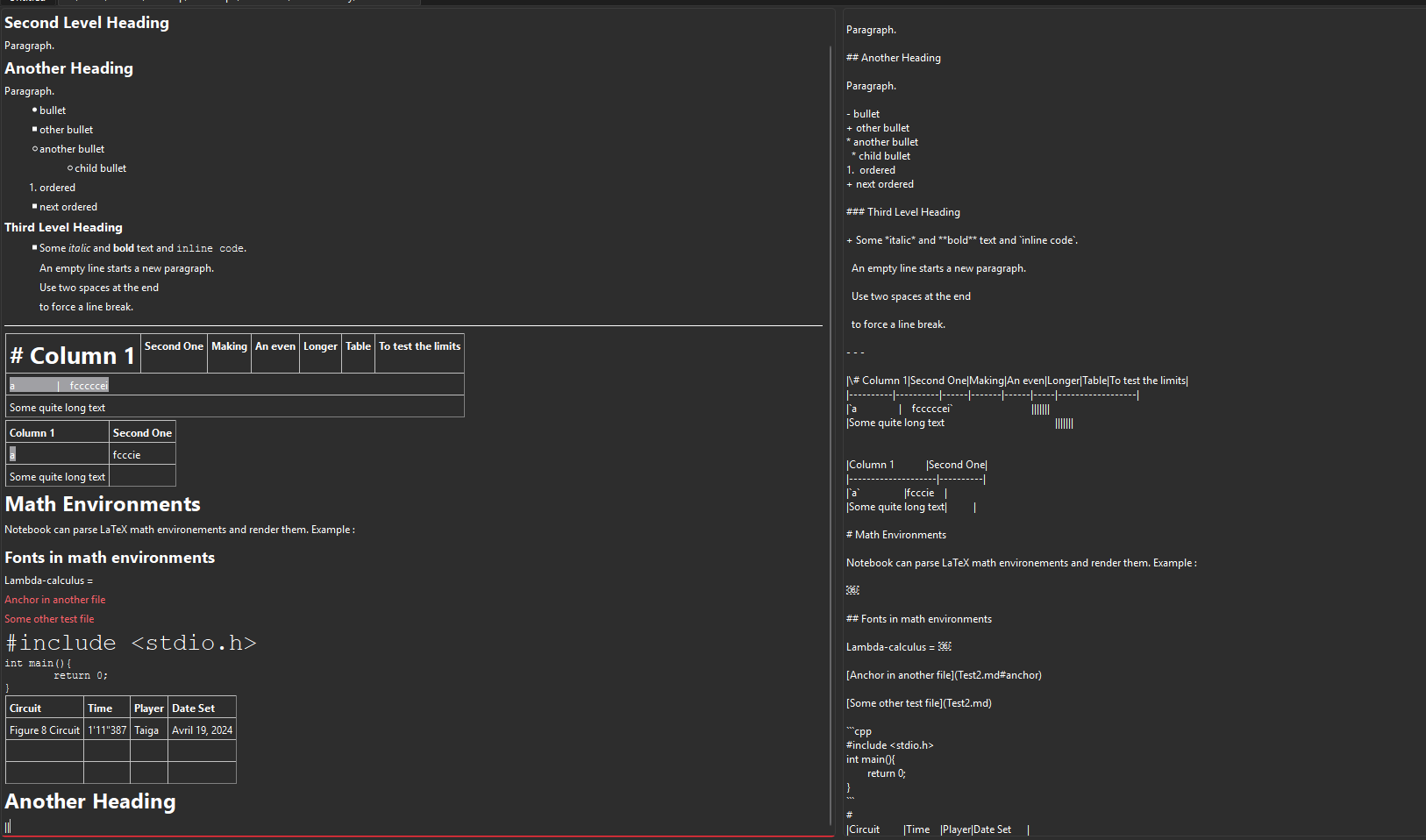
-
@JonB The view in which I remove the backticks is a 'rendered' view, a la Typora. By looking inside the markdown writer (qtextmarkdownwriter.cpp), i found that backticks are automatically inserted if the QTextCharFormat of a certain piece of text has
setFontFixedPitch(true). I am typing and I can see the exported markdown in a debug view@BastienSante
I know nothing about this or its consequences. You did not say anything about whether my code correctly captures a backtick sequence in your source as you were asking and which you had wrong.
