
QtCreator 18.0.0 often throws file errors when modifying code and Ctrl+S.
-
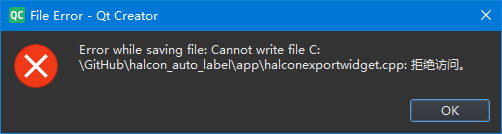
Hint .cpp: access denied.
Only when Ctrl+S is pressed multiple times is it possible to save successfully.Is it a problem that I placed the work directory in the root directory of the C:/?
In the dir: C:/GitHub/myproject, I am already give permission like this:
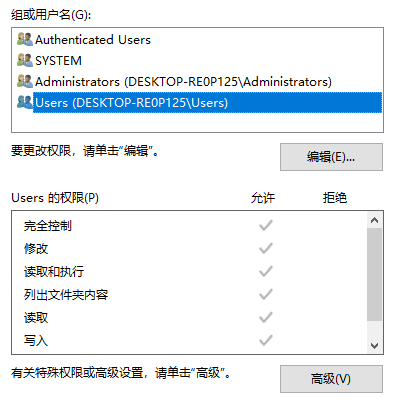
I'm testing to put the code in other folders, such as Documents, there are no problems for the time being.
-
Hint .cpp: access denied.
Only when Ctrl+S is pressed multiple times is it possible to save successfully.Is it a problem that I placed the work directory in the root directory of the C:/?
In the dir: C:/GitHub/myproject, I am already give permission like this:
I'm testing to put the code in other folders, such as Documents, there are no problems for the time being.
@Calcifer said in QtCreator 18.0.0 often throws file errors when modifying code and Ctrl+S.:
Only when Ctrl+S is pressed multiple times is it possible to save successfully.
Then it is not e.g. a permission error else it would not sometimes succeed.
First thought: do you have anti-virus software running? If so can you disable it? -
Hint .cpp: access denied.
Only when Ctrl+S is pressed multiple times is it possible to save successfully.Is it a problem that I placed the work directory in the root directory of the C:/?
In the dir: C:/GitHub/myproject, I am already give permission like this:
I'm testing to put the code in other folders, such as Documents, there are no problems for the time being.
@Calcifer You could use Process Monitor with
qtcreator.exeand find out what is going on when you get the message box. -
@Calcifer said in QtCreator 18.0.0 often throws file errors when modifying code and Ctrl+S.:
Only when Ctrl+S is pressed multiple times is it possible to save successfully.
Then it is not e.g. a permission error else it would not sometimes succeed.
First thought: do you have anti-virus software running? If so can you disable it?@JonB said in QtCreator 18.0.0 often throws file errors when modifying code and Ctrl+S.:
@Calcifer said in QtCreator 18.0.0 often throws file errors when modifying code and Ctrl+S.:
Only when Ctrl+S is pressed multiple times is it possible to save successfully.
Then it is not e.g. a permission error else it would not sometimes succeed.
First thought: do you have anti-virus software running? If so can you disable it?Thank you for your suggestion. I'll give it a try.
-
@Calcifer You could use Process Monitor with
qtcreator.exeand find out what is going on when you get the message box.@cristian-adam said in QtCreator 18.0.0 often throws file errors when modifying code and Ctrl+S.:
@Calcifer You could use Process Monitor with
qtcreator.exeand find out what is going on when you get the message box.Thank you!
I have got Process Monitor opening, and trying to add my workdir to the whitelist of anti-virus software, that should work.


