
QSqlQuery in Qt6: in-place vs prepared
-
Hi! This is my first post on this forum. I've also posted this question on SO.
First of all, Qt version is 6.10.0, testing on Arch Linux rolling. I think I've found a bug in Qt but maybe it's just my fault.
My program asks MariaDB database for some data and displays it in
QTableViewinstance via aQSqlQueryModelsubclass - I've just reimplementedcolumnCount(),headerData()anddata()methods to get read-only model:columnCount()gives constant number (query used with this model always have constant number of columns inSELECTstatement)headerData()is reimplemented just to give human-readable column namesdata()method is used to format raw values and apply some styling. This is my implementation ofdata():
QVariant EquipmentModel::data(const QModelIndex &item, int role) const {
    // shortcuts
    QVariant value = QSqlQueryModel::data(item, role);
    int column = item.column();

    // stash raw value for column 2
    if (role == Qt::UserRole) {
        if (column == 2)
            return QSqlQueryModel::data(item, Qt::DisplayRole);
    }

    // data to be displayed
    if (role == Qt::DisplayRole) {
        // name
        if (column == 1)
            return value;

        // type
        if (column == 2) {
            if (value.toString() == APP_TYPE1)
                return QString(APP_TYPE1_TXT);

            if (value.toString() == APP_TYPE2)
                return QString(APP_TYPE2_TXT);

            if (value.toString() == APP_TYPE)
                return QString(APP_TYPE3_TXT);
        }

        // verification dates
        if ((column == 3) || (column == 4)) {
            if (value.isNull())
                return QVariant(QMetaType::fromType<QDate>());
            else
                return QDateTime::fromString(value.toString(), Qt::ISODate).toString("dd.MM.yyyy");
        }
    }

    // text alignment in a cell
    if (role == Qt::TextAlignmentRole) {
        // default alignment
        int alignment = Qt::AlignVCenter;

        // type, verification date, verification valid to
        if ((column == 2) || (column == 3) || (column == 4))
            alignment |= Qt::AlignCenter;

        // name
        if (column == 1)
            alignment |= Qt::AlignLeft;

        return alignment;
    }

    // background colors
    if (role == Qt::BackgroundRole) {
        // verification date
        if (
            (column == 3) &&
            (item.siblingAtColumn(2).data(Qt::UserRole).toString() == APP_TYPE1) &&
            item.data(Qt::DisplayRole).isNull())
            return QBrush(QColor("red"), Qt::SolidPattern);

        // verification upto date
        if (
            (column == 4)  &&
            (item.siblingAtColumn(2).data(Qt::UserRole).toString() == APP_TYPE1)) {
            // time has out or empty value (no info about verifications)
            if (item.data(Qt::DisplayRole).isNull() || (item.siblingAtColumn(5).data(Qt::DisplayRole).toInt() <= 0))
                return QBrush(QColor("red"), Qt::SolidPattern);

            // month or less left
            if (item.siblingAtColumn(5).data(Qt::DisplayRole).toInt() <= 30)
                return QBrush(QColor("orange"), Qt::SolidPattern);
        }
    }

    // the rest of model-specific data
    return value;
}
In main program code I'm assigning the instance of my
EquipmentModelto the mainQTableViewvia itssetModel()and then setting SQLSELECTstatement viasetQuery(). I have some form of basic query which contains optionalWHEREclause:QString basic_query = "SELECT DISTINCT e.id, e.name, e.type, v.ts, v.upto, v.d_left " "FROM Equipment AS e " "INNER JOIN Users AS u ON u.id = e.user_id " "LEFT JOIN (SELECT equipment_id, max(ts) AS ts, max(upto) AS upto, DATEDIFF(MAX(upto), NOW()) AS d_left FROM EquipmentVerifications GROUP BY equipment_id) AS v ON v.equipment_id = e.id " "LEFT JOIN Equipment_Supplies AS es ON es.equipment_id = e.id " "LEFT JOIN Supplies AS s ON s.id = es.supply_id " "WHERE %1 " "ORDER BY e.name";At the first run (or on
ResetSearchBtn->clicked()signal) I apply this query to the model with the following:model->setQuery(basic_query.arg("1 = 1"));which in turn gives me all the records from desired table. For this case it's okay for me to use in-place query because no validation of user input should be done. However when search field is populated and user has clicked on search button I use prepared statement approach according to the Qt documentation:
QSqlQuery q;

q.prepare(basic_query.arg("e.name LIKE :search OR s.name LIKE :search OR s.description LIKE :search OR s.sn LIKE :search"));
q.bindValue(":search", QString("%%1%").arg(SearchStringFld->text()));
q.exec();

model->setQuery(std::move(q));
The problem is that it works only partially. For example, values in some columns are displayed properly, background coloring works, but columns 3 and 4 doesn't contain any values in it. When I try to
qDebug()ram item values inEquipmentModel::data()method I can see that this method is called multiple times (as expected) and first calls regardingQt::DisplayRoleand columns 3 and 4 gives proper validQDates. However, later calls lead to invalidQDateinstances so the view doesn't show any data in these columns. I've re-checked the correctness of theSELECTstatement by dumpingexecutedQuery()and feeding it directly in MariaDB. Moreover, if I try to dump model's data by walking through rows and columns right after assigning query viasetQuery()I see that all data cells are good.To check if this is the problem with prepared query I've replaced query assignment with this one:
model->setQuery(basic_query.arg("e.name LIKE '%%1%' OR s.name LIKE '%%1%' OR s.description LIKE '%%1%' OR s.sn LIKE '%%1%'").arg(SearchStringFld->text()));and the problem gone! Here are two screenshots to illustrate what I'm saying:


As you can see the number of rows in query is the same, column 1 is populated properly and background coloring as applied as well, however, columns 3 and 4 are not populated because of invalid
QDatein case of prepared query. It looks like a bug in Qt, however, there is a chance that I'm doing something terribly wrong. I've found thread on Qt forum which gives the same advice: don't allocate on heap, use stack and then move to thesetQuery(). I'd like to use prepared query in that case because I'm dealing with user-provided input and want to avoid SQL injections during my queries to the DB.So, to summarize: am I doing something wrong? What is the proper way to use prepared queries in Qt 6 when assigning them to the models?
-
According to the source, under the hood
setQuery()for in-place queries just calls another overloadedsetQuery():void QSqlQueryModel::setQuery(const QString &query, const QSqlDatabase &db) { setQuery(QSqlQuery(query, db)); }So, it looks like the problem lies within
QSqlQuery'sprepare(),bindValue()andexec()sequence for parameter binding -
Using positional parameters binding gives the same result. Also tested on Windows build - pretty much the same...
PS
This is the dump ofQSqlQuerycontents afterexec()ing it:1 "H**01" "m**ring" QDate("2025-08-06") QDate("2026-08-05") 252 3 "H**03" "m**ring" QDate("2025-08-06") QDate("2026-08-05") 252 4 "H**04" "m**ring" QDate("2025-08-06") QDate("2026-08-05") 252 5 "H**05" "m**ring" QDate(Invalid) QDate(Invalid) 0So, basically, parameter binding works - resulting query contains all necessary lines. However, for some reason, model isn't able to get this data from original query. I've even tried to tailor my own reimplementation of
data()to the simplestreturn QSqlQueryModel::data(item, role);- and still no luck... -
OK, I was able to boil it down to the MariaDB/Qt typing. I've replaced
DATEtype in database withINTand changed my SQL query accordingly (direct difference instead ofDATEDIFF) and it worked fine! Also I remember that on Qt5 (IIRC 5.12) original query worked fine. Seems like starting from some specific Qt version the usage of parameter binding together withDATE/QDatechanged somehow and nowQSqlQueryModelgives invalidQDateinstances -
Please provide a minimal compilable example which does not involve a model but also creates the table
-
@dviktor
TL;DR: You have posted 3 "pages" of information/questions and I at least do not know exactly what you are asking or where your problem lies. And please don't paste links to external screenshots which are not even accessible to people other than you.For example, you seem to spend most of your time talking about parameters and binding and then write "So, basically, parameter binding works".... Does your problem relate to binding? Does it relate to using a query with
LIKEand binding?So, it looks like the problem lies within QSqlQuery's prepare(), bindValue() and exec() sequence for parameter binding
I doubt it.
Here are some of the things I think you should do:
QSqlQuery::prepare()return a value for you to check --- so do so. As doesexec()--- so do that too.- Remove everything to do with a view/table view and concentrate just on the model/SQL query.
- If there is a problem potentially with a date being invalid, change your SQL query to use whatever MariaDB has to turn a date into text (some sort of
CONVERTTOTEXT(SQL_date_column_or_expression)) and return it as such, so that you can see what is there.
I will stop here as you have just made a new post..... Let me look at that....
-
OK, I was able to boil it down to the MariaDB/Qt typing. I've replaced
DATEtype in database withINTand changed my SQL query accordingly (direct difference instead ofDATEDIFF) and it worked fine! Also I remember that on Qt5 (IIRC 5.12) original query worked fine. Seems like starting from some specific Qt version the usage of parameter binding together withDATE/QDatechanged somehow and nowQSqlQueryModelgives invalidQDateinstances@dviktor said in QSqlQuery in Qt6: in-place vs prepared:
I've replaced DATE type in database with INT and changed my SQL query accordingly (direct difference instead of DATEDIFF)
In the course of your questions you jump between various SQL queries and show output which does not seem to relate to the queries you show.
DATEDIFF()has never returned a SQLDATE, it returns anINT. Have you somehow told your model that this column is aQDateor SQLDATEwhen in fact it is an integer? How come you show certain rows with a validQDateand others where it is invalid? I don't see how that would arise, either the column is a date or an integer but not a mixture across different rows.like starting from some specific Qt version the usage of parameter binding together with DATE/QDate changed somehow and now QSqlQueryModel gives invalid QDate instances
What binding? Parameter binding relates to input parameters used e.g. in a
WHEREclause. Sorry but it cannot influence columns returned, nor affect something about whether that data is a date or not....I would first have no view and no model and verify what you get back with plain
QSqlQuerys. When that is working I would move toQSqlQueryModelbut still no view and verify that. Finally I would attach aQTableViewto the model and verify that. Baby steps each time.... -
My intention was to edit original post but I've spent more than 3600 seconds limit for edits so I've just added new info in separate posts.
So I'll try to summarize current observations and results:- My original scheme contained just two columns with
DATEtype - columnstsanduptoin MariaDB.DATEDIFFis used just to calculate difference between these columns and return it as integer. - Client written in Qt handles columns
tsanduptoasDATEand tries to convert it to human-readable form withQDateTime::fromString(value.toString(), Qt::ISODate).toString("dd.MM.yyyy");. Difference column is treated as-is and used only for background settings to warn the user - I've done debug dumps of query contents right after
exec()ing it and all of expected values were in place for both in-place and prepared queries. However, if I try to debug-print them fromEquipmentModel::datathen I see different behavior in case of in-place and prepared queries. - If I replace
DATEin database scheme toINTandDATEDIFF()to direct difference then things start to work fine - no moreInvalidvalues seen indata()method.
- My original scheme contained just two columns with
-
My intention was to edit original post but I've spent more than 3600 seconds limit for edits so I've just added new info in separate posts.
So I'll try to summarize current observations and results:- My original scheme contained just two columns with
DATEtype - columnstsanduptoin MariaDB.DATEDIFFis used just to calculate difference between these columns and return it as integer. - Client written in Qt handles columns
tsanduptoasDATEand tries to convert it to human-readable form withQDateTime::fromString(value.toString(), Qt::ISODate).toString("dd.MM.yyyy");. Difference column is treated as-is and used only for background settings to warn the user - I've done debug dumps of query contents right after
exec()ing it and all of expected values were in place for both in-place and prepared queries. However, if I try to debug-print them fromEquipmentModel::datathen I see different behavior in case of in-place and prepared queries. - If I replace
DATEin database scheme toINTandDATEDIFF()to direct difference then things start to work fine - no moreInvalidvalues seen indata()method.
@dviktor
So can we agree that input parameters and binding are not in any way an issue and we can ignore that part of your writings?QDateTime::fromString(value.toString(), Qt::ISODate): this can fail depending on the exact content/format ofvalue.toString(). Also what type isvalueto begin with? If it's aQDateI don't see the point of converting it to a string and then trying to parse that as an ISO date. You should look at whatQVariant::typeName()andQVariant::metaType()return on the value. As I wrote earlier, if you are saying some date values seem to be valid while others are not, write a query which returns it as a string from the database and examine that.If you claim that all rows returned are valid if examined directly but not when it goes through
QSqlQueryModelanddata()then produce a minimal reproducer which shows exactly this happening. If your table holds just two rows, one which works and one which does not, that would be great. - My original scheme contained just two columns with
-
yes, because raw query dump shows all expected entries, it looks like parameter binding at its own is not a problem, but it somehow interferences when model tries to retrieve data. Regarding conversion to string and other potential problems with model: I've even tried to get rid of my custom model at all and assign plain QSqlQueryModel to my view without column hiding - effectively, raw dump with QTableView - and the problem with DATE columns still persisted. So that's not related to my custom model, and as I said earlier - change to INT instead of DATE "fixes" it. I'll post minimals tomorrow together with data dumps for both DATE and INT columns. Thank you for suggestions!
-
yes, because raw query dump shows all expected entries, it looks like parameter binding at its own is not a problem, but it somehow interferences when model tries to retrieve data. Regarding conversion to string and other potential problems with model: I've even tried to get rid of my custom model at all and assign plain QSqlQueryModel to my view without column hiding - effectively, raw dump with QTableView - and the problem with DATE columns still persisted. So that's not related to my custom model, and as I said earlier - change to INT instead of DATE "fixes" it. I'll post minimals tomorrow together with data dumps for both DATE and INT columns. Thank you for suggestions!
@dviktor said in QSqlQuery in Qt6: in-place vs prepared:
it looks like parameter binding at its own is not a problem, but it somehow interferences when model tries to retrieve data
This should really not be possible. It might affect which rows are returned if the parameter is used in a
WHERE, but that is a different matter.and the problem with DATE columns still persisted
- Confirm what
QVariant::metaType()returns for your SQLDATEcolumns. I would expect it not to return a string but eitherQDateorQDateTime? - Print out the
value.toString(). Is it really parseable as aQt::ISODate? - As I said, temporarily change the SQL side to return a string of its date and examine that.
- As a random thought, any chance you are getting USA-style-date-strings and then trying to convert them as though they were ISO dates? That would produce invalid dates on some values but not others, where the day number is regarded as a month number and is greater than 12.
- Confirm what
-
Finally, I was able to make the simplest reproducible example.
CMakeLists.txt
main.cpp
main.hcontains only DB credentials, I will not post it here.Final result:
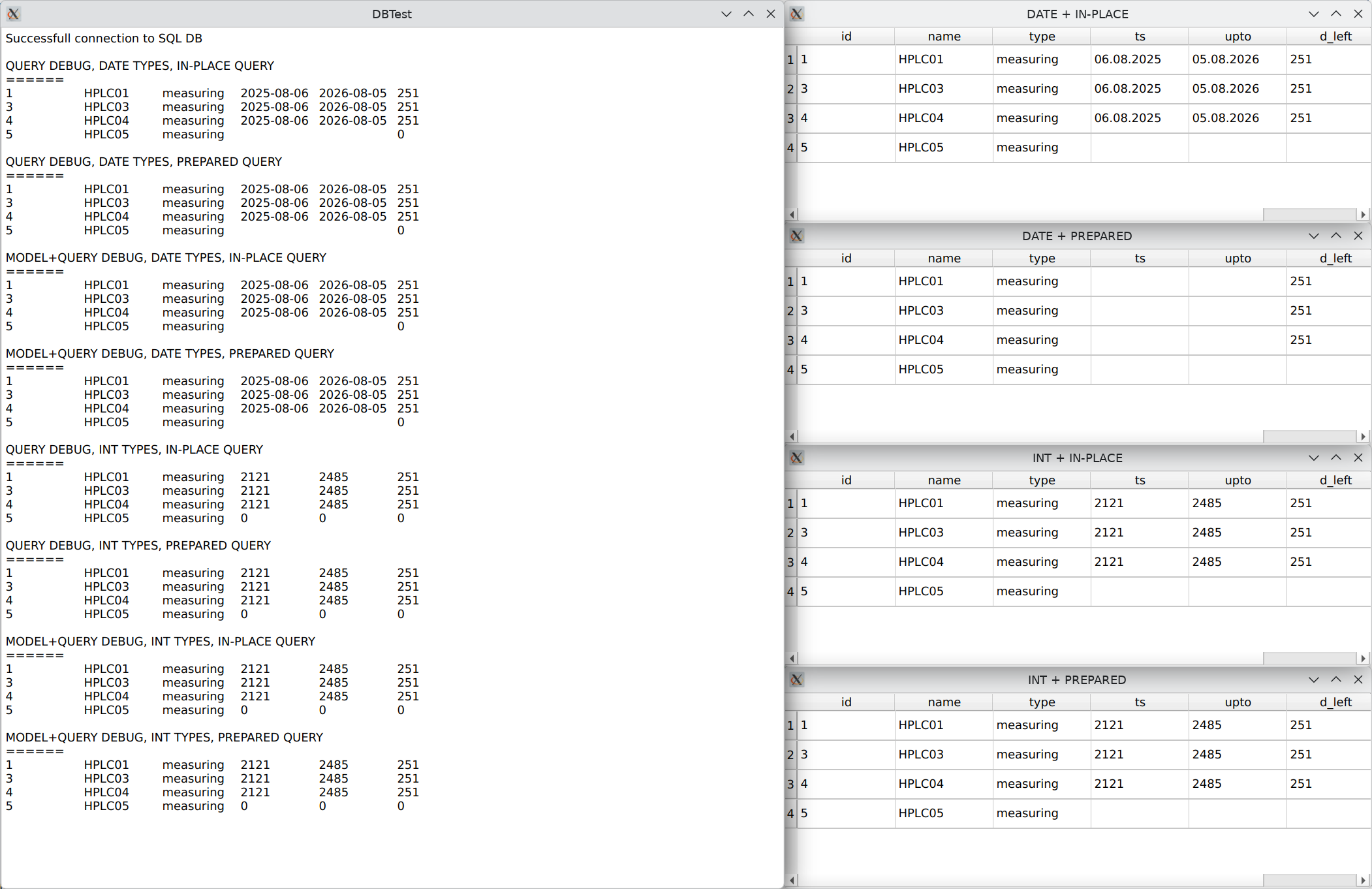
As you can see I have 12 tests: 6 forDATE(4 textual dump + 2 views) and 6 forINT(4 textual dump + 2 views) types for columns in MariaDB. Also there are table definitions.From the results it can be seen that the only problematic case is
DATE+ prepared query +QTableView. For the simplicity I haven't used custom model at all - just stayed withQSqlQueryModel. Also re-checking the contents of separate queries and models shows that their data is valid and contains expected records. But the view doesn't display it properly for some reason -
If I change my basic SQL query statement (the first line of it) from:
"SELECT DISTINCT e.id, e.name, e.type, v.ts, v.upto, v.d_left "
to:
"SELECT DISTINCT e.id, e.name, e.type, DATE_FORMAT(v.ts, '%d.%m.%Y'), DATE_FORMAT(v.upto, '%d.%m.%Y'), v.d_left "
(remember that I still use plainQSqlQueryModelso no custom data conversions involved) then all works fine!
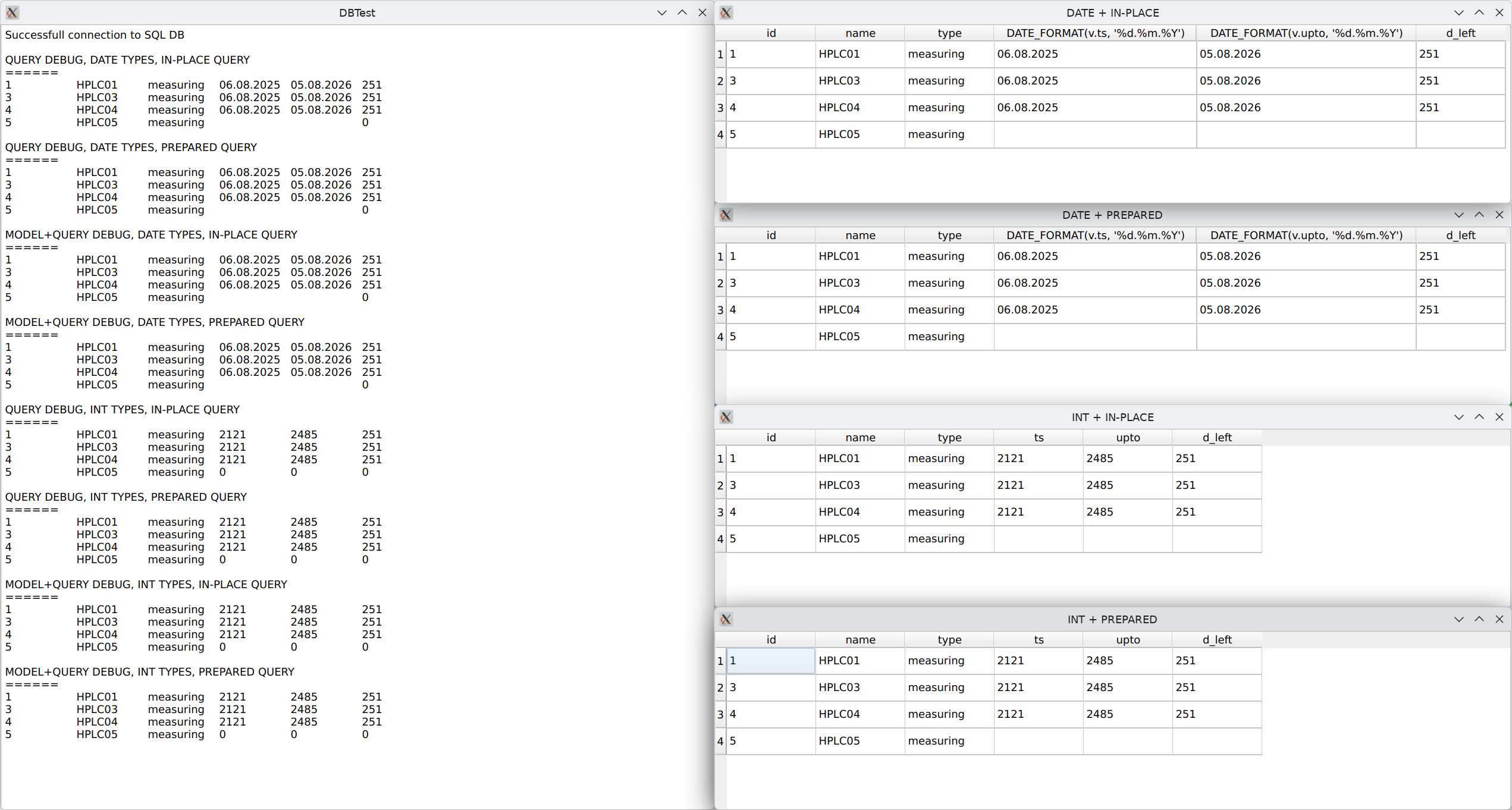
So, it looks like
QSqlQueryModelmisbehaves somehow in connection withQTableViewwhen some of the columns are ofQDatetype -
Your test still does not create and fill the table. Fix it if you want help from me.
-
Your test still does not create and fill the table. Fix it if you want help from me.
@Christian-Ehrlicher I've made direct dump of my test database. You can quickly feed it to the MariaDB with:
cat dbtest.sql | mariadb -u root -p -D dbtest
assumingdbtestdatabase already createdPS: added '05' strings to make search return the same results
PPS: '05' was used as search string in my MRE -
This is working fine for me:
#include <QtSql>
#include <QtWidgets>

int main(int argc, char* argv[])
{
    QApplication a(argc, argv);
    QSqlDatabase db = QSqlDatabase::addDatabase("QMYSQL");
    db.setDatabaseName("testdb");
    db.setUserName("");
    db.setPassword("");
    db.setHostName("");
    db.setConnectOptions("MYSQL_OPT_SSL_VERIFY_SERVER_CERT=FALSE");
    if (!db.open()) {
        qDebug() << db.lastError();
        return 1;
    }
    QSqlQuery query;
    query.exec("DROP TABLE IF EXISTS test");
    if (!query.exec("CREATE TABLE test (id int, ts date)")) {
        qDebug() << query.lastError();
        return 1;
    }
    QString insertSql1 = "INSERT INTO test (id, ts) VALUES (1, now())";
    if (!query.exec(insertSql1)) {
        qDebug() << query.lastError();
        return 1;
    }
    QTableView tv1;
    auto model1 = new QSqlQueryModel;
    model1->setQuery(QSqlQuery("SELECT * FROM test WHERE id = 1"));
    tv1.setModel(model1);
    tv1.show();

    QTableView tv2;
    auto model2 = new QSqlQueryModel;
    QSqlQuery q;
    q.prepare("SELECT * FROM test WHERE id = :id");
    q.bindValue(":id", 1);
    q.exec();
    model2->setQuery(std::move(q));
    tv2.setModel(model2);
    tv2.show();

    int ret = a.exec();
    query.exec("DROP TABLE IF EXISTS test");
    db.close();
    return ret;
}
Please provide a minimal, compilable example to reproduce your problem.
-
I told you what I need and also showed you that it works correctly so... Prove me wrong
-
I don't argue that it may work on this simplest two-column example without any issues but that's not my case. My SQL query is a bit more sophisticated and includes
JOINs as well as calculated columns (withMAX,DATEDIFFetc). Checking with bare SQL request viamariadbcommand line client or phpMyAdmin console shows that the query line itself is ok - I get all expected rows and columns.And as it shown on the screenshots above the problem goes away if I wrap
DATE-typed columns withDATE_FORMATso I effectively get string objects instead of date. So that's why I've decided it's a bug somewhere in Qt. I've also prepared minimal database sample which exposes erratic behavior. Moreover, the database itself may be provided by third-party service and not by means of Qt-aided creation. Who knows - may be there are some difference in a way database were prepared. -
I don't argue that it may work on this simplest two-column example without any issues but that's not my case. My SQL query is a bit more sophisticated and includes
JOINs as well as calculated columns (withMAX,DATEDIFFetc). Checking with bare SQL request viamariadbcommand line client or phpMyAdmin console shows that the query line itself is ok - I get all expected rows and columns.And as it shown on the screenshots above the problem goes away if I wrap
DATE-typed columns withDATE_FORMATso I effectively get string objects instead of date. So that's why I've decided it's a bug somewhere in Qt. I've also prepared minimal database sample which exposes erratic behavior. Moreover, the database itself may be provided by third-party service and not by means of Qt-aided creation. Who knows - may be there are some difference in a way database were prepared.@dviktor
I looked at your "minimal" repro. The queries are horrendously long and complex, and require many tables with many columns. If I were you and I wanted help/someone to look at it I would spend my time reducing to an absolute minimum, e.g. does it require aJOINat all, does it show up with oneJOIN, do I really need a calculated column, do I needMAX()or other "aggregate", does it matter whether a column isDATEversusDATETIME, does theWHEREclause matter, etc. I would hope to produce the absolute minimum code and database where I could say: "if you run this query it works fine but as soon as I make just this one little change it goes wrong". Up to you.

