Skip to content
  • Categories
  • Recent
  • Tags
  • Popular
  • Users
  • Groups
  • Search
  • Get Qt Extensions
  • Unsolved
Collapse
Brand Logo
  1. Home
  2. Qt Development
  3. QML and Qt Quick
  4. QQuickWidget embeded in QDialog has no hover effection at show
Qt 6.11 is out! See what's new in the release blog

QQuickWidget embeded in QDialog has no hover effection at show

Scheduled Pinned Locked Moved Unsolved QML and Qt Quick
1 Posts 1 Posters 212 Views
  • Oldest to Newest
  • Newest to Oldest
  • Most Votes
Reply
  • Reply as topic
Log in to reply
This topic has been deleted. Only users with topic management privileges can see it.
  • Y Offline
    Y Offline
    yanqinh
    wrote on last edited by yanqinh
    #1

    A. My trouble:
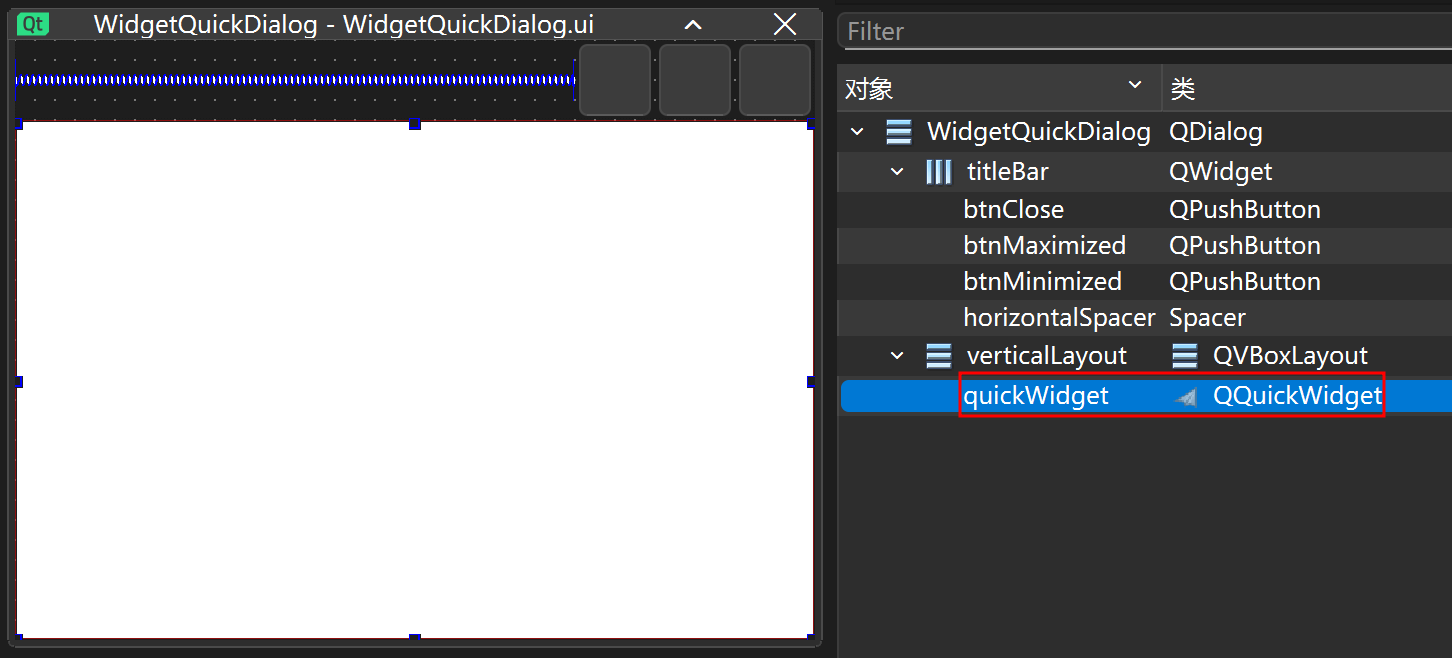
    I embed a QQuickWidget into QDialog.
    But the qml MouseArea of Button will have no hover effection after showing until I clicked any position (also desktop).

    It would have hover effection if I replace dialog.exec() with dialog.show() or exec with WindowModality. ( I need ApplicationModality.)

    B. What I have tried but no use:

    I used to try giving focus to MouseArea in qml by Timer, calling forceActive() in cpp, setFocus() etc, and QcoreApplication::postEvent(MousePressEvent...).

    C. My idea
    I don't know how to solve it, maybe I will replace QDialog with QQuickView.

    I use QQuickWidget in QDialog to reuse some cpp implementation ( frameless, shadow and corner with radius).

    I’m hoping to hear your thoughts.

    bbf0a522-a429-462d-a73d-a840ea476ee3-image.png

        WidgetQuickDialog dialog;
        dialog.SetContentText(text);
        dialog.exec();
    
    import QtQuick
    import QtQuick.Window
    import QtQuick.Controls
    import QtQuick.Layouts
    
    Item {
        id: root
    
        property string btnRightText: "btnRightText"
        property string contentText: "contentText"
    
        signal signalBtnRightClicked
    
        anchors.fill: parent
    
        Rectangle {
            anchors.fill: parent
            color: "white"
        }
        ColumnLayout {
            anchors.fill: parent
    
            Text {
                Layout.fillWidth: true
                color: "#1C1F23"
                text: root.contentText
    
                font {
                    family: "PingFang SC"
                    pixelSize: 16
                }
            }
            Item {
                Layout.fillHeight: true
                Layout.fillWidth: true
            }
            Button {
                function getBgColor() {
                    var normalColor = "#00C221";
                    if (pressed) {
                        return Qt.darker(normalColor, 1.2);
                    } else if (hovered) {
                        return Qt.darker(normalColor, 1.1);
                    }
                    return normalColor;
                }
    
                Layout.alignment: Qt.AlignRight | Qt.AlignBottom
                Layout.bottomMargin: 15
                Layout.preferredHeight: 40
                Layout.preferredWidth: 100
                Layout.rightMargin: 20
                text: root.btnRightText
    
                background: Rectangle {
                    color: parent.getBgColor()
                    radius: 4
                }
    
                onPressed: root.signalBtnRightClicked()
    
                font {
                    family: "PingFang SC"
                    pixelSize: 18
                    weight: 600
                }
                MouseArea {
                    id: btnMouseArea
    
                    anchors.fill: parent
                    cursorShape: Qt.PointingHandCursor
                    enabled: true
                    hoverEnabled: true
                    propagateComposedEvents: true
    
                    onPressed: function (mouse) {
                        mouse.accepted = false;
                    }
                }
                /* Just a try, ths log will outputs but still no hover effection
                Timer {
                    interval: 500
                    repeat: false
                    running: true
    
                    onTriggered: {
                        console.log("hello world")
                        btnMouseArea.forceActiveFocus();
                        btnMouseArea.entered();
                        btnMouseArea
                    }
                }
                */
            }
        }
    }
    
    
    1 Reply Last reply
    0

    • Login

    • Login or register to search.
    • First post
      Last post
    0
    • Categories
    • Recent
    • Tags
    • Popular
    • Users
    • Groups
    • Search
    • Get Qt Extensions
    • Unsolved