
Issue with QLabel and wordwrap
-
@Bonnie
Hmm. I still don't 100% follow [I am going to create my own brand new post about layouts and spacing in a few moments to ask about what I have never understood, but that may be a separate matter]. But if I understand you right you are saying when the OP wrote "If I remove the word-wrap then I actually get what I want :" that is not "the whole story", they have made some other change(s) than just word wrap (e.g. expanding policy, spacer/stretch)?Anyway at this point for my own part as I wrote earlier I would want the OP to post exactly what they have done to see what they see....
@JonB said in Issue with QLabel and worwrap:
But if I understand you right you are saying when the OP wrote "If I remove the word-wrap then I actually get what I want :" that is not "the whole story", they have made some other change(s) than just word wrap (e.g. expanding policy, spacer/stretch)?
Emm, I think this is talking about the second picture and the third picture, the only difference between these two is in the third picture wordWrap is changed to false.
(Now I'm not sure if I understand you right, what does "the one line label grow to full width" mean).
I've met similar problem but not the same as OP. I could give a simple example by changing your code to
QVBoxLayout *vlayout = new QVBoxLayout;
w.setLayout(vlayout);

QLabel *lab = new QLabel("Install all additional resources");
lab->setStyleSheet("QLabel { background-color : red; }");

vlayout->addWidget(lab, 0, Qt::AlignCenter);

lab->setWordWrap(true);
So I want this label to be in the center of its parent widget which has a fixed (or maximum) width, and when the text is too long and can't be shown in single line completely, it should wrap. (This is exactly how our UI designs it)
But if wordwrap=true, it breaks into 2 lines even though there's enough space to show it in single line. -
Hi everyone, just logged in and there's alot of activity ! Did not expect that.
I haven't had the time to read everything here, but in the meantime I feel like some more context is warranted:
This whole thing is a custom class of mine mimicking a QCheckBox, it is very simply, a QSvgWidget and a QLabel put together in a QHBoxLayout with some signal/slot and events shenanigans to make it interactive.
This was made to add the word-wrap property to QCheckBoxes, which for some reasons isn't available in base QCheckBox. This whole thing was made for the word-wrap hence why I can't remove it. And we need word-wrap because our app is "modular" so to speak, I'm not in control of the text, and depending on the content and the language, it could get pretty long and need a word-wrap.
As requested, here is a simple reproductible example:
Subwidget.cpp:
SubWidget::SubWidget(QWidget *parent) : QWidget{parent} { QSvgWidget * svg = new QSvgWidget("Path/to/the/SVG/asset/Not/really/relevant"); QVBoxLayout * innerLayout = new QVBoxLayout(); innerLayout->setContentsMargins(0, 0, 0, 0); innerLayout->setSpacing(0); innerLayout->addWidget(svg); QFrame * frame = new QFrame(); frame->setStyleSheet("QFrame{min-width: 14px;max-width: 14px;min-height: 14px;max-height: 14px;margin:0px;padding:0px;}"); frame->setLayout(innerLayout); QLabel * label = new QLabel("This is a text, a very looong text !!!!"); label->setWordWrap(true); label->setStyleSheet("QLabel{background-color:red;margin:0px;pading:0px}"); QHBoxLayout * layout = new QHBoxLayout(); layout->setContentsMargins(0, 0, 0, 0); layout->setSpacing(0); layout->addWidget(frame); layout->addWidget(label); this->setLayout(layout); }- The QSvgWidget has to be in a QFrame, because for some reasons defining the size of a QSvgWidget in the stylesheet causes some wonky behaviour but I found that wrapping it in a QFrame solves my problems
and main.cpp
#include "SubWidget.h"

#include <QApplication>

int main(int argc, char *argv[])
{
    QApplication a(argc, argv);
    SubWidget w;
    w.show();
    return a.exec();
}
and the .pro file:
QT       += core gui widgets svgwidgets
CONFIG += c++17
SOURCES += \
    SubWidget.cpp \
    main.cpp
HEADERS += \
    SubWidget.h
# Default rules for deployment.
qnx: target.path = /tmp/$${TARGET}/bin
else: unix:!android: target.path = /opt/$${TARGET}/bin
!isEmpty(target.path): INSTALLS += target
Here's the result:
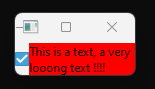
and once stretched:
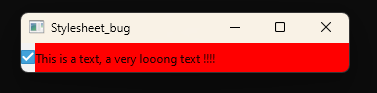
All I'm trying to do is make it so that the QLabel (the red zone) stops after the end of the text once stretched.
I'll take a more detailed look into what has been proposed and I'll keep you updated.
EDIT: @JonB you said
assuming the OP is correct that word wrap makes the one line label grow to full width, which I have not verifiedDo note that in my example, the QLabel gets stretched horizontally even if word-wrap is turned off (but fixing that becomes trivial by adding some stretch factors here and there), so I'm a bit confused.
-
Yes, the horizontal size hint of QLabel with wordWrap on is such a pain in the a**. I end up writing my own label class.
Emmm...but your problem is a bit different from mine. So visually you could accept picture 1, but you need only reacting to the text part's clicking, right?
Then you could try the html markup way, and make your text in<a href="xxx"></a>tags ("xxx" cannot be empty and need adding style to make links look like normal text), then react toQLabel::linkActivatedinstead of click events. But this will make the cursor becoming hand when hovering the text, if you don't want this you need to also connectQWidget::unsetCursortoQLabel::linkHovered.
Another way would be trying to get the text rect in the label and ignore the click events outside text rect, but this can be more complicated.Using this html markup tech looks like an easy solution for my issue (at least easier than manually calculating the rect and dealing with mouse events that way).
Alas this would open us up for some code injection, since the text in those labels is loaded at run-time from some on-disk files, so this solution is a no-go sadly. -
Some additional infos:
In my OG post, this first image is our current implementation.

This second image is after calling QHBoxLayout::addStretch(100) on our layout after adding our checkbox and label:

And the third image is exact same setup as the second, but without word-wrap:

Which is exactly what I'm looking for, but with word-wrap obviously.
Glad to see I'm not the only one having some issues with word-wrap, even though I never had issues with labels wrapping when not needed.
-
Using this html markup tech looks like an easy solution for my issue (at least easier than manually calculating the rect and dealing with mouse events that way).
Alas this would open us up for some code injection, since the text in those labels is loaded at run-time from some on-disk files, so this solution is a no-go sadly.@PLL3 said in Issue with QLabel and worwrap:
Using this html markup tech looks like an easy solution for my issue (at least easier than manually calculating the rect and dealing with mouse events that way).
Alas this would open us up for some code injection, since the text in those labels is loaded at run-time from some on-disk files, so this solution is a no-go sadly.Well it should be safe if you handle the text by
QString::toHtmlEscaped().
But I actually don't like that the cursor needs to be unset when hovering.
So I think the mouse events filtering may be a better way.
Aren't you already handling the mouse events since QLabel has no "clicked" signal?@PLL3 said in Issue with QLabel and worwrap:
Glad to see I'm not the only one having some issues with word-wrap, even though I never had issues with labels wrapping when not needed.
This unnecessarily breaking lines issue only occurs when the sizehint width is used as the actual label width.
In normal case, long text labels are usually horizontally expanding, so there won't be such problem.
I never had such issues until my current project. -
Aren't you already handling the mouse events since QLabel has no "clicked" signal?
Yes, but to handle the mouse position I simply use the enterEvent and leaveEvent toggling a flag to remember wether the mouse is hovering the widget or no.
If I understand correctly, I'll have to replace/modify that to work with the text rect instead of the whole QLabel, sounds doable, if only a bit convoluted.Anyway, I think we've pretty much gone round the whole subject. Nothing much to do here, I think I'll close the thread soon.
I'll keep watching @JonB 's thread, since it's asking for an evolution that would solve my current issue. -
Hi, closing this thread.
To sum up, my issue stems from a Qt layout limitation, for posterity's sake here's the solution that I ended up using to get around my problem:
I installed an eventFilter on my QLabel, filtering for QSinglePointEvent and checking wether the cursor was within the text, here's a small code example:
bool SubWidget::eventFilter(QObject * iObject, QEvent* iEvent){ if ((iObject == _label) && (iEvent->isSinglePointEvent())){ //if event is a mouse event on _label QFontMetrics fm(_label->font()); int textWidth = fm.horizontalAdvance(_label->text()); // width of the text in pixels int textHeight = fm.height(); // height of the text in pixels int textX = 0; int textY = 0; // calculate the coordinates for the top-left pixel of the actual text, text position depends on alignment if ((_label->alignment() & Qt::AlignLeft) == Qt::AlignLeft){ textX = _label->x(); } else if ((_label->alignment() & Qt::AlignHCenter) == Qt::AlignHCenter){ textX = _label->x() + (_label->width() - textWidth)/2; } else if ((_label->alignment() & Qt::AlignRight) == Qt::AlignRight){ textX = _label->x() + _label->width() - textWidth; } if ((_label->alignment() & Qt::AlignTop) == Qt::AlignTop){ textY = _label->y(); } else if ((_label->alignment() & Qt::AlignVCenter) == Qt::AlignVCenter){ textY = _label->y() + (_label->height() - textHeight)/2; } else if ((_label->alignment() & Qt::AlignBottom) == Qt::AlignBottom){ textY = _label->y() + _label->height() - textHeight; } QSinglePointEvent* pointEvent = static_cast<QSinglePointEvent*>(iEvent); QPointF mousePos = pointEvent->position(); // Get mouse position relative to the label from the event if ((textX <= mousePos.x() && mousePos.x() <= (textX + textWidth)) // if mouse is located within the text area && (textY <= mousePos.y() && mousePos.y() <= (textY + textHeight))) { //Do stuff here to further refine the event //eg: hover event, mousepress event etc etc return true; } else { return false; } } return QWidget::eventFilter(iObject, iEvent); } -
P PLL3 has marked this topic as solved on
-
Hi, closing this thread.
To sum up, my issue stems from a Qt layout limitation, for posterity's sake here's the solution that I ended up using to get around my problem:
I installed an eventFilter on my QLabel, filtering for QSinglePointEvent and checking wether the cursor was within the text, here's a small code example:
bool SubWidget::eventFilter(QObject * iObject, QEvent* iEvent){ if ((iObject == _label) && (iEvent->isSinglePointEvent())){ //if event is a mouse event on _label QFontMetrics fm(_label->font()); int textWidth = fm.horizontalAdvance(_label->text()); // width of the text in pixels int textHeight = fm.height(); // height of the text in pixels int textX = 0; int textY = 0; // calculate the coordinates for the top-left pixel of the actual text, text position depends on alignment if ((_label->alignment() & Qt::AlignLeft) == Qt::AlignLeft){ textX = _label->x(); } else if ((_label->alignment() & Qt::AlignHCenter) == Qt::AlignHCenter){ textX = _label->x() + (_label->width() - textWidth)/2; } else if ((_label->alignment() & Qt::AlignRight) == Qt::AlignRight){ textX = _label->x() + _label->width() - textWidth; } if ((_label->alignment() & Qt::AlignTop) == Qt::AlignTop){ textY = _label->y(); } else if ((_label->alignment() & Qt::AlignVCenter) == Qt::AlignVCenter){ textY = _label->y() + (_label->height() - textHeight)/2; } else if ((_label->alignment() & Qt::AlignBottom) == Qt::AlignBottom){ textY = _label->y() + _label->height() - textHeight; } QSinglePointEvent* pointEvent = static_cast<QSinglePointEvent*>(iEvent); QPointF mousePos = pointEvent->position(); // Get mouse position relative to the label from the event if ((textX <= mousePos.x() && mousePos.x() <= (textX + textWidth)) // if mouse is located within the text area && (textY <= mousePos.y() && mousePos.y() <= (textY + textHeight))) { //Do stuff here to further refine the event //eg: hover event, mousepress event etc etc return true; } else { return false; } } return QWidget::eventFilter(iObject, iEvent); }@PLL3 Emm, this doesn't seem right. Isn't it only working for single line text? Are you sure it works when the text is wrapped?
The proper method I think here should be https://doc.qt.io/qt-6/qfontmetrics.html#boundingRect-3, which can calculate with text wrapping. -
@PLL3 Emm, this doesn't seem right. Isn't it only working for single line text? Are you sure it works when the text is wrapped?
The proper method I think here should be https://doc.qt.io/qt-6/qfontmetrics.html#boundingRect-3, which can calculate with text wrapping.@Bonnie Ohh damn, you are correct, my textWidth value doesn't change when the text is wrapped or unwrapped.
Thanks for pointing that out, I might have not detected this for a while.
I'll look into what you proposed and update my previous solution if that works. -
Aren't you already handling the mouse events since QLabel has no "clicked" signal?
Yes, but to handle the mouse position I simply use the enterEvent and leaveEvent toggling a flag to remember wether the mouse is hovering the widget or no.
If I understand correctly, I'll have to replace/modify that to work with the text rect instead of the whole QLabel, sounds doable, if only a bit convoluted.Anyway, I think we've pretty much gone round the whole subject. Nothing much to do here, I think I'll close the thread soon.
I'll keep watching @JonB 's thread, since it's asking for an evolution that would solve my current issue.@PLL3 said in Issue with QLabel and wordwrap:
I'll keep watching @JonB 's thread, since it's asking for an evolution that would solve my current issue.
FWIW, @Bonnie has now answered my thread correctly in https://forum.qt.io/post/832859. void QLayoutItem::setAlignment(Qt::Alignment alignment) is just what I was asking about/looking for but couldn't spot. One can forget "spacers" and "stretchers" and just do
layout->setAlignment(Qt::AlignLeft)(or another desired alignment), it is a single setting on the layout and makes much simpler sense.However, I had a quick fiddle and didn't find it really helped with your word wrapping case. You might want to try for yourself in case you find some way, but I'm thinking it does not address your situation.
-
@JonB One can forget "spacers" and "stretchers" and just do layout->setAlignment(Qt::AlignLeft)
Out of curiosity I tried it, and it had the same result as adding a spacer item after my QLabel, ie it squishes it to the left and forces it to wrap as much as it can.
@Bonnie The proper method I think here should be https://doc.qt.io/qt-6/qfontmetrics.html#boundingRect-3, which can calculate with text wrapping.
Maybe I utilized it wrong but it did not work for me, I tried bot of these calls:
QRect boundingRect1 = fm.boundingRect(_label->rect(), _label->alignment(), _label->text());

QRect boundingRect2 = fm.boundingRect(_label->frameRect(), _label->alignment(), _label->text());
As soon as the text start wrapping, it didn't work.
I ended up using the original width of the unwrapped text and the actual size of the QLabel.
The current width of the text is smaller value of the two.
By comparing the original width of the unwrapped text and the QLabel width I estimate the number of lines and using the lineheight I can estimate the current height of the text.Here's the updated eventFilter:
bool SubWidget::eventFilter(QObject * iObject, QEvent* iEvent){
    if ((iObject == _label) && (iEvent->isSinglePointEvent())){ //if event is a mouse event on _label

        QFontMetrics fm(_label->font());
        int lineHeight = fm.height(); // height of one line of text in pixels
        int originalTextWidth = fm.horizontalAdvance(_label->text()); // original width of the text (unwrapped) in pixels

        QRect labelRect = _label->frameRect();
        int labelWidth = labelRect.width(); // Current width of the entire label

        int nbOfLines = 1 + (originalTextWidth / labelWidth); // we try to estimate the number of lines (not always 100% accurate but good enough)

        // We now have estimations of the actual text width and text height
        int textHeightEstimate = lineHeight * nbOfLines;
        int textWidthEstimate = originalTextWidth < labelWidth ? originalTextWidth : labelWidth;

        int textX = 0;
        int textY = 0;
        // calculate the coordinates for the top-left pixel of the actual text, text position depends on alignment
        if ((_label->alignment() & Qt::AlignLeft) == Qt::AlignLeft){
            textX = 0;
        }
        else if ((_label->alignment() & Qt::AlignHCenter) == Qt::AlignHCenter){
            textX = (_label->width() - textWidthEstimate)/2;
        }
        else if ((_label->alignment() & Qt::AlignRight) == Qt::AlignRight){
            textX = _label->width() - textWidthEstimate;
        }
        if ((_label->alignment() & Qt::AlignTop) == Qt::AlignTop){
            textY = 0;
        }
        else if ((_label->alignment() & Qt::AlignVCenter) == Qt::AlignVCenter){
            textY = (_label->height() - textHeightEstimate)/2;
        }
        else if ((_label->alignment() & Qt::AlignBottom) == Qt::AlignBottom){
            textY = _label->height() - textHeightEstimate;
        }

        QSinglePointEvent* pointEvent = static_cast<QSinglePointEvent*>(iEvent);
        QPointF mousePos = pointEvent->position(); // Get mouse position relative to the label from the event
        if ((textX <= mousePos.x() && mousePos.x() <= (textX + textWidthEstimate)) // if mouse is located within the text area
            && (textY <= mousePos.y() && mousePos.y() <= (textY + textHeightEstimate)))
        {
            // Mouse is hovering text
            // Do stuff here
            std::cout << "MOUSE IS HOVERING TEXT !!!!!" << std::endl;
            return true;
        }
        else
        {
            // Mouse is hovering label but not text
            // Do stuff here
            return false;
        }
    }
    return QWidget::eventFilter(iObject, iEvent);
}
From my quick tests, this seems to work most of the time.
One exception is, due to how wrapping works with words of varying sizes, when wrapping over several lines, I might calculate 5 lines of text when there are really 6. But this is frankly minor, and shouldn't happen very often.
This works well enough and I already spent too much time on this minor issue. -
@JonB One can forget "spacers" and "stretchers" and just do layout->setAlignment(Qt::AlignLeft)
Out of curiosity I tried it, and it had the same result as adding a spacer item after my QLabel, ie it squishes it to the left and forces it to wrap as much as it can.
@Bonnie The proper method I think here should be https://doc.qt.io/qt-6/qfontmetrics.html#boundingRect-3, which can calculate with text wrapping.
Maybe I utilized it wrong but it did not work for me, I tried bot of these calls:
QRect boundingRect1 = fm.boundingRect(_label->rect(), _label->alignment(), _label->text());

QRect boundingRect2 = fm.boundingRect(_label->frameRect(), _label->alignment(), _label->text());
As soon as the text start wrapping, it didn't work.
I ended up using the original width of the unwrapped text and the actual size of the QLabel.
The current width of the text is smaller value of the two.
By comparing the original width of the unwrapped text and the QLabel width I estimate the number of lines and using the lineheight I can estimate the current height of the text.Here's the updated eventFilter:
bool SubWidget::eventFilter(QObject * iObject, QEvent* iEvent){
    if ((iObject == _label) && (iEvent->isSinglePointEvent())){ //if event is a mouse event on _label

        QFontMetrics fm(_label->font());
        int lineHeight = fm.height(); // height of one line of text in pixels
        int originalTextWidth = fm.horizontalAdvance(_label->text()); // original width of the text (unwrapped) in pixels

        QRect labelRect = _label->frameRect();
        int labelWidth = labelRect.width(); // Current width of the entire label

        int nbOfLines = 1 + (originalTextWidth / labelWidth); // we try to estimate the number of lines (not always 100% accurate but good enough)

        // We now have estimations of the actual text width and text height
        int textHeightEstimate = lineHeight * nbOfLines;
        int textWidthEstimate = originalTextWidth < labelWidth ? originalTextWidth : labelWidth;

        int textX = 0;
        int textY = 0;
        // calculate the coordinates for the top-left pixel of the actual text, text position depends on alignment
        if ((_label->alignment() & Qt::AlignLeft) == Qt::AlignLeft){
            textX = 0;
        }
        else if ((_label->alignment() & Qt::AlignHCenter) == Qt::AlignHCenter){
            textX = (_label->width() - textWidthEstimate)/2;
        }
        else if ((_label->alignment() & Qt::AlignRight) == Qt::AlignRight){
            textX = _label->width() - textWidthEstimate;
        }
        if ((_label->alignment() & Qt::AlignTop) == Qt::AlignTop){
            textY = 0;
        }
        else if ((_label->alignment() & Qt::AlignVCenter) == Qt::AlignVCenter){
            textY = (_label->height() - textHeightEstimate)/2;
        }
        else if ((_label->alignment() & Qt::AlignBottom) == Qt::AlignBottom){
            textY = _label->height() - textHeightEstimate;
        }

        QSinglePointEvent* pointEvent = static_cast<QSinglePointEvent*>(iEvent);
        QPointF mousePos = pointEvent->position(); // Get mouse position relative to the label from the event
        if ((textX <= mousePos.x() && mousePos.x() <= (textX + textWidthEstimate)) // if mouse is located within the text area
            && (textY <= mousePos.y() && mousePos.y() <= (textY + textHeightEstimate)))
        {
            // Mouse is hovering text
            // Do stuff here
            std::cout << "MOUSE IS HOVERING TEXT !!!!!" << std::endl;
            return true;
        }
        else
        {
            // Mouse is hovering label but not text
            // Do stuff here
            return false;
        }
    }
    return QWidget::eventFilter(iObject, iEvent);
}
From my quick tests, this seems to work most of the time.
One exception is, due to how wrapping works with words of varying sizes, when wrapping over several lines, I might calculate 5 lines of text when there are really 6. But this is frankly minor, and shouldn't happen very often.
This works well enough and I already spent too much time on this minor issue.@PLL3 said in Issue with QLabel and wordwrap:
Out of curiosity I tried it, and it had the same result as adding a spacer item after my QLabel
That's about what I expected, possibly in all cases. Which is why I didn't think it would help you. My beef (in the related thread I created) is that I feel this is a much "nicer" way of achieving left alignment without having a spacer at the end or a stretch on the last widget.
-
@JonB One can forget "spacers" and "stretchers" and just do layout->setAlignment(Qt::AlignLeft)
Out of curiosity I tried it, and it had the same result as adding a spacer item after my QLabel, ie it squishes it to the left and forces it to wrap as much as it can.
@Bonnie The proper method I think here should be https://doc.qt.io/qt-6/qfontmetrics.html#boundingRect-3, which can calculate with text wrapping.
Maybe I utilized it wrong but it did not work for me, I tried bot of these calls:
QRect boundingRect1 = fm.boundingRect(_label->rect(), _label->alignment(), _label->text());

QRect boundingRect2 = fm.boundingRect(_label->frameRect(), _label->alignment(), _label->text());
As soon as the text start wrapping, it didn't work.
I ended up using the original width of the unwrapped text and the actual size of the QLabel.
The current width of the text is smaller value of the two.
By comparing the original width of the unwrapped text and the QLabel width I estimate the number of lines and using the lineheight I can estimate the current height of the text.Here's the updated eventFilter:
bool SubWidget::eventFilter(QObject * iObject, QEvent* iEvent){
    if ((iObject == _label) && (iEvent->isSinglePointEvent())){ //if event is a mouse event on _label

        QFontMetrics fm(_label->font());
        int lineHeight = fm.height(); // height of one line of text in pixels
        int originalTextWidth = fm.horizontalAdvance(_label->text()); // original width of the text (unwrapped) in pixels

        QRect labelRect = _label->frameRect();
        int labelWidth = labelRect.width(); // Current width of the entire label

        int nbOfLines = 1 + (originalTextWidth / labelWidth); // we try to estimate the number of lines (not always 100% accurate but good enough)

        // We now have estimations of the actual text width and text height
        int textHeightEstimate = lineHeight * nbOfLines;
        int textWidthEstimate = originalTextWidth < labelWidth ? originalTextWidth : labelWidth;

        int textX = 0;
        int textY = 0;
        // calculate the coordinates for the top-left pixel of the actual text, text position depends on alignment
        if ((_label->alignment() & Qt::AlignLeft) == Qt::AlignLeft){
            textX = 0;
        }
        else if ((_label->alignment() & Qt::AlignHCenter) == Qt::AlignHCenter){
            textX = (_label->width() - textWidthEstimate)/2;
        }
        else if ((_label->alignment() & Qt::AlignRight) == Qt::AlignRight){
            textX = _label->width() - textWidthEstimate;
        }
        if ((_label->alignment() & Qt::AlignTop) == Qt::AlignTop){
            textY = 0;
        }
        else if ((_label->alignment() & Qt::AlignVCenter) == Qt::AlignVCenter){
            textY = (_label->height() - textHeightEstimate)/2;
        }
        else if ((_label->alignment() & Qt::AlignBottom) == Qt::AlignBottom){
            textY = _label->height() - textHeightEstimate;
        }

        QSinglePointEvent* pointEvent = static_cast<QSinglePointEvent*>(iEvent);
        QPointF mousePos = pointEvent->position(); // Get mouse position relative to the label from the event
        if ((textX <= mousePos.x() && mousePos.x() <= (textX + textWidthEstimate)) // if mouse is located within the text area
            && (textY <= mousePos.y() && mousePos.y() <= (textY + textHeightEstimate)))
        {
            // Mouse is hovering text
            // Do stuff here
            std::cout << "MOUSE IS HOVERING TEXT !!!!!" << std::endl;
            return true;
        }
        else
        {
            // Mouse is hovering label but not text
            // Do stuff here
            return false;
        }
    }
    return QWidget::eventFilter(iObject, iEvent);
}
From my quick tests, this seems to work most of the time.
One exception is, due to how wrapping works with words of varying sizes, when wrapping over several lines, I might calculate 5 lines of text when there are really 6. But this is frankly minor, and shouldn't happen very often.
This works well enough and I already spent too much time on this minor issue.@PLL3 said in Issue with QLabel and wordwrap:
Out of curiosity I tried it, and it had the same result as adding a spacer item after my QLabel, ie it squishes it to the left and forces it to wrap as much as it can.
Yes, as the example code I posted above shows, I met this problem exactly when I'm using alignment in layout :)
@PLL3 said in Issue with QLabel and wordwrap:
QRect boundingRect1 = fm.boundingRect(_label->rect(), _label->alignment(), _label->text());
Oh,
flagsis not the same as alignment, the way you call it still doesn't tell that you want text to wrap.
So here it should be something likefm.boundingRect(_label->contentsRect(), _label->alignment() | Qt::TextWordWrap, _label->text())contentsRect()is not the exact rect value that Qt use to draw text, but is the closest one in my opinion. If you want to be more accurate you can check the Qt source code ofQLabel::paintEvent, but maybe not very necessary. -
I stumbled upon this thread while looking for a solution about such unwanted word wrap, and I am pretty sure the following post on StackOverflow is about the exact same issue and has a few potential manual workaround for it : https://stackoverflow.com/questions/31535143/how-to-prevent-qlabel-from-unnecessary-word-wrapping
I wish this would be fixed in Qt core instead though, as the current behavior definitely does not look like the intended behavior for that case...
