
Skip to content
  • Categories
  • Recent
  • Tags
  • Popular
  • Users
  • Groups
  • Search
  • Get Qt Extensions
  • Unsolved
Collapse
Brand Logo
  1. Home
  2. Qt Development
  3. General and Desktop
  4. QT HTML to pdf width error
Qt 6.11 is out! See what's new in the release blog

QT HTML to pdf width error

Scheduled Pinned Locked Moved Unsolved General and Desktop
2 Posts 2 Posters 242 Views 1 Watching
  • Oldest to Newest
  • Newest to Oldest
  • Most Votes
Reply
  • Reply as topic
Log in to reply
This topic has been deleted. Only users with topic management privileges can see it.
  • J Offline
    J Offline
    JISU
    wrote on last edited by
    #1

    I am working on converting HTML to .pdf via QT.
    The code I created is as follows.
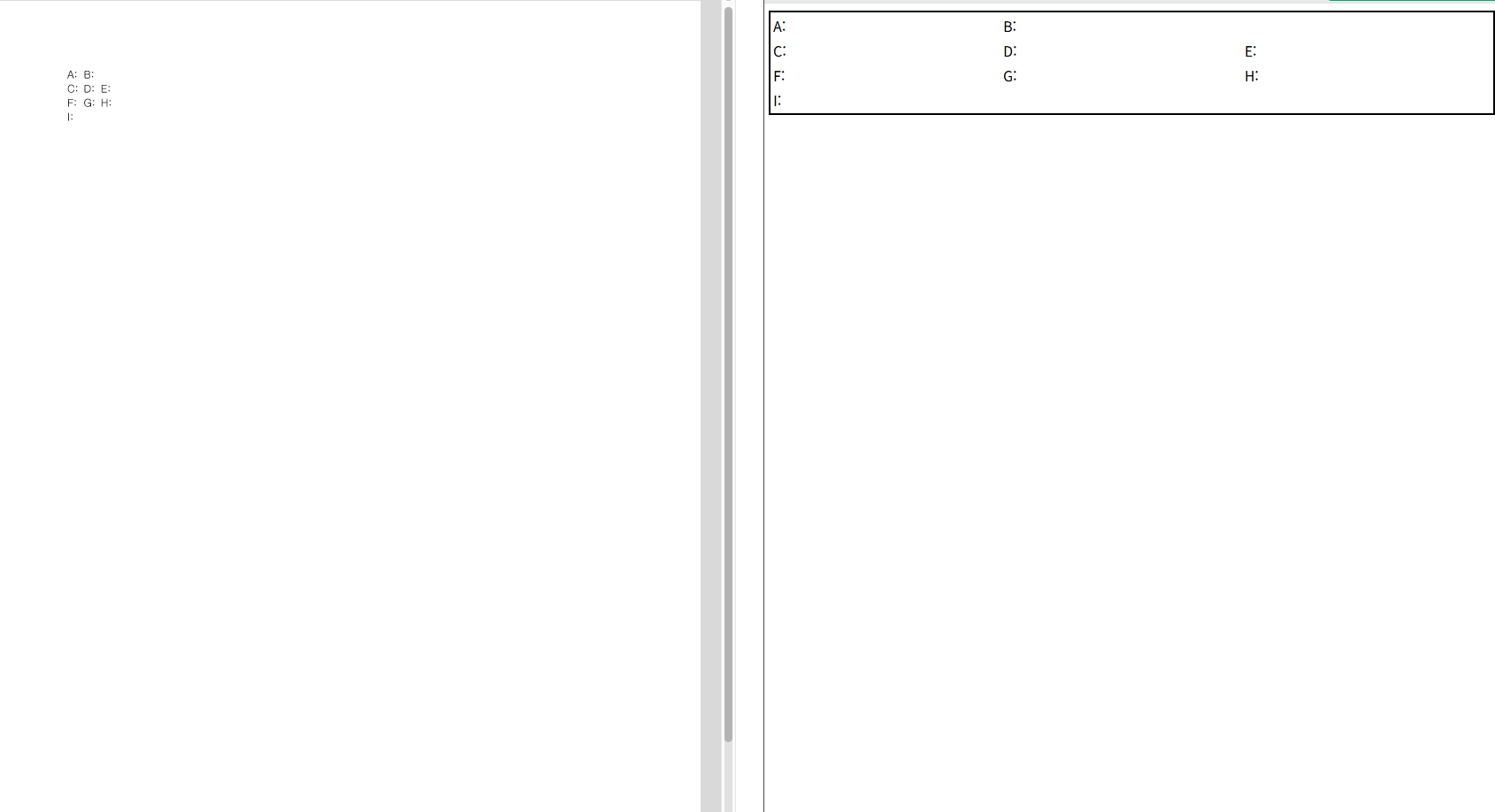
    However, when I look at the generated pdf result, the table is shifted to one side (left picture).
    How can I make it appear as width: 100% like the Viewer supported by the web (W3Schools) (right picture)?
    test.PNG

    QString strHtml = R"(
                  <!DOCTYPE html>
                  <html>
                    <head>
                      <meta charset="UTF-8">
                      <title>Test Hospital DR Report</title>
                      <style>
                      table {
                        width: 100%;
                      }
                      </style>
                    </head>
                    <body>
                      <table style="width:100%">
                        <tr>
                          <td>A: </td>
                          <td>B: </td>
                        </tr>
                        <tr>
                          <td>C: </td>
                          <td>D: </td>
                          <td>E: </td>
                        </tr>
                        <tr>
                          <td>F: </td>
                          <td>G: </td>
                          <td>H: </td>
                        </tr>
                        <tr>
                          <td>I: </td>
                          <td></td>
                          <td></td>
                        </tr>
                      </table>
                    </body>
                  </html>
                )";
    
    
        QTextDocument doc;
        doc.setHtml(strHtml);
    
        // Print HTML content
        QPrinter printer;
        printer.setPrinterName(QPrinterInfo::defaultPrinter().printerName());
        if (printer.isValid()) {
            doc.print(&printer);
            qDebug() << "[" << __FUNCTION__ << "] Printed successfully...";
        } else {
            qDebug() << "[" << __FUNCTION__ << "] Failed to print...";
        }
    
    Pl45m4P 1 Reply Last reply
    0
    • J JISU

      I am working on converting HTML to .pdf via QT.
      The code I created is as follows.
      However, when I look at the generated pdf result, the table is shifted to one side (left picture).
      How can I make it appear as width: 100% like the Viewer supported by the web (W3Schools) (right picture)?

      test.PNG

      QString strHtml = R"(
                    <!DOCTYPE html>
                    <html>
                      <head>
                        <meta charset="UTF-8">
                        <title>Test Hospital DR Report</title>
                        <style>
                        table {
                          width: 100%;
                        }
                        </style>
                      </head>
                      <body>
                        <table style="width:100%">
                          <tr>
                            <td>A: </td>
                            <td>B: </td>
                          </tr>
                          <tr>
                            <td>C: </td>
                            <td>D: </td>
                            <td>E: </td>
                          </tr>
                          <tr>
                            <td>F: </td>
                            <td>G: </td>
                            <td>H: </td>
                          </tr>
                          <tr>
                            <td>I: </td>
                            <td></td>
                            <td></td>
                          </tr>
                        </table>
                      </body>
                    </html>
                  )";
      
      
          QTextDocument doc;
          doc.setHtml(strHtml);
      
          // Print HTML content
          QPrinter printer;
          printer.setPrinterName(QPrinterInfo::defaultPrinter().printerName());
          if (printer.isValid()) {
              doc.print(&printer);
              qDebug() << "[" << __FUNCTION__ << "] Printed successfully...";
          } else {
              qDebug() << "[" << __FUNCTION__ << "] Failed to print...";
          }
      
      Pl45m4P Offline
      Pl45m4P Offline
      Pl45m4
      wrote on last edited by
      #2

      @JISU

      Hi,
      try QPdfWriter instead and I don't think the style width = 100% is supported, so you get your table, but not stretched over the whole page.


      If debugging is the process of removing software bugs, then programming must be the process of putting them in.

      ~E. W. Dijkstra

      1 Reply Last reply
      0

      • Login

      • Login or register to search.
      • First post
        Last post
      0
      • Categories
      • Recent
      • Tags
      • Popular
      • Users
      • Groups
      • Search
      • Get Qt Extensions
      • Unsolved