Skip to content
  • Categories
  • Recent
  • Tags
  • Popular
  • Users
  • Groups
  • Search
  • Get Qt
  • Unsolved
Collapse
Brand Logo
  1. Home
  2. Qt Development
  3. General and Desktop
  4. QLineEdit - wrong placeholderText's color on Linux Mint dark theme
Qt 6.12 LTS is out! See what's new in the release blog

QLineEdit - wrong placeholderText's color on Linux Mint dark theme

Scheduled Pinned Locked Moved Solved General and Desktop
19 Posts 4 Posters 5.8k Views 2 Watching
  • Oldest to Newest
  • Newest to Oldest
  • Most Votes
Reply
  • Reply as topic
Log in to reply
This topic has been deleted. Only users with topic management privileges can see it.
  • SGaistS SGaist

    Hi,

    Which version of Qt is provided by your distribution ?
    Did you try to build your application with it ?

    K Offline
    K Offline
    Kobid
    wrote on last edited by
    #4

    @SGaist said in QLineEdit - wrong placeholderText's color on Linux Mint dark theme:

    Hi,

    Which version of Qt is provided by your distribution ?
    Did you try to build your application with it ?

    Seems that installing Keepassx (I think it is the only Qt app which I installed from Mint repo, other ones are from flatpak) I got 5.15.13 as dependency packages:

    qmake --version
    QMake version 3.1
    Using Qt version 5.15.13 in /usr/lib/x86_64-linux-gnu
    

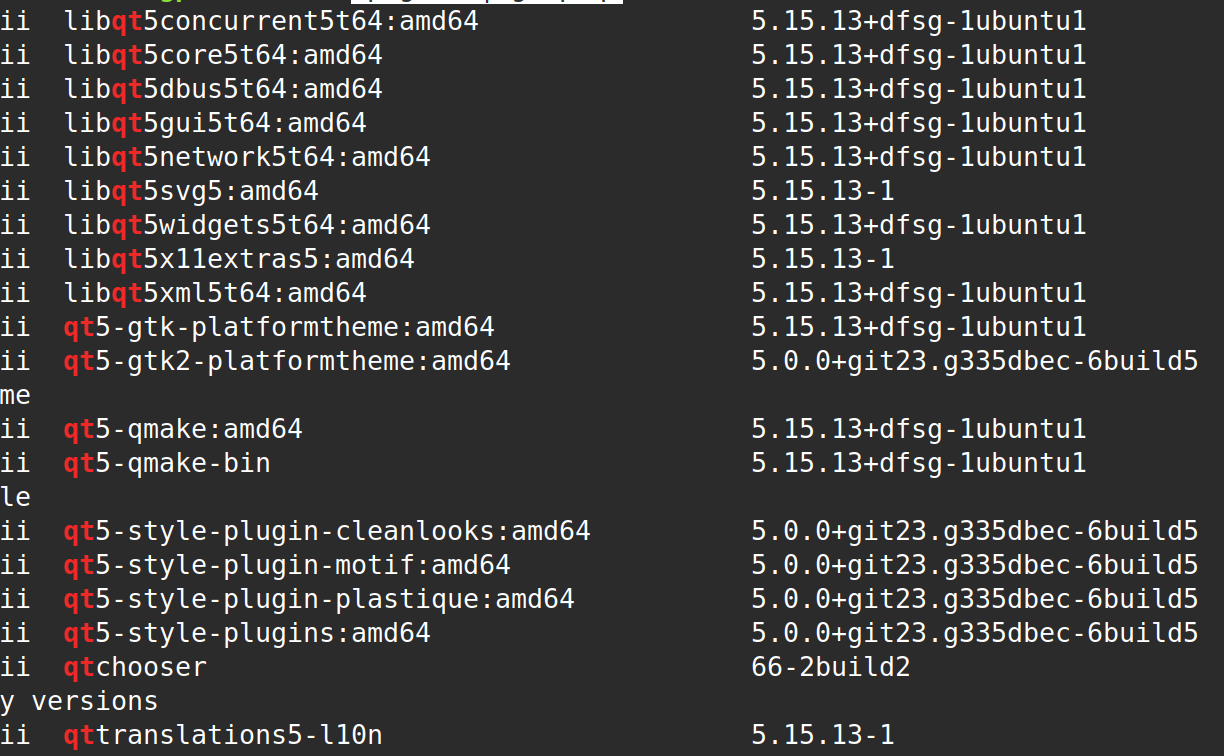
    Command dpkg -l | grep qt also return similar packages:
    152e65b9-8ffd-4d71-927b-f48d5d7c5f93-obraz.png

    I didn't try to compile on these versions yet

    @cristian-adam Can you provide .pro example? C++ is my secondary language and I'm polishing it on Qt where I mostly use qmake and .pro. Even if Phanton fix the problem, it is sad that so silly placeholderText has this problem in default Qt Style

    1 Reply Last reply
    0
    • K Offline
      K Offline
      Kobid
      wrote on last edited by Kobid
      #5

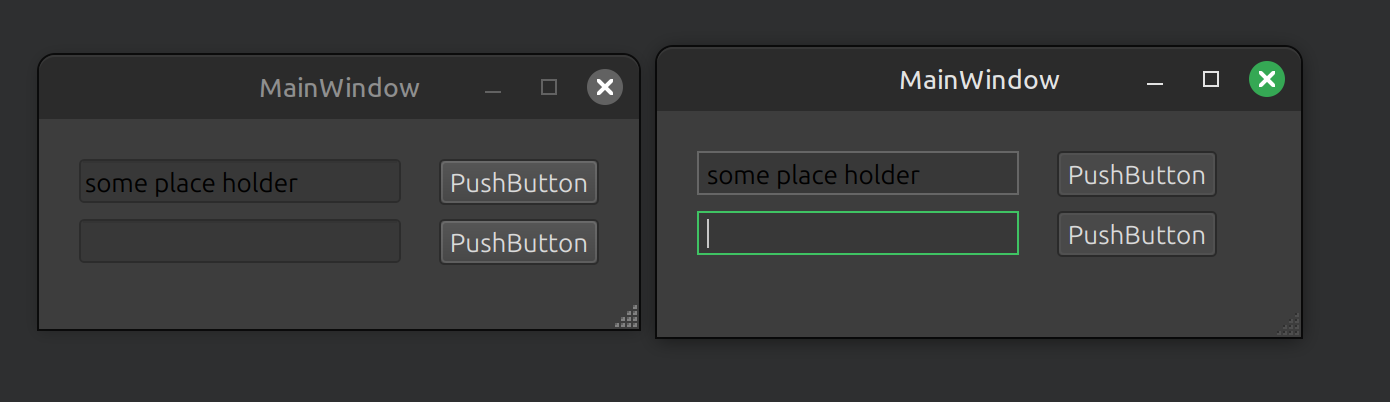
      Ok I have installed PhantonStyle and it also has black placeholder (on the right):

      obraz.png

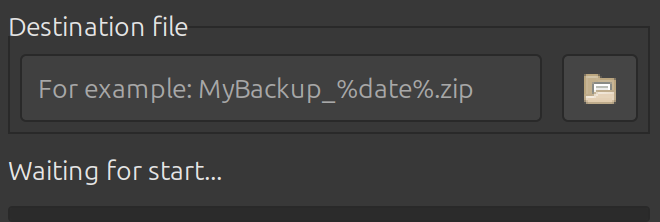
      Here is for example my app written in wxWidgets with GTK and placeholder is correct:

      8ae8ef7c-4f98-4829-b52a-c7e973b08bd5-obraz.png

      1 Reply Last reply
      0
      • cristian-adamC Offline
        cristian-adamC Offline
        cristian-adam
        wrote on last edited by
        #6

        I think it has something to do with the default palette, which can vary from operating system to operating system.

        If I look at https://doc.qt.io/qt-6/qpalette.html it could be that for some entry, like QPalette::PlaceholderText the light theme color value is being used instead of the dark theme one.

        1 Reply Last reply
        0
        • cristian-adamC Offline
          cristian-adamC Offline
          cristian-adam
          wrote on last edited by
          #7

          You can change the QPalette::PlaceholderText to something else, see:

          int main(int argc, char *argv[])
          {        
              QApplication a(argc, argv);
          
              QPalette pal = QApplication::palette();
              pal.setColor(QPalette::PlaceholderText, pal.color(QPalette::Mid));
              QApplication::setPalette(pal);
          
          1 Reply Last reply
          0
          • K Offline
            K Offline
            Kobid
            wrote on last edited by
            #8

            Thank you @cristian-adam . Found something interesting. The QPalette::Mid was too much alike to edit background so I played with different types to get something close to GTK placeholder color. Finally did something stupid just for curiosity:

            int main(int argc, char *argv[])
            {
                QApplication a(argc, argv);
                //QApplication::setStyle(new PhantomStyle);
            
                QPalette pal = QApplication::palette();
                pal.setColor(QPalette::PlaceholderText, pal.color(QPalette::PlaceholderText));
                QApplication::setPalette(pal);
            
                MainWindow w;
                w.show();
                return a.exec();
            }
            

            And the result is:
            4c824cd7-2cdd-4392-b202-ad25f20efcb9-obraz.png

            What happened there? Palette don't have initialized color for QPalette::PlaceholderText color role?

            1 Reply Last reply
            1
            • cristian-adamC Offline
              cristian-adamC Offline
              cristian-adam
              wrote on last edited by
              #9

              It looks like a bug. Please do open up a bug report at https://bugreports.qt.io

              Hopefully the Qt Widgets maintainers have more ideas why this is happening. But now you have a workaround.

              Does:

                 QPalette pal = QApplication::palette();
                  QApplication::setPalette(pal);
              

              work? Or you have to explicitly set QPalette::PlaceholderText ?

              1 Reply Last reply
              0
              • K Offline
                K Offline
                Kobid
                wrote on last edited by
                #10

                No. That doesn't work.
                Ok I'll submit a bug report.
                Thank you

                1 Reply Last reply
                0
                • K Kobid has marked this topic as solved on
                • Christian EhrlicherC Online
                  Christian EhrlicherC Online
                  Christian Ehrlicher
                  Lifetime Qt Champion
                  wrote on last edited by
                  #11

                  You should check it with a recent Qt version first before creating a bug report

                  Qt Online Installer direct download: https://download.qt.io/official_releases/online_installers/
                  Visit the Qt Academy at https://academy.qt.io/catalog

                  1 Reply Last reply
                  0
                  • K Offline
                    K Offline
                    Kobid
                    wrote on last edited by
                    #12

                    Yo mean preview version? Because I have recent stable 6.9

                    1 Reply Last reply
                    0
                    • Christian EhrlicherC Online
                      Christian EhrlicherC Online
                      Christian Ehrlicher
                      Lifetime Qt Champion
                      wrote on last edited by
                      #13

                      In your images above you use Qt5

                      Qt Online Installer direct download: https://download.qt.io/official_releases/online_installers/
                      Visit the Qt Academy at https://academy.qt.io/catalog

                      1 Reply Last reply
                      0
                      • K Offline
                        K Offline
                        Kobid
                        wrote on last edited by
                        #14

                        The installed one in linux mint (Keepassx installed this version) is 5.15. For my project I'm using 6.9 in custom installation

                        1 Reply Last reply
                        0
                        • Christian EhrlicherC Online
                          Christian EhrlicherC Online
                          Christian Ehrlicher
                          Lifetime Qt Champion
                          wrote on last edited by
                          #15

                          Ok, then all is fine, create a bug report. Looks like a problem with the gtk platform plugin.
                          Maybe it's also related to https://bugreports.qt.io/browse/QTBUG-86195

                          Qt Online Installer direct download: https://download.qt.io/official_releases/online_installers/
                          Visit the Qt Academy at https://academy.qt.io/catalog

                          K 1 Reply Last reply
                          0
                          • K Offline
                            K Offline
                            Kobid
                            wrote on last edited by
                            #16

                            Created ticket if someone come here with similar problem:
                            https://bugreports.qt.io/browse/QTBUG-136075

                            1 Reply Last reply
                            0
                            • Christian EhrlicherC Christian Ehrlicher

                              Ok, then all is fine, create a bug report. Looks like a problem with the gtk platform plugin.
                              Maybe it's also related to https://bugreports.qt.io/browse/QTBUG-86195

                              K Offline
                              K Offline
                              Kobid
                              wrote on last edited by
                              #17

                              @Christian-Ehrlicher said in QLineEdit - wrong placeholderText's color on Linux Mint dark theme:

                              Ok, then all is fine, create a bug report. Looks like a problem with the gtk platform plugin.
                              Maybe it's also related to https://bugreports.qt.io/browse/QTBUG-86195

                              Weird, I searched first for placeholdertext keyword and didn't find anything. Anyway, that one is for Windows 10 reported in 2023

                              Christian EhrlicherC 1 Reply Last reply
                              0
                              • K Kobid

                                @Christian-Ehrlicher said in QLineEdit - wrong placeholderText's color on Linux Mint dark theme:

                                Ok, then all is fine, create a bug report. Looks like a problem with the gtk platform plugin.
                                Maybe it's also related to https://bugreports.qt.io/browse/QTBUG-86195

                                Weird, I searched first for placeholdertext keyword and didn't find anything. Anyway, that one is for Windows 10 reported in 2023

                                Christian EhrlicherC Online
                                Christian EhrlicherC Online
                                Christian Ehrlicher
                                Lifetime Qt Champion
                                wrote on last edited by Christian Ehrlicher
                                #18

                                @Kobid said in QLineEdit - wrong placeholderText's color on Linux Mint dark theme:

                                Anyway, that one is for Windows 10 reported in 2023

                                Please read the full bug report. It's also for linux.

                                Qt Online Installer direct download: https://download.qt.io/official_releases/online_installers/
                                Visit the Qt Academy at https://academy.qt.io/catalog

                                1 Reply Last reply
                                0
                                • K Offline
                                  K Offline
                                  Kobid
                                  wrote on last edited by
                                  #19

                                  You are right

                                  1 Reply Last reply
                                  0

                                  • Login

                                  • Login or register to search.
                                  • First post
                                    Last post
                                  0
                                  • Categories
                                  • Recent
                                  • Tags
                                  • Popular
                                  • Users
                                  • Groups
                                  • Search
                                  • Get Qt
                                  • Unsolved