Skip to content
  • Categories
  • Recent
  • Tags
  • Popular
  • Users
  • Groups
  • Search
  • Get Qt Extensions
  • Unsolved
Collapse
Brand Logo
  1. Home
  2. Qt Development
  3. General and Desktop
  4. QGroupBox Title in Fusion setStyle
Forum Updated to NodeBB v4.3 + New Features

QGroupBox Title in Fusion setStyle

Scheduled Pinned Locked Moved Solved General and Desktop
5 Posts 2 Posters 643 Views
  • Oldest to Newest
  • Newest to Oldest
  • Most Votes
Reply
  • Reply as topic
Log in to reply
This topic has been deleted. Only users with topic management privileges can see it.
  • K Offline
    K Offline
    Kchan
    wrote on last edited by
    #1

    Hello,

    I was wondering if there's an easy way to update the way to update the QGroupBox Title to be embedded in the border instead of above the QGroupBox in the Fusion QStyle?

    So basically in the example the title is above the border which is what I don't want : 2eb30d39-7a09-4d3d-9af4-7f86c36aaf47-image.png
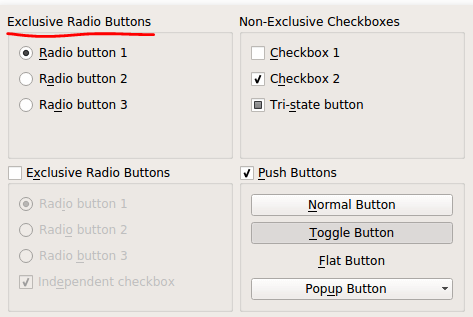
    which I found here : https://doc.qt.io/qt-5/qtwidgets-widgets-groupbox-example.html

    What I'm looking for is : 9aecfd04-463b-4b8a-8152-d60c782ff56f-image.png
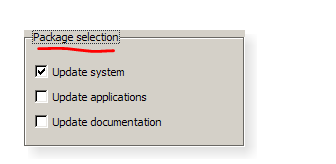
    Which I found here in the QT5 class descriptor for QGroupBox : https://doc.qt.io/qt-5/qgroupbox.html

    I've been messing around with title but not sure what dictates where the title actually lands.

    QGroupBox::title {
    subcontrol-origin: margin
    left: 7px;
    padding: 0px 5px 0px 5px;
    }

    Sort of new to QT5 GUI Development. I've tried reading a style sheet (.qss file) and updating various attributes with no luck. And also tried setting the style to "Windows" which got me the proper box title alignment in the border but the whole look is old and not the look I'm going for. Really like Fusion (defaulted) but didn't know how to get the title to properly align with the border.

    Any help would be appreciated!

    1 Reply Last reply
    0
    • Christian EhrlicherC Offline
      Christian EhrlicherC Offline
      Christian Ehrlicher
      Lifetime Qt Champion
      wrote on last edited by
      #2

      Use https://doc.qt.io/qt-6/qgroupbox.html#alignment-prop and set Qt::AlignVCenter in Qt6

      Qt Online Installer direct download: https://download.qt.io/official_releases/online_installers/
      Visit the Qt Academy at https://academy.qt.io/catalog

      K 1 Reply Last reply
      0
      • Christian EhrlicherC Christian Ehrlicher

        Use https://doc.qt.io/qt-6/qgroupbox.html#alignment-prop and set Qt::AlignVCenter in Qt6

        K Offline
        K Offline
        Kchan
        wrote on last edited by
        #3

        @Christian-Ehrlicher thank you for the suggestion. I apologize I wasn't able to post the code but I'm on this air-gapped system that didn't make that easy. I did look into the alignment option but all I could do was move the title around that was still above the border. I could never get it to move into the border as I showed in the example above.

        What I did end up doing was changing the QGroupBox::title reading in .qss file and playing around with the padding, top and left attributes:

        QgroupBox::title {
        subcontrol-origin: margin;
        top: 10px;
        left: 7px;
        padding: 0px 5px 5px 5px;
        }

        Which ended up giving me the look I was going over.

        I appreciate the feed back! Thank you

        1 Reply Last reply
        0
        • K Kchan has marked this topic as solved on
        • Christian EhrlicherC Offline
          Christian EhrlicherC Offline
          Christian Ehrlicher
          Lifetime Qt Champion
          wrote on last edited by
          #4

          The support for VCenter was added somewhere in Qt6.x

          Qt Online Installer direct download: https://download.qt.io/official_releases/online_installers/
          Visit the Qt Academy at https://academy.qt.io/catalog

          K 1 Reply Last reply
          0
          • Christian EhrlicherC Christian Ehrlicher

            The support for VCenter was added somewhere in Qt6.x

            K Offline
            K Offline
            Kchan
            wrote on last edited by
            #5

            @Christian-Ehrlicher I should have mentioned as well that we're stuck using QT5 for the time being.

            1 Reply Last reply
            0

            • Login

            • Login or register to search.
            • First post
              Last post
            0
            • Categories
            • Recent
            • Tags
            • Popular
            • Users
            • Groups
            • Search
            • Get Qt Extensions
            • Unsolved