
QComboBox Fails to Display Dropdown When Placed in QGraphicsView via QGraphicsProxyWidget
-
Hello,
I was using QGraphicsView with QGraphicsScene and tried adding a QComboBox inside, with just a simple implementation.
Although I googled many related issues online, I couldn't find complete information to solve the problem.Below is a simple implementation of my MainWindow:
MainWIndows
MainWindow::MainWindow(QWidget *parent)
    : QMainWindow(parent)
    , ui(new Ui::MainWindow) {
    ui->setupUi(this);

    setupWidgets();
    setupGraphicsView();
}

..
..
..

void MainWindow::setupGraphicsView() {
    m_graphicsView = new QGraphicsView(this);
    m_scene = new QGraphicsScene(this);
    m_graphicsView->setScene(m_scene);
    setCentralWidget(m_graphicsView);

    QComboBox *cbx = new QComboBox();
    cbx->addItem("00");
    cbx->addItem("01");
    cbx->addItem("02");

    QGraphicsProxyWidget *proxyWidgetCB = m_scene->addWidget(cbx);
    proxyWidgetCB->setPos(20, 20);

    m_scene->setSceneRect(0, 0, 1280, 720);
    m_graphicsView->setFixedSize(1280, 720);
}
In a Windows 10 environment, the dropdown menu looks normal.

However, in Windows 11, although it turns gray when clicked, the list is not visible. But clicking directly below it switches the items, which suggests that the list is hidden?
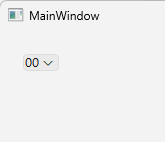
Is this a bug in Windows 11 or a Qt bug?
Test environments:
OS Versions:- Windows 10 Pro, 22H2 (19045.2965)
- Windows 11 Pro, 23H2 (22631.4037)
QT Versions:
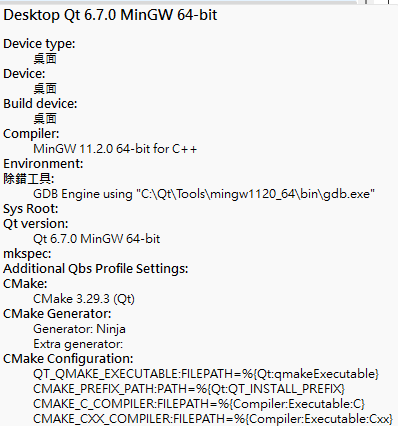
-
Hello,
I was using QGraphicsView with QGraphicsScene and tried adding a QComboBox inside, with just a simple implementation.
Although I googled many related issues online, I couldn't find complete information to solve the problem.Below is a simple implementation of my MainWindow:
MainWIndows
MainWindow::MainWindow(QWidget *parent)
    : QMainWindow(parent)
    , ui(new Ui::MainWindow) {
    ui->setupUi(this);

    setupWidgets();
    setupGraphicsView();
}

..
..
..

void MainWindow::setupGraphicsView() {
    m_graphicsView = new QGraphicsView(this);
    m_scene = new QGraphicsScene(this);
    m_graphicsView->setScene(m_scene);
    setCentralWidget(m_graphicsView);

    QComboBox *cbx = new QComboBox();
    cbx->addItem("00");
    cbx->addItem("01");
    cbx->addItem("02");

    QGraphicsProxyWidget *proxyWidgetCB = m_scene->addWidget(cbx);
    proxyWidgetCB->setPos(20, 20);

    m_scene->setSceneRect(0, 0, 1280, 720);
    m_graphicsView->setFixedSize(1280, 720);
}
In a Windows 10 environment, the dropdown menu looks normal.
However, in Windows 11, although it turns gray when clicked, the list is not visible. But clicking directly below it switches the items, which suggests that the list is hidden?
Is this a bug in Windows 11 or a Qt bug?
Test environments:
OS Versions:- Windows 10 Pro, 22H2 (19045.2965)
- Windows 11 Pro, 23H2 (22631.4037)
QT Versions:
@Momo-Dai said in QComboBox Fails to Display Dropdown When Placed in QGraphicsView via QGraphicsProxyWidget:
Is this a bug in Windows 11 or a Qt bug?
If I remember correctly there were/are some issues with the Windows 11 "style" and Qt6...
Where it doesn't draw widget content and borders correctly.
Don't know what widgets are affected exactly... but could be this case here.You could try another style (e.g. windows vista) on Windows 11 and check if the error persists.
Here is one of the topics where it was mentioned.
-
@Momo-Dai said in QComboBox Fails to Display Dropdown When Placed in QGraphicsView via QGraphicsProxyWidget:
Is this a bug in Windows 11 or a Qt bug?
If I remember correctly there were/are some issues with the Windows 11 "style" and Qt6...
Where it doesn't draw widget content and borders correctly.
Don't know what widgets are affected exactly... but could be this case here.You could try another style (e.g. windows vista) on Windows 11 and check if the error persists.
Here is one of the topics where it was mentioned.
Thank you very much for your response.
I tried setting the Windows Vista style before creating the QApplication.#include "mainwindow.h" #include <QApplication> #include <QStyleFactory> int main(int argc, char *argv[]) { #if defined(Q_OS_WINDOWS) QApplication::setStyle(QStyleFactory::create("windowsvista")); #endif QApplication a(argc, argv); MainWindow w; w.show(); return a.exec(); }It seems that with this setting, the dropdown menu is displayed correctly.
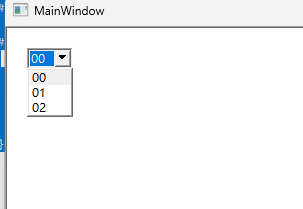
-
M Momo.Dai has marked this topic as solved on
-
Thank you very much for your response.
I tried setting the Windows Vista style before creating the QApplication.#include "mainwindow.h" #include <QApplication> #include <QStyleFactory> int main(int argc, char *argv[]) { #if defined(Q_OS_WINDOWS) QApplication::setStyle(QStyleFactory::create("windowsvista")); #endif QApplication a(argc, argv); MainWindow w; w.show(); return a.exec(); }It seems that with this setting, the dropdown menu is displayed correctly.
