

QSettings: inferring type of stored value
-
As @Christian-Ehrlicher said,
QSettingsusesQVariantwith all its power and limitations under the hood.
When you experiment, it's important to know thatQSettingsbuffers itsQVariantvalue sin memory, before actually writing stuff on disk.
If you register custom enum types, it will actually remember the exact type until it's written and read back from disk. That might be confusing when you debug.There are different ways to safely infer types to settings, but they require individual implementation.
- One option is to encode enum types to a string value and parse them back. I have seen implementations along the lines of
@@@ENUM::EnumName::EnumValue. - Another option, as said before, is to map keys to types - at the cost of hard coding.
- The option I'd probably choose is to implement union class around your enums. The class is actually a small
QVariantfor custom enums. It can be constructed with a value of any of the enums needed. Atype()getter tells which enum it actually holds.QDataStreamoperators, or atoByteArray() / fromByteArray()implementation will eventually stream the content into a byte array that can be saved in the settings. You can implement a cast and / or atoEnum<Type>()template function. You probably want to start the data stream or the byte array with some magic numbers, so your union class can tell if it likes a byte array or not. Sounds complicated, but it's actually just a thin wrapper.
@Axel-Spoerl thanks for the detailed reply. I'd like to back up for a moment, as I seem to be missing something here.
I've implemented a wrapper class around QSettings. (Normally I'd post code in code blocks, but in this case I think an image will be more informative.) Notice that despite my attempting to store a bool setting, when I read it back, it comes back as a QString.
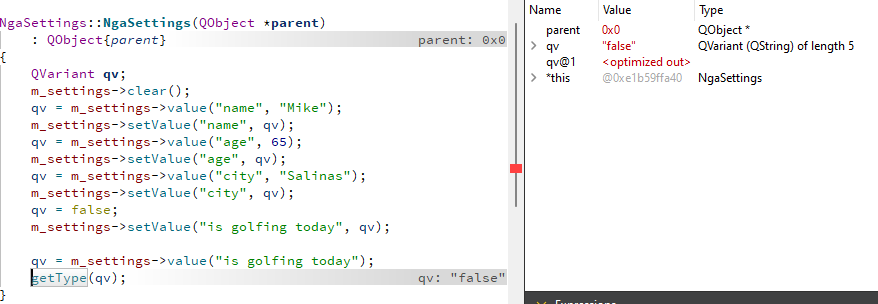
Am I doing something wrong, or do I simply need to follow your second option in order to derive the type?Thanks...
- One option is to encode enum types to a string value and parse them back. I have seen implementations along the lines of
-
It's working fine here:
QSettings s("D:\\test.ini", QSettings::IniFormat);
s.setValue("mybool", true);
qDebug() << s.value("mybool");
--> QVariant(bool, true)
So I would say the debugger is simply converting the bool to a user-visible value since QVariant<bool>() can be properly converted to a QString.
Qt Online Installer direct download: https://download.qt.io/official_releases/online_installers/
Visit the Qt Academy at https://academy.qt.io/catalog -
It's working fine here:
QSettings s("D:\\test.ini", QSettings::IniFormat);
s.setValue("mybool", true);
qDebug() << s.value("mybool");
--> QVariant(bool, true)
So I would say the debugger is simply converting the bool to a user-visible value since QVariant<bool>() can be properly converted to a QString.
@Christian-Ehrlicher
@mzimmersAt debugging time, the variant is still in memory. Not sure, but my guess is that the debugging output is different, when you read the settings right awawy in the class constructor.
-
@Axel-Spoerl @Christian-Ehrlicher I've moved some code around:
class NgaSettings : public QObject
{
    Q_OBJECT
    QML_ELEMENT
    QSettings *m_settings = new QSettings("company", "nga", this);

public:
    explicit NgaSettings(QObject *parent = nullptr) {
        m_settings->clear();
        m_settings->setValue("name", "Mike");
        m_settings->setValue("age", "65");
        m_settings->setValue("city", "Salinas");
        m_settings->setValue("is golfing today", false);
}
    INVOKABLE void getType(const QVariant &v) {
        if (v.canConvert<QString>()) {
            qDebug() << "QString";
        } else if (v.canConvert<bool>()) {
            qDebug() << "bool";
        } else {
            qDebug() << "unknown";
        }
    }
And I test it in QML:
    Component.onCompleted: {
        console.log("SettingsList.qml: type is " + ngaSettings.getType("is golfing today"))
    }
getType returns true on the test for QString. I don't think re-ordering the test will help, as it appears that any non-null QString will convert to a (true) bool.
So, I'm back to thinking that I have to maintain a map of keys to types.
-
What do you expect - as I said a bool can be converted to a string. You have to check the type of QVariant...
-
QSettingsout of the box expects the user to know the type of each key.
When the settings object is constructed and key/value pairs are added, they are actually stored in a list in memory and remember their original type.
Custom enums become integers.
Once read back from the settings file, everything (numbers included) will be interpreted as a string by default.Example:
MainWindow::MainWindow(QWidget *parent)
    : QMainWindow(parent)
    , ui(new Ui::MainWindow)
{
    QSettings s("/home/axel/tmp/settings.conf", QSettings::Format::NativeFormat);
    qDebug() << "----------- after write -----------";
    qDebug() << "One" << s.value("One");
    qDebug() << "Two" << s.value("Two");
    qDebug() << "Three" << s.value("Three");
    qDebug() << "Boolean" << s.value("Boolean");
}

MainWindow::~MainWindow()
{
    QSettings s("/home/axel/tmp/settings.conf", QSettings::Format::NativeFormat);
    s.setValue("One", Value1);
    s.setValue("Two", IllegalValue);
    s.setValue("Three", Dummy);
    s.setValue("Boolean", true);
    qDebug() << "----------- before write -----------";
    qDebug() << "One" << s.value("One");
    qDebug() << "Two" << s.value("Two");
    qDebug() << "Three" << s.value("Three");
    qDebug() << "Boolean" << s.value("Boolean");
    delete ui;
}
Output:
----------- after write ----------- One QVariant(QString, "0") Two QVariant(QString, "1") Three QVariant(QString, "2") Boolean QVariant(QString, "true") ----------- before write ----------- One QVariant(int, 0) Two QVariant(int, 1) Three QVariant(int, 2) Boolean QVariant(bool, true) -
@Axel-Spoerl @Christian-Ehrlicher I've moved some code around:
class NgaSettings : public QObject
{
    Q_OBJECT
    QML_ELEMENT
    QSettings *m_settings = new QSettings("company", "nga", this);

public:
    explicit NgaSettings(QObject *parent = nullptr) {
        m_settings->clear();
        m_settings->setValue("name", "Mike");
        m_settings->setValue("age", "65");
        m_settings->setValue("city", "Salinas");
        m_settings->setValue("is golfing today", false);
}
    INVOKABLE void getType(const QVariant &v) {
        if (v.canConvert<QString>()) {
            qDebug() << "QString";
        } else if (v.canConvert<bool>()) {
            qDebug() << "bool";
        } else {
            qDebug() << "unknown";
        }
    }
And I test it in QML:
    Component.onCompleted: {
        console.log("SettingsList.qml: type is " + ngaSettings.getType("is golfing today"))
    }
getType returns true on the test for QString. I don't think re-ordering the test will help, as it appears that any non-null QString will convert to a (true) bool.
So, I'm back to thinking that I have to maintain a map of keys to types.
@mzimmers
I find the way you are going about things slightly odd. Usually in the case ofQSettingswhere you are saving/restoring named "settings/variables" you know the type of the item. E.g. if you have awidthvariable/member/whatever it's going to be a number, if it's alast_modifiedit's going to be aQDateTime, etc. When you read back you know from the name which variable you're going to store the read value in so you know what type to ask for (even if you callcanConvert<>()to be sure). There are not so many obvious use cases where you would need to look at the (unknown) type of a setting read in, if you don't know the type in advance what are you going to do with whatever you get anyway? -
@mzimmers
Maybe you want to split the implementation. It looks as if a variant map is what you need for the user to view, modify, add and remove key/value pairs. Another question is how to save / restore it. Could be in a database, a proprietary file format, or streamed into a byte array and saved in settings. -
QSettingsout of the box expects the user to know the type of each key.
When the settings object is constructed and key/value pairs are added, they are actually stored in a list in memory and remember their original type.
Custom enums become integers.
Once read back from the settings file, everything (numbers included) will be interpreted as a string by default.Example:
MainWindow::MainWindow(QWidget *parent)
    : QMainWindow(parent)
    , ui(new Ui::MainWindow)
{
    QSettings s("/home/axel/tmp/settings.conf", QSettings::Format::NativeFormat);
    qDebug() << "----------- after write -----------";
    qDebug() << "One" << s.value("One");
    qDebug() << "Two" << s.value("Two");
    qDebug() << "Three" << s.value("Three");
    qDebug() << "Boolean" << s.value("Boolean");
}

MainWindow::~MainWindow()
{
    QSettings s("/home/axel/tmp/settings.conf", QSettings::Format::NativeFormat);
    s.setValue("One", Value1);
    s.setValue("Two", IllegalValue);
    s.setValue("Three", Dummy);
    s.setValue("Boolean", true);
    qDebug() << "----------- before write -----------";
    qDebug() << "One" << s.value("One");
    qDebug() << "Two" << s.value("Two");
    qDebug() << "Three" << s.value("Three");
    qDebug() << "Boolean" << s.value("Boolean");
    delete ui;
}
Output:
----------- after write ----------- One QVariant(QString, "0") Two QVariant(QString, "1") Three QVariant(QString, "2") Boolean QVariant(QString, "true") ----------- before write ----------- One QVariant(int, 0) Two QVariant(int, 1) Three QVariant(int, 2) Boolean QVariant(bool, true)@Axel-Spoerl said in QSettings: inferring type of stored value:
Once read back from the settings file, everything (numbers included) will be interpreted as a string by default.
Aha...I wasn't aware of this, and this explains why much of what I was trying wasn't working.
I notice you said "by default." Does this mean this can be changed from within the QSettings class, or do I need to handle this myself?
Regarding your suggestion of splitting the implementation, I think that's exactly what's necessary.
Thanks!
-
@mzimmers
I find the way you are going about things slightly odd. Usually in the case ofQSettingswhere you are saving/restoring named "settings/variables" you know the type of the item. E.g. if you have awidthvariable/member/whatever it's going to be a number, if it's alast_modifiedit's going to be aQDateTime, etc. When you read back you know from the name which variable you're going to store the read value in so you know what type to ask for (even if you callcanConvert<>()to be sure). There are not so many obvious use cases where you would need to look at the (unknown) type of a setting read in, if you don't know the type in advance what are you going to do with whatever you get anyway?@JonB the intention was to use a ListView, using the QSettings keys as a model, to construct a list of settings for the user to view and alter. If I'm understanding @Axel-Spoerl correctly, though, this would be unwieldy at best. Looks like I need to make that mapping, and use those keys as my model. Not sure how I'll handle this in the QML delegate, but that's tomorrow's problem.
-
@JonB the intention was to use a ListView, using the QSettings keys as a model, to construct a list of settings for the user to view and alter. If I'm understanding @Axel-Spoerl correctly, though, this would be unwieldy at best. Looks like I need to make that mapping, and use those keys as my model. Not sure how I'll handle this in the QML delegate, but that's tomorrow's problem.
@mzimmers
Looks like your users will ultimately modify the preferences of the application they use.
I really like the idea of doing that in a list view with a model. Totally cool. The model could actually serve the application to query its preferences.
I'd simply add data stream operators ortoByteArray() / fromByteArray()helpers to store everything inQSettingsultimately.
But i'd not wrap the model around aQSettingsobject, as you already said.
The model could even be more powerful and allow/disallow preference modifications in certain states of the application, or fire signals if a specific preference has been changed - so the application can react.
Exposing that stuff to QML shouldn't be difficult. Let us know if help is needed there.
And thanks for bringing the topic up - I find it inspiring. -
As @Christian-Ehrlicher said,
QSettingsusesQVariantwith all its power and limitations under the hood.
When you experiment, it's important to know thatQSettingsbuffers itsQVariantvalue sin memory, before actually writing stuff on disk.
If you register custom enum types, it will actually remember the exact type until it's written and read back from disk. That might be confusing when you debug.There are different ways to safely infer types to settings, but they require individual implementation.
- One option is to encode enum types to a string value and parse them back. I have seen implementations along the lines of
@@@ENUM::EnumName::EnumValue. - Another option, as said before, is to map keys to types - at the cost of hard coding.
- The option I'd probably choose is to implement union class around your enums. The class is actually a small
QVariantfor custom enums. It can be constructed with a value of any of the enums needed. Atype()getter tells which enum it actually holds.QDataStreamoperators, or atoByteArray() / fromByteArray()implementation will eventually stream the content into a byte array that can be saved in the settings. You can implement a cast and / or atoEnum<Type>()template function. You probably want to start the data stream or the byte array with some magic numbers, so your union class can tell if it likes a byte array or not. Sounds complicated, but it's actually just a thin wrapper.
@Axel-Spoerl said in QSettings: inferring type of stored value:
One option is to encode enum types to a string value and parse them back. I have seen implementations along the lines of @@@ENUM::EnumName::EnumValue.
This is how I ended up doing it. Rather primitive, but effective.
Thanks to all who contributed to this topic.
- One option is to encode enum types to a string value and parse them back. I have seen implementations along the lines of
-
 M mzimmers has marked this topic as solved on


