0xC000007B error after releasing the application
-
@Blackzero said in 0xC000007B error after releasing the application:
I don't know what the problem is
The problem, "The Application Was Unable to Start (0xc000007b)"
whether from Windows or from my application,
Your application is missing one or more components that it needs to have in order to start. You are not deploying something essential (i.e. assuming it is already present and getting lucky sometimes). It may be a Microsoft C++ runtime, or it could be any of 100s of other things.
You could use something like Dependencies.exe on a failing machine to see what is missing.does the application have to be made static or is it the same if it is made static?
No. In order to build a static executable you need to fully understand the dependencies. This is the same problem you have now... and a lot more work.
@ChrisW67 said in 0xC000007B error after releasing the application:
You could use something like Dependencies.exe on a failing machine to see what is missing.
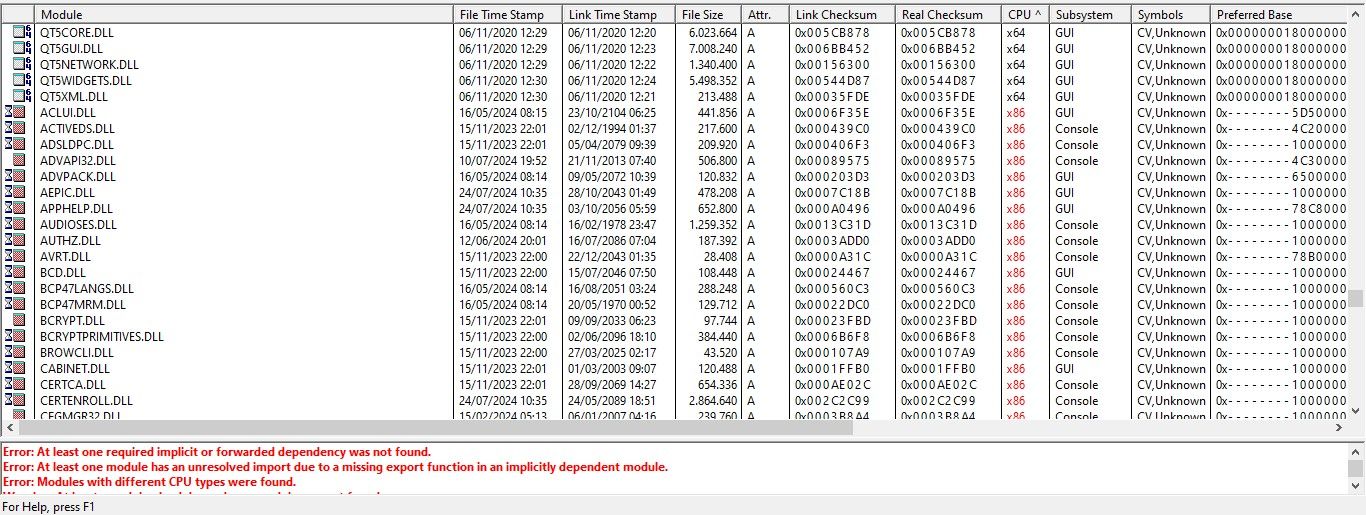
I have looked at it with Dependency Walker there are dozens of DLLs that operate on x86, why does that happen, is it part of my code, or is it not an error from my code?
void runAsAdmin(const QString &exePath) {
    LPCWSTR applicationPath = (LPCWSTR)exePath.utf16();
    HINSTANCE hInstance = ShellExecute(nullptr, L"runas", applicationPath, nullptr, nullptr, SW_SHOWNORMAL);
    if (reinterpret_cast<intptr_t>(hInstance) <= 32) {
        DWORD errorCode = GetLastError();
        QMessageBox::critical(nullptr, "Honda Flash Tool", "Failed to run AutoUpdate in Administrator privilege mode. Error code: " + QString::number(errorCode), QMessageBox::Ok);
    } else {
        qApp->quit();
    }
}
if so it's an error from the code that requires x86 DLLs only this code I suspect, I have made sure the library I use is in x64 release mode, for example the library I use is crypto++, I have rebuilt it into x64 release.
-
@Blackzero said in 0xC000007B error after releasing the application:
I don't know what the problem is
The problem, "The Application Was Unable to Start (0xc000007b)"
whether from Windows or from my application,
Your application is missing one or more components that it needs to have in order to start. You are not deploying something essential (i.e. assuming it is already present and getting lucky sometimes). It may be a Microsoft C++ runtime, or it could be any of 100s of other things.
You could use something like Dependencies.exe on a failing machine to see what is missing.does the application have to be made static or is it the same if it is made static?
No. In order to build a static executable you need to fully understand the dependencies. This is the same problem you have now... and a lot more work.
-
When there are warning messages you should also read them...
-
@ChrisW67 said in 0xC000007B error after releasing the application:
You could use something like Dependencies.exe on a failing machine to see what is missing.
I have looked at it with Dependency Walker there are dozens of DLLs that operate on x86, why does that happen, is it part of my code, or is it not an error from my code?
void runAsAdmin(const QString &exePath) {
    LPCWSTR applicationPath = (LPCWSTR)exePath.utf16();
    HINSTANCE hInstance = ShellExecute(nullptr, L"runas", applicationPath, nullptr, nullptr, SW_SHOWNORMAL);
    if (reinterpret_cast<intptr_t>(hInstance) <= 32) {
        DWORD errorCode = GetLastError();
        QMessageBox::critical(nullptr, "Honda Flash Tool", "Failed to run AutoUpdate in Administrator privilege mode. Error code: " + QString::number(errorCode), QMessageBox::Ok);
    } else {
        qApp->quit();
    }
}
if so it's an error from the code that requires x86 DLLs only this code I suspect, I have made sure the library I use is in x64 release mode, for example the library I use is crypto++, I have rebuilt it into x64 release.
Dependency Walker has not been updated to handle some features in Windows 10+. Dependency.exe has.
These tools will always report some warnings (esp. the first Error in the screen shot). What you are looking for is the components that you know are essential to your application. That's anything you have included in your installer (except the MS runtime), possibly the things you missed, and possibly things you have bundled the wrong version of. If any Qt plugin is needed to start your application then you can also run those plugin DLLs through a dependency check.
There's no point asking us what the specific problem is; we cannot see your machines or project.
-
Well at least Dependency Walker shows CPU architecture for the dlls, and we can see that the Qt5 dlls are built for 64-bits, however the Microsoft dlls are 32-bit (i.e. pulled in from C:\Windows\Syswow64 instead of C:\Windows\system32).
So somewhere higher up in the app/dll foodchain there are one or more 32-bit flavored dlls or exes that causes the 0xC000007B error. -
Well at least Dependency Walker shows CPU architecture for the dlls, and we can see that the Qt5 dlls are built for 64-bits, however the Microsoft dlls are 32-bit (i.e. pulled in from C:\Windows\Syswow64 instead of C:\Windows\system32).
So somewhere higher up in the app/dll foodchain there are one or more 32-bit flavored dlls or exes that causes the 0xC000007B error.@hskoglund So is there any way to solve the DLL? Do I have to do the settings first, if so what should I set?
Thank you .
-
Microsoft has stopped selling them, but maybe some of the laptops are old and use 32-bit versions of Windows 7 or Windows 10? If so your app might be innocent and the 0xc000007b occurs because those laptops do not support 64-bit apps.
Edit: but your Qt5 64-bit dlls are loaded ok, so forget my 32-bit theory above :-)Best is to get a look at all the dlls loaded, a better tool for this is ListDLLs
Start your app and then launch a CMD window and type listdlls <yourappname>.
(You can catch the output to a file by appending a > filename at the end of the command line.) -
Microsoft has stopped selling them, but maybe some of the laptops are old and use 32-bit versions of Windows 7 or Windows 10? If so your app might be innocent and the 0xc000007b occurs because those laptops do not support 64-bit apps.
Edit: but your Qt5 64-bit dlls are loaded ok, so forget my 32-bit theory above :-)Best is to get a look at all the dlls loaded, a better tool for this is ListDLLs
Start your app and then launch a CMD window and type listdlls <yourappname>.
(You can catch the output to a file by appending a > filename at the end of the command line.) -
Microsoft has stopped selling them, but maybe some of the laptops are old and use 32-bit versions of Windows 7 or Windows 10? If so your app might be innocent and the 0xc000007b occurs because those laptops do not support 64-bit apps.
Edit: but your Qt5 64-bit dlls are loaded ok, so forget my 32-bit theory above :-)Best is to get a look at all the dlls loaded, a better tool for this is ListDLLs
Start your app and then launch a CMD window and type listdlls <yourappname>.
(You can catch the output to a file by appending a > filename at the end of the command line.) -
B Blackzero has marked this topic as solved on
-
B Blackzero deleted this topic on
-
Why did you delete solved topics?
-
 C Christian Ehrlicher restored this topic on