Skip to content
  • Categories
  • Recent
  • Tags
  • Popular
  • Users
  • Groups
  • Search
  • Get Qt Extensions
  • Unsolved
Collapse
Brand Logo
  1. Home
  2. Qt Development
  3. General and Desktop
  4. QProgressBar Styling on Windows 11 and Qt 6.7.1

QProgressBar Styling on Windows 11 and Qt 6.7.1

Scheduled Pinned Locked Moved Unsolved General and Desktop
5 Posts 4 Posters 1.1k Views 1 Watching
  • Oldest to Newest
  • Newest to Oldest
  • Most Votes
Reply
  • Reply as topic
Log in to reply
This topic has been deleted. Only users with topic management privileges can see it.
  • X Offline
    X Offline
    xariswon
    wrote on last edited by
    #1

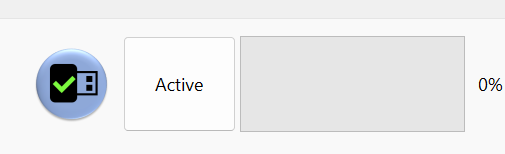
    I just updated a project to Qt 6.7.1 and was delighted to see my code magically used native Windows styling...until I noticed my QProgressBars had become visually useless.

    It previously looked like this:
    604171fd-2004-4e4a-b964-eafdabd96722-image.png

    Not pretty, but easy to see.

    It now looks like this:

    af658f25-7e58-4662-94b0-ca0d794a34d2-image.png

    I have not found any setting that lets me change the thickness of the progress indicator to be wider. It doesn't scale proportionally -- making the whole thing 10 times taller does not change the width of the actual bar.

    Am I missing a setting somewhere?

    Thanks in advance for your help.

    1 Reply Last reply
    1
    • Christian EhrlicherC Offline
      Christian EhrlicherC Offline
      Christian Ehrlicher
      Lifetime Qt Champion
      wrote on last edited by
      #2

      If it is not yet reported, create a bug report and use the windowsvista style in the meantime.

      Qt Online Installer direct download: https://download.qt.io/official_releases/online_installers/
      Visit the Qt Academy at https://academy.qt.io/catalog

      1 Reply Last reply
      0
      • J Offline
        J Offline
        jkeegg
        wrote on last edited by
        #3

        I am facing same problem, any workaround? except using compatibility mode...

        Christian EhrlicherC 1 Reply Last reply
        0
        • J jkeegg

          I am facing same problem, any workaround? except using compatibility mode...

          Christian EhrlicherC Offline
          Christian EhrlicherC Offline
          Christian Ehrlicher
          Lifetime Qt Champion
          wrote on last edited by
          #4

          @jkeegg fix it by yourself or update and hope it's already fixed - what else do you want to hear?

          Qt Online Installer direct download: https://download.qt.io/official_releases/online_installers/
          Visit the Qt Academy at https://academy.qt.io/catalog

          1 Reply Last reply
          0
          • O Offline
            O Offline
            Olex
            wrote on last edited by
            #5

            The same problem - 6.7.2, 6.8.0-beta2 - just for information

            1 Reply Last reply
            0

            • Login

            • Login or register to search.
            • First post
              Last post
            0
            • Categories
            • Recent
            • Tags
            • Popular
            • Users
            • Groups
            • Search
            • Get Qt Extensions
            • Unsolved